
Nissan Juke Service and Repair Manual : Speed limiter
Speed limiter : System Diagram
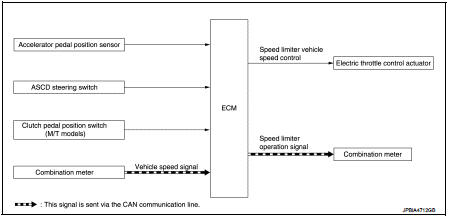
Speed limiter : System Description
INPUT/OUTPUT SIGNAL CHART
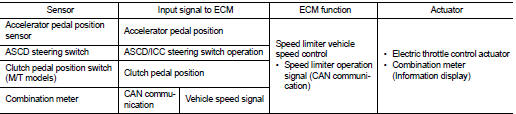
*: This signal is sent to the ECM through CAN communication line
BASIC SPEED LIMITER SYSTEM
• Speed limiter is a system that enables to restrict the vehicle speed within the set speed that is selected by the driver. Driver can be set the vehicle speed in the set speed range.
• ECM controls throttle angle of electric throttle control actuator to regulate vehicle speed.
• Operation status of speed limiter is indicated on the information display in the combination meter.
• If any malfunction occurs in speed limiter system, it automatically deactivates the speed limiter control.
Refer to EC-70, "SPEED LIMITER : Switch Name and Function" for speed limiter operating instructions.
CAUTION:
Always drive vehicle in safe manner according to traffic conditions and obey all
traffic laws.
NOTE:
Since the speed limiter is controlled by the electric throttle control actuator, vehicle speed may exceed a set speed during downhill driving.
 Automatic speed control device (ASCD)
Automatic speed control device (ASCD)
: System Diagram
Automatic speed control device (ASCD)
: System Description
INPUT/OUTPUT SIGNAL CHART
*1: M/T models
*2: CVT models
BASIC ASCD SYSTEM
...
 NISSAN dynamic control system
NISSAN dynamic control system : System
Diagram
CVT models
M/T models
NISSAN dynamic control system : System
Description
CVT models
System Description
TCM transmits a drive mode select sig ...
Other materials:
Exhaust valve timing control
Exhaust valve timing control : System Diagram
Exhaust valve timing control: System Description
INPUT/OUTPUT SIGNAL CHART
SYSTEM DESCRIPTION
This mechanism hydraulically controls cam phases continuously with the fixed
operating angle of the exhaust
valve.
The ECM receives signals such ...
Precaution for Supplemental Restraint System (SRS) "AIR BAG" and "SEAT BELT
PRE-TENSIONER"
The Supplemental Restraint System such as “AIR BAG� and “SEAT BELT PRE-TENSIONER�,
used along
with a front seat belt, helps to reduce the risk or severity of injury to the
driver and front passenger for certain
types of collision. Information necessary to service the system safely is
...
P2100, P2103 throttle control motor relay
DTC Logic
DTC CONFIRMATION PROCEDURE
1.PRECONDITIONING
If DTC Confirmation Procedure has been previously conducted, always perform
the following procedure
before conducting the next test.
1. Turn ignition switch OFF and wait at least 10 seconds.
2. Turn ignition switch ON.
3. Turn ignitio ...
