
Nissan Juke Service and Repair Manual : Intelligent key
Component Function Check
1.CHECK FUNCTION
1. Select “INTELLIGENT KEY� of “BCM� using CONSULT-III.
2. Select “RKE OPE COUN1� in “DATA MONITOR� mode.
3. Check that the function operates normally according to the following conditions.

Is the inspection result normal? YES >> Intelligent Key is OK.
NO >> Refer to DLK-262, "Diagnosis Procedure".
Diagnosis Procedure
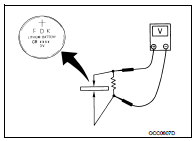
1.CHECK INTELLIGENT KEY BATTERY
Check by connecting a resistance (approximately 300 Ω) so that the current value becomes about 10 mA. Refer to DLK-356, "Removal and Installation".
Standard : Approx. 2.5 - 3.0 V
Is the measurement value within the specification? YES >> Replace Intelligent Key.
NO >> Replace Intelligent Key battery.
 Hazard function
Component Function Check
1.CHECK FUNCTION
1. Select “INTELLIGENT KEY� of “BCM� using CONSULT-III.
2. Select “FLASHER� in “ACTIVE TEST� mode.
3. Check that the function operates nor ...
 Intelligent key warning buzzer
Component Function Check
1.CHECK FUNCTION
1. Select “INTELLIGENT KEY� of “BCM� using CONSULT-III.
2. Select “OUTSIDE BUZZER� in “ACTIVE TEST� mode.
3. Check that the function opera ...
Other materials:
Continuously Variable Transmission (CVT)
The ignition lock is designed so that the ignition switch cannot be turned to
the LOCK position until the shift lever is moved to the P (Park) position.
• When turning the ignition switch to the LOCK position, make sure that the shift
lever is in the P (Park) position.
• When removing th ...
Vehicle loading information
WARNING
It is extremely dangerous to ride in the cargo area inside the vehicle.
In the event of a collision, individuals positioned in these unsecured areas are significantly more likely to suffer serious injury or fatalities.
Never allow passengers to ...
Front suspension member
Exploded View
2WD
1. Front suspension member
2. Damper assembly*
3. Rebound stopper rubber
4. Washer
5. Member stay
6. Rebound stopper
: N·m (kg-m, ft-lb)
*: For K9K models
4WD
1. Front suspension member
2. Rebound stopper rubber
3. Washer
4. Member stay
5. Rebound stopper ...
