
Nissan Leaf 2018-2025 (ZE1) Owner's Manual : Intelligent Around View Monitor
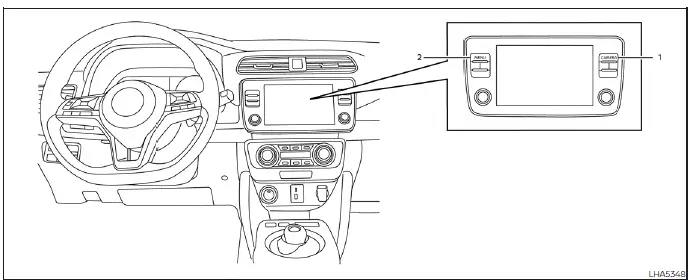
- CAMERA button (conveniently located on the display bezel to manually cycle through alternative camera views or force start the system)
- MENU button (provides instant access to the main system settings and customizable display parameters)
WARNING
Failure to strictly adhere to all warnings, safety notes, and technical instructions for the proper use of the Intelligent Around View Monitor system could lead to undetected blind spots, resulting in severe property damage, serious personal injury, or death.
- The Intelligent Around View Monitor is engineered exclusively as a high-tech convenience feature and is not a safe substitute for attentive, manual vehicle operation because it has distinct peripheral blind zones where objects cannot be captured by the lenses. The extreme four corners of the vehicle body, in particular, are blind areas where obstacles and low-lying hazards do not always appear in the blended bird's-eye, front-facing, or rear-facing perspective feeds. Always physically check your surroundings over your shoulder and verify the perimeter to be absolutely certain that it is safe to move before operating your Nissan Leaf. Always back up or pull forward slowly and cautiously.
- Regardless of the advanced assistance tech active on the screen, the driver always maintains complete legal and physical responsibility for safety during parking maneuvers, tight garage navigation, and all low-speed vehicle operations.
- Always use your physical interior and exterior side view mirrors or look directly through the glass panels to properly and accurately judge distances to surrounding objects, pedestrians, or adjacent vehicles.
CAUTION
Take extreme care not to scratch, gouge, or smudge the glass camera lens surfaces when carefully wiping away accumulated road dirt, salt grime, or winter snow from the front of the camera housings.
The highly intuitive Intelligent Around View Monitor system is purposefully designed as an advanced electronic aid to assist the driver in tight parking situations, such as slot parking, perpendicular backing, or tight parallel parking maneuvers. The central infotainment monitor splits the screen area to display various composite views of the current position of your Nissan Leaf in a high-contrast split screen format, though keep in mind that not all individual views are available at all times depending on your current gear selection and forward speed.
Available views:
- Front View
Provides a real-time wide-angle view of the area directly in front of the front bumper of the vehicle, ideal for pulling close to walls or high curbs. - Rear View
Displays a live video stream of the area directly behind the rear bumper, automatically activating to help avoid obstacles while backing up. - Bird's-Eye View
Utilizes digital software to stitch together images from all four exterior lenses, outputting a seamless overhead composite view of the surrounding parameters of the vehicle from above. - Front-Side View
Focuses the camera angle specifically on the blind zone around and ahead of the front passenger's side wheel, preventing expensive curb rashing and rim damage on your Nissan Leaf. - Full screen rear view
Expands the standard backup perspective to fill the entire infotainment display screen, offering a panoramic view to the rear of the vehicle which is calibrated to be a little wider than the standard split-screen rear view.
- Intelligent Around View Monitor system operation
- Difference between predicted and actual distances
- How to switch the display
- Intelligent Around View Monitor system limitations
 RearView Monitor system limitations
WARNING
Listed below are the inherent technical system limitations of the RearView Monitor equipment. Failure to operate your vehicle in accordance with these specific system limitations could ca ...
 Intelligent Around View Monitor
system operation
Intelligent Around View Monitor
system operation
To display the multiple synchronized perspective views, the advanced Intelligent Around View Monitor system utilizes a network of four ultra-wide-angle digital cameras strategica ...
Other materials:
Side air bag (satellite) sensor
Exploded View
1. Satellite sensor
: Vehicle front
: Do not reuse
: N·m (kg-m, ft-lb)
Removal and Installation
WARNING:
• Before servicing, turn ignition switch OFF, disconnect battery negative
terminal and wait 3 minutes
or more.
• Never use the air tools or electric tools for serv ...
Precaution for Supplemental Restraint System (SRS) "AIR BAG" and "SEAT BELT
PRE-TENSIONER"
The Supplemental Restraint System such as “AIR BAG� and “SEAT BELT PRE-TENSIONER�,
used along
with a front seat belt, helps to reduce the risk or severity of injury to the
driver and front passenger for certain
types of collision. Information necessary to service the system safely is
...
System
System Diagram
System Description
DESCRIPTION
• Automatic air conditioning system is controlled by each function of A/C
auto amp., BCM, ECM and IPDM E/
R.
• Each operation of air conditioning system is transmitted from multi display
unit via CAN communication. A/C
auto amp. transmits ...
