
Nissan Leaf 2018-2025 (ZE1) Owner's Manual : RearView Monitor system limitations
WARNING
Listed below are the inherent technical system limitations of the RearView Monitor equipment. Failure to operate your vehicle in accordance with these specific system limitations could cause blind spots to go unnoticed, resulting in serious personal injury or death.
- The camera system cannot completely eliminate all blind spots around the rear quarters of the vehicle and may not show every low-lying obstacle or narrow hazard.
- The area directly underneath the rear bumper fascia and the curved corner areas of the rear bumper cannot be viewed on the RearView Monitor screen because of the hardware monitoring range limitation. The camera system will not show very small objects resting below the bumper level, and it may fail to show objects that are placed extremely close to the bumper skin or flat on the ground surface.
- The perceived distance to objects viewed in the RearView Monitor will differ significantly from the actual physical distance because a specialized wide-angle fish-eye lens is used to maximize the peripheral view.
- Objects displayed in the RearView Monitor will appear visually reversed or mirror-opposite compared to when they are viewed directly in the standard physical rearview mirror and outside door mirrors.
- Always use the displayed guide lines strictly as an estimated reference point.
The precise alignment accuracy of the graphic lines is highly affected by the overall number of cabin occupants, the cargo weight, vehicle level position, fluctuating road conditions, and the steepness of the road grade.
- Always make sure that the rear hatch assembly is securely and tightly closed when backing up, as an open tailgate tilts the camera lens straight up toward the sky.
- Do not place stickers, tape, accessories, or auxiliary mechanical brackets on or over the rearview camera lens. The rearview camera housing is precision-installed just above the rear license plate frame.
- When washing the vehicle exterior with a high pressure water sprayer, be sure not to spray the high-velocity jet stream directly around the camera housing. Otherwise, water ingress may penetrate the camera unit seals, causing moisture condensation on the internal lens, a system malfunction, electrical fire, or a dangerous electric shock hazard.
- Do not strike, knock, or apply heavy physical pressure to the camera module. It is a highly sensitive precision instrument. Any harsh impacts may misalign the internal components, cause a malfunction, or result in permanent internal short circuits leading to a fire or an electric shock.
The following optical phenomena are normal operating limitations of the camera technology and do not represent a mechanical or electrical system malfunction:
- When the ambient outside temperature is extremely high or low, the liquid crystal screen refresh rate drops, which may cause objects to not display clearly or appear blurry.
- When blindingly strong sunlight or high-beam headlights directly shine straight into the camera lens aperture, blooming occurs and objects may not be displayed clearly on the console.
- Distinct vertical light lines may be seen running through objects on the screen. This is caused by strong specular reflected light bouncing off the shiny surfaces or chrome trim of the rear bumper.
- The video display image may appear to strobe or flicker when operating under certain types of external fluorescent street lighting.
- The digital colors of objects rendered on the RearView Monitor may differ somewhat from the actual real-life color of those objects due to sensor white-balance processing.
- Objects captured on the monitor screen may appear grainy or lose clarity when operating in a very dark, unlit environment.
- There may be a brief processing delay or black-screen transition when switching between different display views or menus inside your Nissan Leaf.
- If thick road dirt, mud, rain droplets, or packed snow accumulate on the outer glass of the camera, the RearView Monitor may not display objects clearly. Regularly clean the camera assembly to maintain visibility.
- Do not apply automotive wax or ceramic coatings to the camera lens surface. Be sure to wipe off any accidental wax residue immediately with a clean microfiber cloth dampened with a highly diluted mild cleaning agent, then finish by wiping it down with a dry cloth.
System maintenance
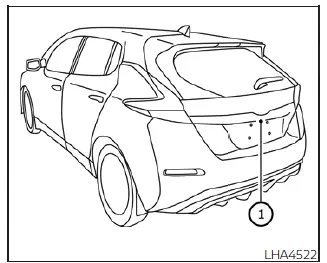
CAUTION
- Do not use pure alcohol, benzine, harsh chemical solvents, or paint thinner to clean the camera assembly housing. Using these chemicals will cause permanent plastic degradation, structural cracking, and severe color discoloration.
- Do not scratch or scratch-clean the protective optical cover of the camera, as the monitor screen clarity may be adversely affected by the resulting abrasions.
If road dirt, grease, rain film, or winter snow accumulates on the exposed camera module 1, the RearView Monitor image will degrade and may not display objects clearly. Clean the camera lens carefully by wiping its surface down with a soft microfiber cloth dampened with a diluted mild cleaning agent, and then wipe away any remaining moisture with a soft dry cloth.
 How to park with predicted course lines
WARNING
If the factory tires are replaced with different sized tires or alternative aftermarket rims, the calculated trajectory metrics will be altered, and the predicted course lines m ...
 Intelligent Around View Monitor
CAMERA button (conveniently located on the display bezel to manually cycle through alternative camera views or force start the system)
MENU button (provides in ...
Other materials:
Fluid cooler system
Exploded View
1. Bracket
2. Bracket
3. Bracket
4. CVT fluid cooler
5. Clamp
6. CVT fluid cooler hose C
7. CVT fluid cooler hose B
8. CVT fluid cooler tube assembly
9. CVT fluid cooler hose D
10. CVT fluid cooler hose A
11. Transaxle assembly
A. CVT oil warmer
: Vehicle front
: ...
Remove
Use the following procedure to remove the head restraint/headrest.
1. Pull the head restraint/headrest up to the highest position.
2. Push and hold the lock knob.
3. Remove the head restraint/headrest from the seat.
4. Store the head restraint/headrest properly in a secure place so it is not l ...
Special Service Tool
HFC-134a (R-134a) Service Tool and Equipment
• Never mix HFC-134a (R-134a) refrigerant and/or its specified lubricant with
CFC-12 (R-12) refrigerant and/
or its lubricant.
• Separate and non-interchangeable service equipment must be used for handling
each type of refrigerant/
lubricant.
...
