
Nissan Leaf 2018-2025 (ZE1) Owner's Manual : RearView Monitor
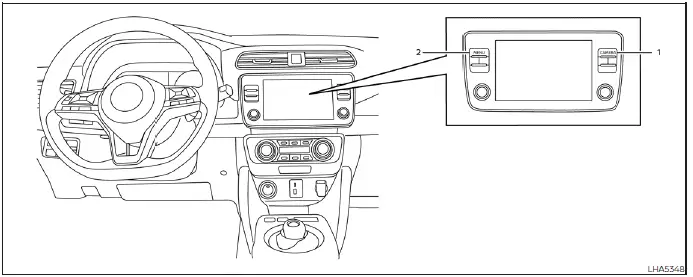
- CAMERA button (used to manually trigger the display views or adjust active screen brightness layouts)
- MENU button (opens up global display preferences and system option configuration screens)
WARNING
Failure to follow all safety warnings and technical instructions for the proper use of the integrated RearView Monitor camera system could result in severe vehicle damage, serious personal injury, or even death.
- The RearView Monitor system is designed solely as a driver convenience feature and is not a safe substitute for proper, attentive backing procedures. Always physically turn your head and torso to look out the cabin windows and carefully check your exterior side view mirrors to be absolutely certain that it is safe to maneuver before operating the vehicle in reverse gear. Always back up slowly and cautiously.
- The camera system is specifically engineered as an optical aid to the driver by showing large, stationary objects located directly behind the rear bumper, thereby helping to avoid backing collisions or scraping and damaging the vehicle body.
- The colored distance guide lines and the flanking vehicle width lines should be utilized strictly as a visual reference only when the Nissan Leaf is parked on a completely level, flat paved surface. The apparent distance viewed on the central monitor screen is for relative reference only and can vary significantly from the actual physical distance between the vehicle bumper and any displayed objects.
CAUTION
Take extreme care not to scratch, scrape, or smudge the protective glass camera lens when gently cleaning dirt, road grime, salt, or packed snow from the outer protective shell of the camera housing.
- RearView Monitor system operation
- How to park with predicted course lines
- RearView Monitor system limitations
 NissanConnect Manual
Please refer to the digital NissanConnect manual by scanning the integrated QR code printed on this page with your smartphone, or consult your physical, printed NissanConnect man ...
 RearView Monitor system operation
The automated RearView Monitor system is programmed to automatically display a live wide-angle view of the area directly behind the vehicle on the central console screen as soon ...
Other materials:
Back door opener actuator
Diagnosis Procedure
1.CHECK BACK DOOR OPENER ACTUATOR INPUT SIGNAL
1. Turn ignition switch OFF.
2. Disconnect back door opener assembly connector.
3. Check voltage between back door opener assembly harness connector and ground.
Is the inspection result normal?
YES >> GO TO 3.
NO > ...
Towing your vehicle
When towing your vehicle, all State (Provincial in Canada) and local regulations
for towing must be followed. Incorrect towing equipment could damage your vehicle.
Towing instructions are available from a NISSAN dealer. Local service operators
are familiar with the applicable laws and procedur ...
B1113, B1114 satellite sensor RH
DTC Logic
DTC DETECTION LOGIC
1.CHECK SELF-DIAG RESULT
With CONSULT-III
1. Turn ignition switch ON.
2. Perform “Self Diagnostic Result� mode of “AIR BAG� using CONSULT-III.
Without CONSULT-III
1. Turn ignition switch ON.
2. Check the air bag warning lamp status. Refer to SRC-12, ...
