
Nissan Leaf 2018-2025 (ZE1) Owner's Manual : RearView Monitor system operation
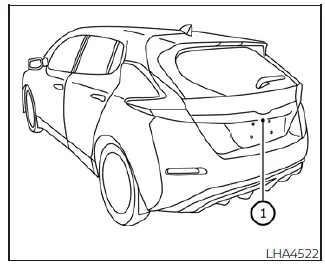
The automated RearView Monitor system is programmed to automatically display a live wide-angle view of the area directly behind the vehicle on the central console screen as soon as the shift selector is placed into the R (Reverse) position. The audio system radio playback or media stream can still be heard in the background while the RearView Monitor screen interface remains active.
To output this live display on the dashboard screen, the RearView Monitor system relies on a specialized wide-angle video camera lens located just above the rear license plate trim molding 1.
With the primary EV (electric vehicle) powertrain fully powered on and indicating a green "READY to drive" status on the dashboard cluster, move the electronic shift selector to the R (Reverse) position to initiate the transmission stream for the RearView Monitor.
How to read the displayed lines
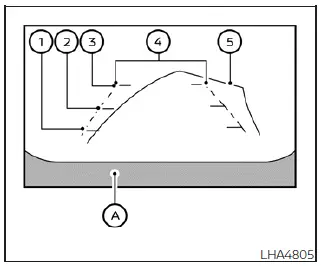
Superimposed colorful guiding lines which clearly indicate the estimated vehicle clearance width and specific tracking distances to trailing objects—relative to the rear fascia body line A—are dynamically displayed on the monitor screen.
Distance guide lines
These horizontal overlays indicate the approximate clearance distance extending outward from the rear bumper skin of the Nissan Leaf.
- Red horizontal line 1 : approx. 1.5 feet (0.5 meters) from the vehicle bumper
- Yellow horizontal line 2 : approx. 3 feet (1.0 meter) from the vehicle bumper
- Green horizontal line 3 : approx. 7 feet (2.0 meters) from the vehicle bumper
Vehicle width guide lines 4
These parallel lines indicate the approximate outer clearance footprint of the vehicle width when backing up straight.
Please note that the visual width mapped out by the vehicle width guide lines is intentionally calibrated to be slightly wider than the actual physical width of the car body panels.
Predicted course lines 5
These lines indicate the expected path of travel your vehicle will follow when reversing. The predictive trajectory course lines will automatically appear on the monitor screen whenever the shift selector is placed in the R (Reverse) position and the steering wheel column is rotated away from center. These predicted course lines will move left or right depending on how much the steering wheel is turned, and they will disappear from view while the steering wheel is held in the dead-center, straight-ahead alignment.
The default vehicle width guide lines and the outer margins of the predicted course lines are both designed to be wider than the actual physical track and path of the car.
Difference between predicted and actual distances
The overlaid graphic guidelines and their relative contact points on the ground are meant for approximate visual reference only. Obstacles situated on steep uphill gradients, downhill slopes, or objects projecting horizontally into mid-air will actually be located at distances completely different from those projected on the monitor screen relative to the guide grids (refer to the situational illustrations below). When facing complex parking environments, turn around physically to view the objects yourself as you are backing up, or select Park, apply the brake, and exit the vehicle to verify the true positioning of objects behind your Nissan Leaf.
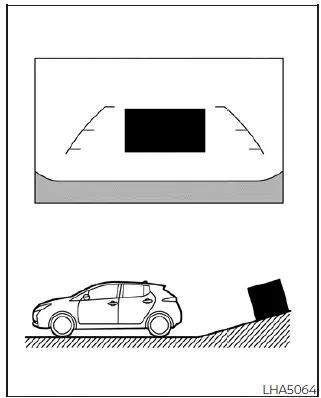
Backing up on a steep uphill
When reversing the vehicle up a steep hill or driveway incline, the flat distance guide lines and the vehicle width guide lines are projected on screen closer to the bumper than the actual true distance. Always take note that any object or obstacle situated on the hill is actually farther away than it appears on the monitor screen display.
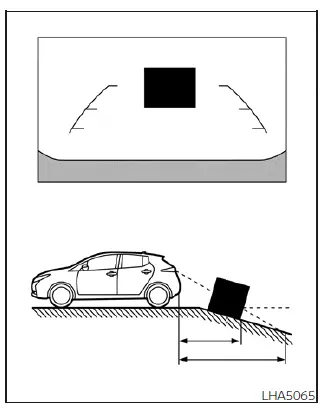
Backing up on a steep downhill
When reversing the vehicle down a steep hill or grade decline, the flat distance guide lines and the vehicle width guide lines are projected on screen farther away from the bumper than the actual true distance. Always take note that any object situated on the downhill slope is actually much closer than it appears on the monitor screen display.
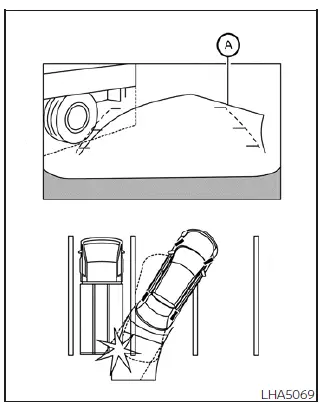
Backing up near a projecting object
The dynamic predicted course lines A may appear to completely clear and not touch a high projecting object in the digital display. However, the upper tailgate of your Nissan Leaf may still collide with the obstacle if that object projects horizontally over the actual path of the backing up course.
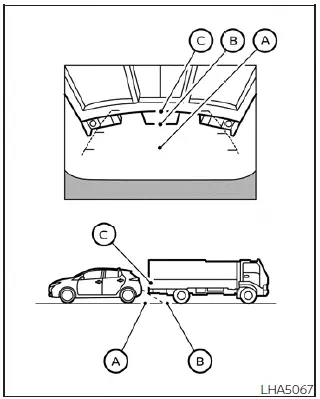
Backing up behind a projecting object
The high projecting position C is visually projected farther away than the lower ground position B on the digital camera display screen. However, in physical space, the projecting point C is actually situated at the exact same close distance as ground position A. The rear hatch of the vehicle may strike the projecting object when backing up to ground position A if the object extends outward over the actual reversing course of the Nissan Leaf.
 RearView Monitor
CAMERA button (used to manually trigger the display views or adjust active screen brightness layouts)
MENU button (opens up global display preferences and syst ...
 How to park with predicted course lines
WARNING
If the factory tires are replaced with different sized tires or alternative aftermarket rims, the calculated trajectory metrics will be altered, and the predicted course lines m ...
Other materials:
System
Intelligent key system/engine start function
INTELLIGENT KEY SYSTEM/ENGINE START FUNCTION : System Diagram
INTELLIGENT KEY SYSTEM/ENGINE START FUNCTION : System
SYSTEM DESCRIPTION
• The engine start function of Intelligent Key system makes it possible to
start and stop the engine without
...
Reservoir tank cap
Inspection
• Check valve seat of reservoir tank cap.
- Check if valve seat (A) is swollen to the extent that the edge of the
metal plunger (B) cannot be seen when watching it vertically from
the top.
- Check if valve seat has no soil and damage.
• Pull negative-pressure valve to open i ...
G sensor
Exploded View
1. Bracket
2. G sensor
: Vehicle front
: N·m (kg-m, ft-lb)
: N·m (kg-m, in-lb)
Removal and Installation
CAUTION:
• Never drop or strike G sensor, because it has little tolerance for impact.
• Never use a power tool to avoid impact.
REMOVAL
1. Disconnect the battery ...
