
Nissan Leaf 2018-2025 (ZE1) Owner's Manual : Intelligent Around View Monitor system operation
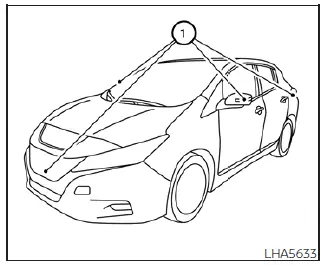
To display the multiple synchronized perspective views, the advanced Intelligent Around View Monitor system utilizes a network of four ultra-wide-angle digital cameras strategically located in the center of the front grille assembly, embedded on the lower housings of the vehicle's left and right outside door mirrors, and one positioned discreetly just above the vehicle's rear license plate 1.
With the main Nissan Leaf EV (electric vehicle) system active and powered on, simply move the electronic shift selector lever to the R (Reverse) position to instantly pull up the camera interface, or manually press the physical CAMERA button on the center console bezel to operate and cycle through the multi-angle layouts of the Intelligent Around View Monitor.
When the camera feed is first activated with the panoramic bird's-eye view active in the split-screen display, a vivid red icon will flash momentarily on the screen. This indicates that the parking sonar sensor array is fully activated and scanning the surrounding parameters for close-range hazards. For additional detailed instructions and safety information on the rear sonar system, please see the specialized section titled "Rear sonar system". The camera layout displayed on the Intelligent Around View Monitor will automatically close and return to the previously active multimedia or map screen exactly 3 minutes after the CAMERA button has been pressed, provided the shift lever remains in a forward or parking position other than the active R (Reverse) position.
Available views
WARNING
- The overlaid distance guide lines and the parallel vehicle width lines should be used strictly as an approximate reference point, and only when the vehicle is resting on a completely flat, paved, and level surface. The apparent distance of an obstacle viewed on the central monitor screen may vary significantly from the actual physical distance between the vehicle bumper and the displayed objects.
- Always cross-reference the static displayed guidelines and the digitally stitched bird's-eye view with your physical surroundings. The exact tracking accuracy of the guidelines and the composite bird's-eye view are greatly affected by the number of cabin occupants, the distribution of cargo weight, the fuel or battery layout level, the current vehicle position, and fluctuating road conditions or steep road grades.
- If the factory wheels or tires are replaced with different sized tires or alternative aftermarket configurations, the dynamic tracking system calibration will be altered, meaning the predicted course lines and the bird's-eye view composite alignment may be displayed incorrectly.
- When driving the vehicle up a steep hill or incline grade, objects and vehicles viewed in the monitor screen are physically further away than they appear on the display. Conversely, when driving the vehicle down a steep hill, objects viewed in the monitor are physically closer than they appear on the screen.
- Please remember that objects shown in the rear view feed will appear visually flipped or mirror-opposite compared to when they are viewed naturally in the physical center rearview mirror and outside door mirrors.
- Never rely solely on driver-assist camera technology; always check your side mirrors or actually look over your shoulder to properly judge real-time distances to other objects, walls, or pedestrians.
- On a snow-covered, icy, or highly slippery road surface, tire slippage can occur, meaning there may be a distinct difference between the calculated predicted course lines and the actual tracking course line path taken by the vehicle.
- The static vehicle width markers and the dynamic predicted course lines are intentionally calibrated to be slightly wider than the actual physical width and travel course of your Nissan Leaf to provide a safe buffer zone.
- The displayed rearview overlay lines will appear slightly off-center to the right side of the screen; this is normal system operation because the physical rearview camera lens is offset and not installed in the exact geometric rear center of the vehicle bumper structure.
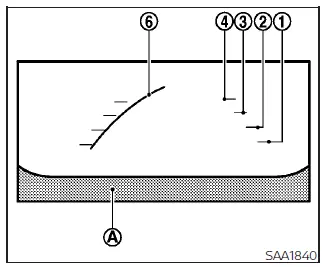
Front View
Front and rear view
Color-coded graphic guiding lines that indicate the approximate vehicle clearance width and tracking distance to prospective obstacles—calculated with reference to the extended vehicle body lines A—are projected directly on the monitor display screen.
Distance guide lines
These horizontal color blocks indicate specific incremental distances extending outwards from the Nissan Leaf bumpers:
- Red line 1 : approximately 1.5 feet (0.5 meters) away from the vehicle body panel
- Yellow lines 2 : approximately 3 feet (1 meter) away from the vehicle body panel
- Green lines 3 : approximately 7 feet (2 meter) away from the vehicle body panel
- Green lines 4 : approximately 10 feet (3 meters) away from the vehicle body panel (integrated only on specific vehicle models if so equipped)
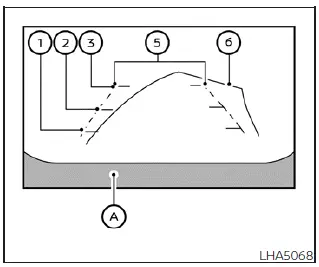
Rear View
Vehicle width guide lines 5
These lines indicate the approximate outer side clearance footprint of the vehicle width to help gauge side distances when backing up.
Predicted course lines 6
These dynamic paths indicate the estimated trajectory course your vehicle will follow based on real-time steering inputs when operating the vehicle. The predicted course lines will automatically generate on the monitor screen the moment the steering wheel is turned away from the center line. These predicted course lines will dynamically curve and shift depending on how much the steering wheel is rotated, and they may not be displayed at all while the steering wheel is held in a straight-ahead position. To ensure optimal forward driver focus, the front-facing camera view will not be displayed on the screen when the vehicle speed rises above 6 mph (10 km/h).
NOTE:
When the display monitor outputs the real-time front view and the steering wheel is rotated approximately 90 degrees or less from the straight-ahead position, both the right and left predicted course lines 6 are projected simultaneously onto the infotainment system screen.
When the steering wheel is turned past approximately 90 degrees or more into a sharper angle, the tracking software modifies the layout, and a trajectory line is displayed exclusively on the side opposite to the direction of the turn to help navigate the outer swing radius.
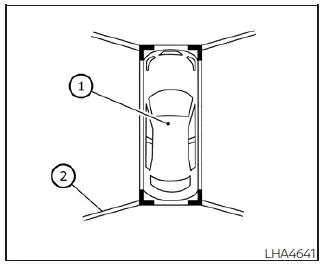
Birds-eye view
The integrated bird's-eye view function delivers a simulated, composite overhead view of the vehicle, which greatly assists the driver in confirming the exact vehicle position and aligning the predicted course into a designated parking space. The centered vehicle icon 1 graphically represents the position of the physical car panels. It is critical to keep in mind that the apparent distance between surrounding objects viewed in this digital bird's-eye view format may vary somewhat from the actual real-world distance to the vehicle body.
The specific peripheral areas that the exterior panoramic cameras cannot physically cover 2 are clearly indicated in solid black on the stitched image display.
Immediately after the Nissan Leaf EV system is placed in the active ON position, these non-viewable blind spots 2 are highlighted in bright yellow for several seconds to alert the driver as soon as the bird's-eye view is displayed. This diagnostic caution highlighting will be shown only the very first time the camera menu triggers after the power switch is rotated into the ON position.
WARNING
- Objects captured within the composite bird's-eye view may appear to be significantly further away than their actual physical distance from the car bumper.
- Tall structures and prominent objects, such as a concrete curb, a loading dock, or an adjacent parked vehicle, may appear misaligned, distorted, or might not be displayed at all at the blending seams where the individual camera feeds meet.
- Obstacles or hanging items that are physically positioned above the horizontal mounting height of the camera lenses cannot be captured or displayed by the system.
- The stitched overhead perspective for the bird's-eye view may become permanently misaligned or inaccurate if any individual camera position alters due to body damage, door mirror impact, or loose mounting hardware.
- A straight parking line painted on the ground surface may appear artificially misaligned, jagged, or discontinuous at the overlapping seam of the camera views. This visual misalignment will naturally increase as the painted line proceeds further away from the vehicle body.
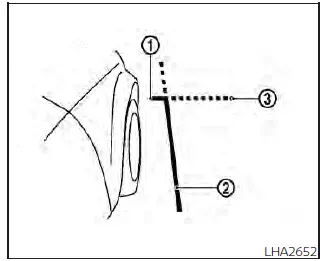
Front-side view
Guiding lines
Technical guiding lines that indicate the approximate clearance width and the outermost front end profile of the vehicle are clearly displayed on the monitor to prevent curb rash and rim scrapes.
The dedicated front-of-vehicle line 1 marks the approximate safety margin and projection path of the front bumper structure.
The longitudinal side-of-vehicle line 2 maps out the approximate overall vehicle width, explicitly factoring in the protrusion of the unfolded outside door mirrors.
The extended paths 3 of both the primary front 1 and side 2 lines are continuously projected forward using a green dotted line format to show your immediate trajectory.
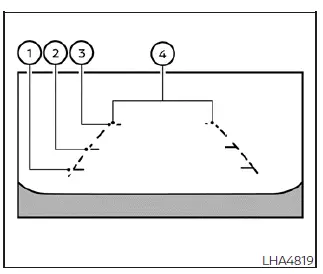
Full screen rear view
Full screen rear view
The specialized full screen rear view mode expands the camera feed across the entire display screen to reveal a significantly wider peripheral area, allowing the driver to check for cross-traffic and blind corners on both the right and left sides simultaneously. This full screen rear view utilizes a wide-angle fish-eye calculation to capture an approximate 180-degree field of view directly behind the Nissan Leaf. Note that dynamic predicted course lines are deactivated and will not be displayed when utilizing this specific ultra-wide full screen mode.
Distance guide lines
These horizontal color-coded bars indicate measured incremental distances extending back from the rear bumper fascia:
- Red line 1 : indicates a close proximity zone of approximately 1.5 feet (0.5 meters) from the vehicle body.
- Yellow line 2 : indicates an intermediate distance of approximately 3 feet (1 meter) from the vehicle body.
- Green line 3 : indicates a safe tracking distance of approximately 7 feet (2 meters) from the vehicle body.
Vehicle width guide lines 4
These parallel bounding tracks indicate the overall vehicle width profile to help you maintain straight alignment when backing up.
 Intelligent Around View Monitor
CAMERA button (conveniently located on the display bezel to manually cycle through alternative camera views or force start the system)
MENU button (provides in ...
 Difference between predicted and
actual distances
Difference between predicted and
actual distances
The superimposed guidelines displayed on the monitor panel and their indicated contact points on the ground are calibrated exclusively for approximate driver reference. Physical obstacles located on s ...
Other materials:
Input shaft and gear
Exploded View
1. Input shaft front bearing
2. Input shaft
3. Snap ring
4. Input shaft rear bearing
5. Adapter plate
6. Bushing
7. 5th input gear
8. 5th-reverse baulk ring
9. Synchronizer lever
10. 5th-reverse synchronizer hub
11. 5th-reverse coupling sleeve
12. Retaining pin
1 ...
Operation
Switch Name and Function
OPERATION AND DISPLAY
A/C Display (Display in Multi Display Unit)
• Air conditioning system operation status is indicated on display in multi
display unit. Indication of air conditioning
system varies according to display mode of multi display unit. For changing
...
Stop lamp switch
Component Function Check
1.CHECK STOP LAMP SWITCH OPERATION
Depress brake pedal and check that stop lamp turns ON, or release brake pedal
and check stop lamp turns
OFF.
Is the inspection result normal?
YES >> GO TO 2.
NO >> Check stop lamp system. Refer to EXL-39, "Wirin ...
