
Nissan Juke Service and Repair Manual : Unit disassembly and assembly
Torque converter and converter housing oil seal
Exploded View
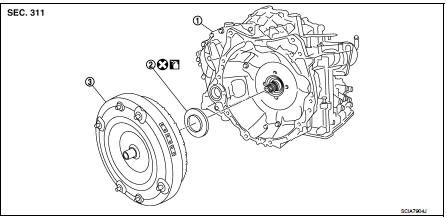
1. Transaxle assembly 2. Converter housing oil seal 3. Torque converter
 : Always replace after every
disassembly.
 : Apply CVT Fluid NS-2.
Disassembly
1. Remove transaxle assembly. Refer to TM-301, "Removal and Installation".
2. Remove torque converter from transaxle assembly.
CAUTION:
Never damage bush on the inside of torque converter sleeve when removing torque
converter.
3. Remove converter housing oil seal using a flat-bladed screwdriver.
CAUTION:
Be careful not to scratch converter housing.
Assembly
Note the following, and install in the reverse order of removal.
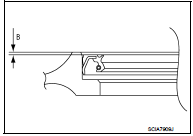
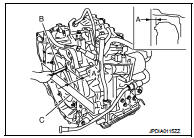
• Drive converter housing oil seal (1) evenly using a drift (A) (commercial service tool) so that converter housing oil seal protrudes by the dimension (B) respectively.

2 : Transaxle assembly
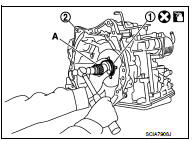

NOTE
:
Converter housing oil seal pulling direction is used as the reference.
• After completing installation, check for CVT fluid leakage and CVT fluid level. Refer to TM-184, "Inspection".
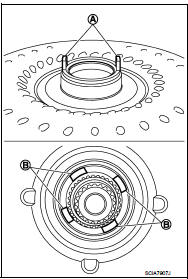
• Attach the pawl (A) of the torque converter to the drive sprocket hole (B) on the transaxle assembly side.
CAUTION:
• Rotate the torque converter for installing torque converter.
• Never damage the bushing inside the torque converter sleeve when installing the converter housing oil seal.
Inspection
INSPECTION AFTER INSTALLATION
• After inserting a torque converter to the CVT, check dimension (A) with in the reference value limit.
B : Scale
C : Straightedge
Dimension (A) : Refer to TM-308, "Torque Converter".
 Unit removal and installation
Transaxle assembly
Exploded View
1. CVT fluid level gauge
2. CVT fluid charging pipe
3. O-ring
4. Transaxle assembly
5. Air breather hose
A. For tightening torque, refer to TM-301, "R ...

Other materials:
Readiness for Inspection/Maintenance (I/M) test
WARNING
A vehicle equipped with All-Wheel Drive (AWD) should never be tested using
a two wheel dynamometer (such as the dynamometers used by some states for emissions
testing), or similar equipment.
Make sure you inform test facility personnel that your vehicle is equipped with
AWD before it ...
Vehicle load capacity
Do not exceed the load limit of your vehicle shown as “The combined weight of
occupants and cargo� on the Tire and Loading Information label. Do not exceed the
number of occupants shown as “Seating Capacity� on the Tire and Loading Information
label.
To get “the combined weight of o ...
Malfunction indicator
Component Function Check
1.CHECK MI FUNCTION
1. Turn ignition switch ON.
2. Make sure that MI lights up.
Is the inspection result normal?
YES >> INSPECTION END
NO >> Go to EC-1019, "Diagnosis Procedure".
Diagnosis Procedure
1.CHECK CAN COMMUNICATION LINE
Refer to LAN ...
