
Nissan Juke Service and Repair Manual : Structure and operation
Sectional View
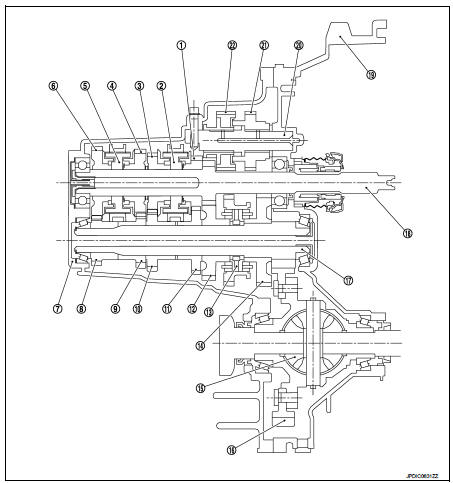
1. 3rd input gear
2. 3rd-4th synchronizer hub assembly
3. 4th input gear
4. 5th input gear
5. 5th-6th synchronizer hub assembly
6. 6th input gear
7. Transaxle case
8. 6th main gear
9. 5th main gear
10. 4th main gear
11. 3rd main gear
12. 2nd main gear
13. 1st-2nd synchronizer hub assembly
14. 1st main gear
15. Differential
16. Final gear
17. Mainshaft
18. Input shaft
19. Clutch housing
20. Reverse idler shaft
21. Reverse input gear
22. Reverse output gear
System Description
TRIPLE-CONE SYNCHRONIZER
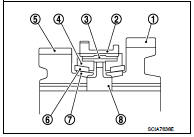
Triple-cone synchronizers are adopted for the 1st and the 2nd gears to reduce operating force of the shifter lever.
1 : 1st main gear
2 : 1st-2nd coupling sleeve
3 : Insert key
4 : Outer baulk ring
5 : 2nd main gear
6 : Synchronizer cone
7 : Inner baulk ring
8 : 1st-2nd synchronizer hub
REVERSE GEAR NOISE PREVENTION FUNCTION (SYNCHRONIZING METHOD)
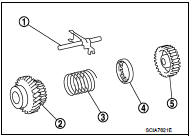
Reverse gear assembly consists of reverse input gear, return spring, reverse baulk ring, and reverse output gear. When the shifter lever is shifted to the reverse position, the construction allows smooth shift operation by stopping the reverse idler shaft rotation by frictional force of synchronizer.
1 : Reverse fork rod
2 : Reverse output gear
3 : Return spring
4 : Reverse baulk ring
5 : Reverse input gear
 Component parts
Component Parts Location
POSITION SWITCH
1 : Position switch
...
 DTC/Circuit diagnosis
POSITION SWITCH ...
Other materials:
Shift lock system
Component Function Check
1.CHECK SHIFT LOCK OPERATION (PART 1)
1. Turn ignition switch ON.
2. Shift the selector lever to “P� position.
3. Attempt to shift the selector lever to any other than position with the brake
pedal released.
Can the selector lever be shifted to any other positio ...
CVT shift selector
Exploded View
1. Selector lever knob
2. Lock pin
3. Knob cover
4 Position indication panel
5. CVT shift selector assembly
6. CVT shift selector harness assembly
7. Detent switch*
8. Shift lock unit
9. Park position switch
:N·m (kg-m, it-lb)
*: With push engine starter
Removal an ...
Service information for electrical incident
Work Flow
WORK FLOW
Control Units and Electrical Parts
PRECAUTIONS
• Never reverse polarity of battery terminals.
• Install only parts specified for a vehicle.
• Before replacing the control unit, check the input and output and functions of
the component parts.
• Do not apply ex ...
