
Nissan Juke Service and Repair Manual : Removal and Installation
REMOVAL
1. Remove rear propeller shaft assembly. Refer to DLN-121, "Removal and Installation".
2. Remove rear drive shaft. Refer to RAX-17, "Removal and Installation".
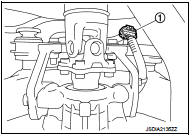
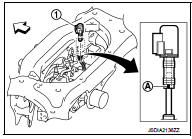
3. Disconnect sub-harness connector (1).
4. Remove rear final drive breather hose.
5. Support rear final drive assembly with a suitable jack.
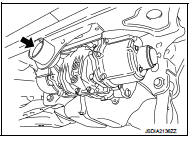
6. Remove rear final drive mounting bolt (
) at rear suspension
member.
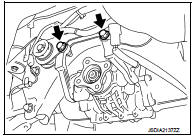
7. Remove final drive mounting bolts and nuts (
), and then
remove rear final drive assembly from final drive mounting
bracket.
CAUTION:
Secure final drive assembly to a suitable jack while removing
it.
8. Remove fuel tank. Refer to FL-23, "4WD : Removal and Installation".
9. Remove final drive mounting bracket.
INSTALLATION
Note the following, and install in the reverse order of removal.
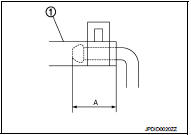
• Install the breather hose (1) to breather tube until dimension (A) shown as follows.
A:
Final drive side : 20mm (0.79 in)
Breather side : 20mm (0.79 in)
CAUTION:
• Never reuse hose clamps.
• Install the hose clamps, with the tab facing vehicle rear.
• If remove breather hose, install breather hose (1) as shown in the figure.
Vehicle front
- Install breather hose with paint mark (A) facing vehicle rear.
• When oil leaks while removing final drive assembly, check oil level after the installation. Refer to DLN-132, "Inspection".
• When replacing rear final drive assembly, perform writing unit parameter. Refer to DLN-39, "Work Procedure".
 Exploded View
1. Final drive mounting bracket
2. Washer
3. Rear final drive assembly
: Vehicle front
: N·m (kg-m, ft-lb)
: Never reuse parts
: Apply multi purpose grease
: Apply gear oil.
...

Other materials:
Oil pump
Exploded View
1. Oil pump drive chain
2. Crankshaft sprocket
3. Oil pump assembly
Removal and Installation
REMOVAL
1. Disconnect the battery cable from the negative terminal.
2. Remove engine under cover.
3. Remove front wheel RH. Refer to WT-7, "Exploded View".
4. Remove fen ...
Car phone or CB radio
When installing a car phone or a CB radio in your vehicle, be sure to observe
the following precautions, otherwise the new equipment may adversely affect the
electronic control modules and electronic control system harness.
WARNING
• A cellular phone should not be used for any purpose ...
U1000 can comm circuit
Description
CAN (Controller Area Network) is a serial communication line for real time
applications. It is an on-board multiplex
communication line with high data communication speed and excellent error
detection ability. A modern
vehicle is equipped with many ECMs, and each control unit shar ...
