
Nissan Juke Service and Repair Manual : Light & rain sensor
Exploded View
CAUTION:
When the light & rain sensor is removed from windshield, the light & rain sensor
cannot be re-used.
REMOVAL
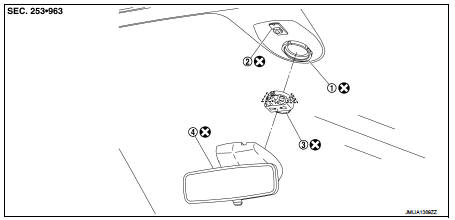
1. Light & rain sensor bracket
2. Mirror base
3. Light & rain sensor
4. Inside mirror assembly
 : Pawl
 : Do not reuse
Removal and Installation
REMOVAL
1. Remove inside mirror assembly. Refer to MIR-41, "Removal and Installation".
2. Disconnect light & rain sensor connector.
3. Disengage both sides of metal spring clips, and remove the light & rain sensor from the windshield.
INSTALLATION
Note the following items, and the install in the reverse order of removal.
CAUTION:
• Surface of windshield should be cleaned.
• Never touch gel/adhesive of new part.
• Lock the metal spring clips and install the light & rain sensor securely.
 Front fog lamp
Exploded View
1. Front fog lamp assembly
2. Metal clip
3. Front fog lamp bulb
4. Front fog lamp bracket
5. U nut
6. Front bumper fascia lower
: Pawl
: N·m (kg-m, in-lb)
Removal and Ins ...
 Lighting & turn signal switch
Removal and Installation
REMOVAL
Remove light & turn signal switch. Refer to BCS-94, "Removal and
Installation".
INSTALLATION
Install in the reverse order of removal. ...
Other materials:
Precaution Necessary for Steering Wheel Rotation after Battery Disconnect
NOTE:
• Before removing and installing any control units, first turn the ignition
switch to the LOCK position, then disconnect
both battery cables.
• After finishing work, confirm that all control unit connectors are connected
properly, then re-connect both
battery cables.
• Always us ...
Inside mirror
Exploded View
Manual anti-dazzling type
1. Windshield glass
2. Mirror base
3. Inside mirror assembly
: Do not reuse
Auto anti-dazzling type
1. Rain sensor bracket
2. Mirror base
3. Rain sensor
4. Inside mirror assembly
: Pawl
: Do not reuse
Removal and Installation
CAUTION:
Ne ...
ABS actuator and electric unit (control unit)
Exploded View
LHD
MR16DDT (2WD), HR16DE
1. ABS actuator and electric unit (control
unit)
2. ABS actuator and electric unit (control
unit) harness connector
3. Bracket
A. To front LH caliper
B. To rear RH caliper
C. To rear LH caliper
D. To front RH caliper
E. To master cylinder seco ...
