
Nissan Juke Service and Repair Manual : Front fog lamp
Exploded View
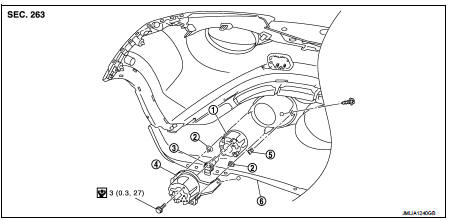
1. Front fog lamp assembly
2. Metal clip
3. Front fog lamp bulb
4. Front fog lamp bracket
5. U nut
6. Front bumper fascia lower
 : Pawl
 : N·m (kg-m, in-lb)
Removal and Installation
CAUTION:
Disconnect the battery negative terminal or remove the fuse.
REMOVAL
1. Remove front fender protector. Keep the service area. Refer to EXT-22, "Removal and Installation".
2. Disconnect front fog lamp harness connector.
3. Remove front fog lamp bracket.
4. Remove front fog lamp mounting bolt, and then remove front fog lamp from front fog lamp bracket.
INSTALLATION
Note the following item, and then installation is the reverse order of removal.
NOTE
:
After installation, perform aiming adjustment. Refer to EXL-88, "Description"
Replacement
CAUTION:
• Disconnect the battery negative terminal or remove the fuse.
• Never touch the glass of bulb directly by hand. Keep grease and other oily matters awy from it.
• Never touch bulb by hand while it is lit or right after being turned off.
• Never leave bulb out of lamp reflector for a long time because dust, moisture smoke, etc. may affect the performance of lamp. When replacing bulb, be sure to replace it with new one.
FRONT FOG LAMP BULB
1. Remove fender protector. Keep the service area. Refer to EXT-22, "Removal and Installation".
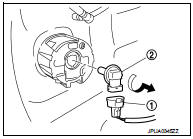
2. Remove front fog lamp bulb connector (1).
3. Rotate the bulb (2) counterclockwise and unlock it.
 Front combination lamp
Exploded View
REMOVAL
1. Front combination lamp
: N·m (kg-m, in-lb)
DISASSEMBLY
1. Parking lamp bulb
2. Parking lamp bulb socket
3. Front turn signal lamp bulb socket
4. Front turn sign ...
 Light & rain sensor
Exploded View
CAUTION:
When the light & rain sensor is removed from windshield, the light & rain sensor
cannot be re-used.
REMOVAL
1. Light & rain sensor bracket
2. Mirror base
...
Other materials:
B2109 steering lock relay
DTC Logic
DTC DETECTION LOGIC
NOTE:
• If DTC B2109 is displayed with DTC U1000, first perform the trouble diagnosis
for DTC U1000. Refer to
PCS-30, "DTC Logic".
• When IPDM E/R power supply voltage is low (Approx. 7 - 8 V for about 1
second), the DTC B2109 may be
detected.
...
Precaution Necessary for Steering Wheel Rotation after Battery Disconnect
NOTE:
• Before removing and installing any control units, first turn the ignition
switch to the LOCK position, then disconnect
both battery cables.
• After finishing work, confirm that all control unit connectors are connected
properly, then re-connect both
battery cables.
• Always us ...
Component parts
Component Parts Location
MODELS WITH USB CONNECTION FUNCTION
1. Front door speaker LH
2. Rear door speaker LH
3. Rear door speaker RH
4. Antenna rod
5. Antenna base (antenna amp.)
6. Front door speaker RH
7. Microphone
8. Tweeter LH
9. Steering switch
10. USB connector and AUX jac ...
