
Nissan Juke Service and Repair Manual : Diagnosis system (BCM)
Common item
COMMON ITEM : CONSULT-III Function (BCM - COMMON ITEM)
APPLICATION ITEM
CONSULT-III performs the following functions via CAN communication with BCM.
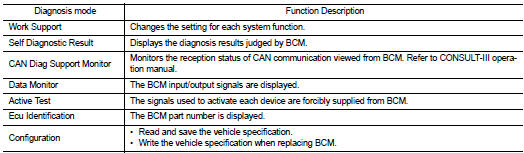
SYSTEM APPLICATION
BCM can perform the following functions for each system.
NOTE
:
It can perform the diagnosis modes except the following for all sub system
selection items
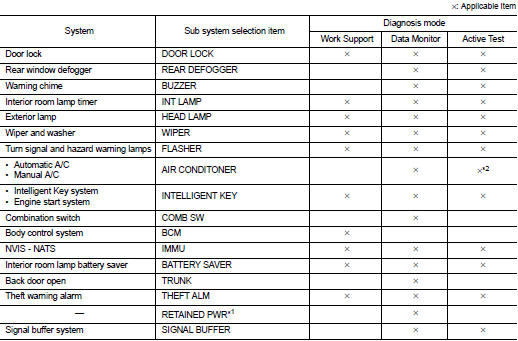
NOTE
:
• *1: This item is displayed, but not used.
• *2: For models with automatic A/C, this diagnosis mode is not used.
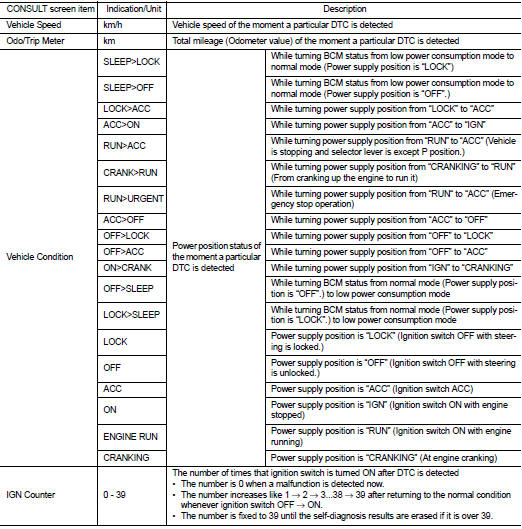
FREEZE FRAME DATA (FFD)
The BCM records the following vehicle condition at the time a particular DTC is detected, and displays on CONSULT-III.
Intelligent key
INTELLIGENT KEY : CONSULT-III Function (BCM - INTELLIGENT KEY) (With Super Lock)
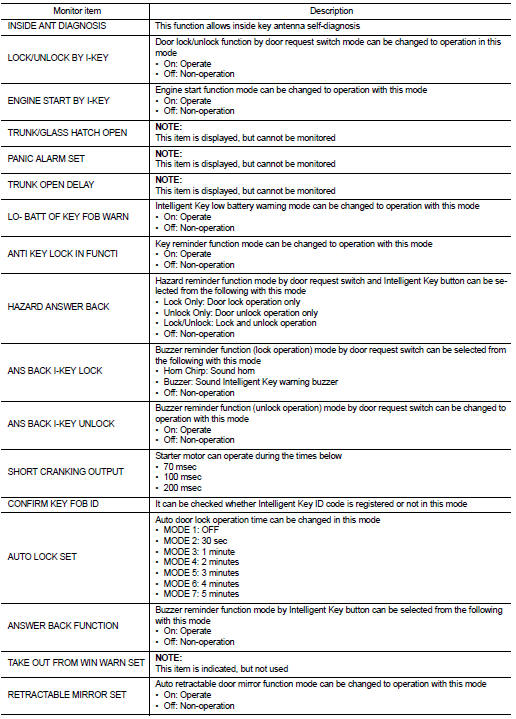
WORK SUPPORT
SELF-DIAG RESULT
Refer to BCS-67, "DTC Index".
DATA MONITOR
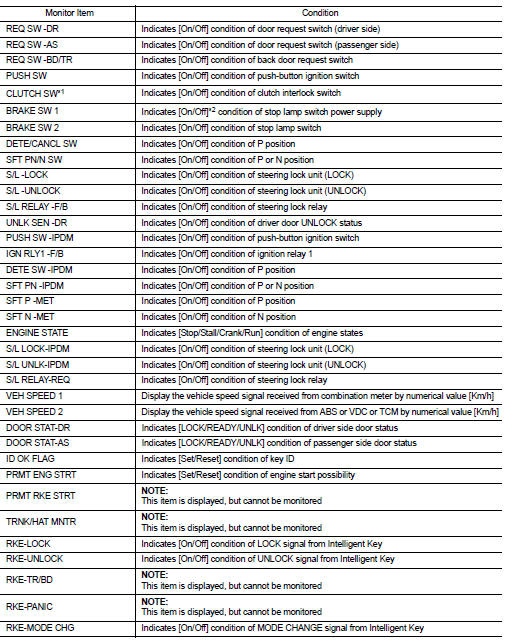

*1: It is displayed but does not operate on CVT models.
*2: OFF is displayed when brake pedal is depressed while brake switch power supply is OFF.
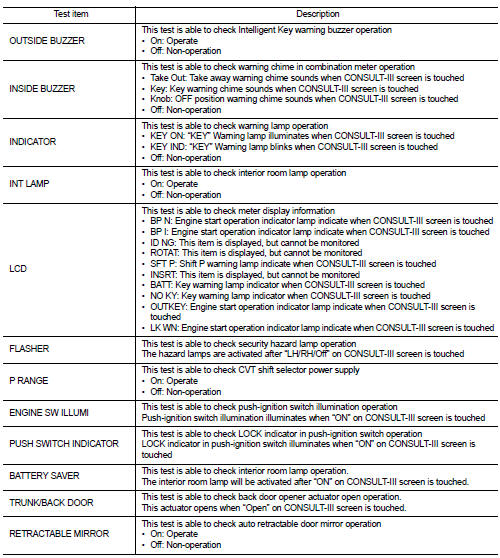
ACTIVE TEST
INTELLIGENT KEY : CONSULT-III Function (BCM - INTELLIGENT KEY) (Without Super Lock)
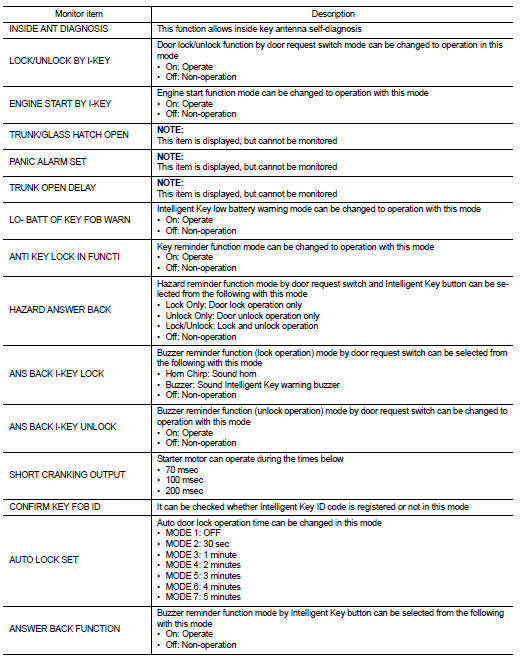
WORK SUPPORT

SELF-DIAG RESULT
Refer to BCS-67, "DTC Index".
DATA MONITOR
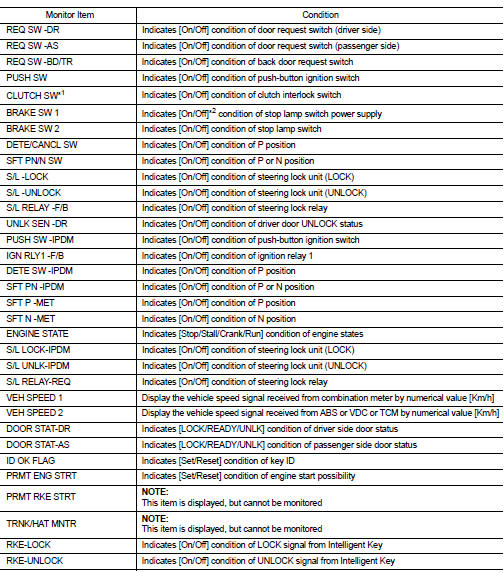
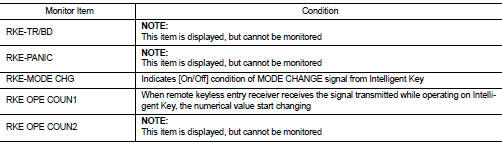
*1: It is displayed but does not operate on CVT models.
*2: OFF is displayed when brake pedal is depressed while brake switch power supply is OFF.
ACTIVE TEST
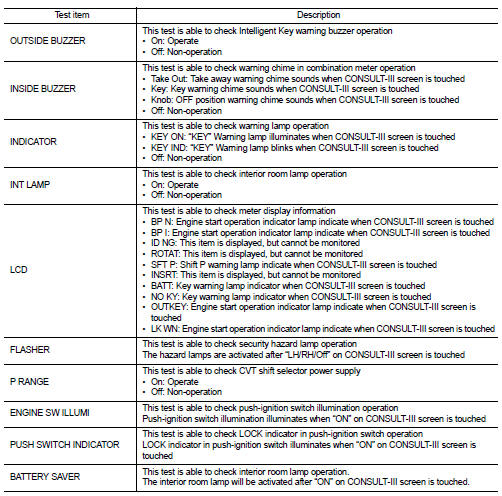

 System
AUTO RETRACTABLE DOOR MIRORR FUNCTION
AUTO RETRACTABLE DOOR MIRORR FUNCTION : System Diagram
AUTO RETRACTABLE DOOR MIRORR FUNCTION : System Description
BCM retracts door mirror when door lock sig ...
 Ecu diagnosis information
BCM (BODY CONTROL MODULE)
List of ECU Reference
...
Other materials:
Indicator lights
All-Wheel Drive (AWD) indicator
light (AWD model)
When the ignition switch is in the “ON� position, the All-Wheel Drive (AWD) indicator
light illuminates and then turns off.
When selecting AWD mode while the engine is running, the AWD indicator light
illuminates.
(See “All-Wheel Driv ...
Writing unit parameter
Description
Perform writing unit parameter of electric controlled coupling after
replacing 4WD control module, rear final
drive assembly or electric controlled coupling. Refer to DLN-39, "Work
Procedure".
Work Procedure
1.WRITE UNIT PARAMETER
With CONSULT-III
1. Confirm the unit ...
Front seat belt
Exploded View
1. Adjuster cover
2. Anchor bolt
3. Shoulder anchor
4. Spacer
5. Retaining washer
6. Seat belt adjuster
7. Seat belt pre-tensioner retractor
(Passenger side)
8. Outer anchor
9. Seat belt pre-tensioner retractor
(Driver side)
10. Seat belt buckle
11. Wave washer
&n ...
