
Nissan Leaf 2018-2025 (ZE1) Owner's Manual : How to use the remote keyless entry function
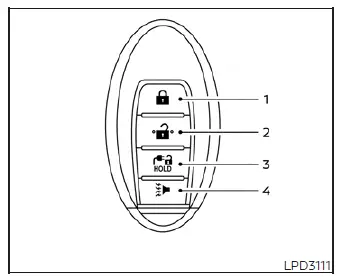
-
 (lock) button
-
 (unlock) button
-
 (charge port lid) button
-
 (panic) button
The integrated remote keyless entry function enables full wireless control over all passenger doors and the rear hatch lock actuators using the radio frequency transmitter built into the NISSAN Intelligent Key. Under optimal external conditions, this system operates reliably from a standard distance of up to 33 feet (10 meters) away from your Nissan Leaf. However, the maximum effective line-of-sight range may vary depending on local physical barriers, atmospheric conditions, and background electromagnetic interference around the vehicle.
The remote keyless entry commands will be completely restricted and will not function under the following specific operational conditions:
- When the physical key fob transmitter is positioned completely outside the maximum wireless operational signaling range.
- When any side passenger door or the rear cargo hatch is left standing wide open or is not fully clicked shut into its secure primary latch position.
- When the internal coin-cell battery of the Intelligent Key has completely discharged or lacks sufficient voltage to transmit a stable signal.
WARNING
- The high-frequency radio waves radiated by this remote entry system could potentially cause electronic interference with the normal operation of active electric medical devices. Individuals who use an implanted cardiac pacemaker or similar life-support equipment should consult with the electronic medical equipment manufacturer to thoroughly check for any possible negative influences prior to utilizing this system.
- The internal transmitter module within the key fob automatically emits strong radio waves whenever any of its physical control buttons are pressed.
The Federal Aviation Administration (FAA) officially advises that these specific radio frequencies might interfere with sensitive commercial aircraft navigation and internal cockpit communication arrays. To ensure passenger safety, do not press any buttons or operate the Intelligent Key transmitter unit while traveling on board an airplane. Additionally, you must take careful precautions to ensure that the key fob buttons cannot be accidentally compressed or operated unintentionally while the unit is packed away in your baggage for a flight.
CAUTION
- Do not allow the internal casing of the key fob, which houses sensitive electronic circuit boards, to come into direct contact with fresh water, rain, or salt water. Exposure to corrosive liquids can severely damage the microelectronics and cause permanent failure of the system functions.
- Do not drop the key fob housing onto hard surfaces, asphalt, or concrete.
- Do not strike the key fob housing sharply or jar it forcefully against another hard object.
- Do not attempt to alter, customize, or modify the internal hardware configuration of the Intelligent Key assembly.
- Excessive moisture or wetting can cause complete electronic failure. If the key fob happens to get wet, immediately wipe all exterior surfaces with a soft cloth until it is completely dry.
- Do not store or leave the key fob for an extended period in an enclosed space where ambient temperatures can exceed 140ºF (60ºC), such as on top of an unshaded dashboard on a hot summer day.
- Do not attach the key fob ring directly to any key holder accessory that contains an integrated magnet.
- Do not position the key fob in close proximity to consumer appliances that actively produce strong localized magnetic fields, such as televisions, high-powered audio equipment, personal computers, or active cellular smartphones.
- When using the remote functions to lock up your Nissan Leaf, always carry the key fob with you and be absolutely certain you have not left a secondary key hidden inside the vehicle.
Locking doors
1. Park the vehicle, shift into the proper gear, and turn the main power switch to the complete LOCK position.
2. Ensure that all passengers have exited the cabin safely and close all side doors and the rear hatch fully.
3. Press the physical
 lock button exactly once on your remote transmitter.
4. The external hazard indicator lamps will flash twice and the vehicle's factory horn will emit one short chirp to confirm the alarm is armed.
5. The central locking system will immediately engage, ensuring all doors and the rear cargo hatch are fully locked.
WARNING
Immediately after executing a lock command via the remote transmitter, always verify that the door latches are securely engaged by physically pulling on the exterior handles. If an unclosed door has caused a system error, skipping this verification might leave your Nissan Leaf unlocked, which can drastically decrease the overall security and safety of your vehicle and personal belongings.
Unlocking doors
1. Press the integrated
 unlock button once on the remote key fob to release the driver's door lock mechanism.
2. The exterior hazard indicator lights will flash once to acknowledge the driver's side entry path is now open.
3. Press the same
 unlock button a second time within 1 minute of the initial command to unlock all passenger doors and the rear hatch simultaneously.
To prevent unauthorized access, all doors and the rear hatch will automatically cycle back into a fully locked state unless one of the following specific manual operations is performed within exactly 1 minute after pressing the
 unlock button:
- Physically pulling open any passenger door or raising the rear hatch.
- Stepping inside the cabin and pressing down on the primary vehicle power switch.
Using the interior lights
The interior courtesy lamps are programmed to illuminate automatically for a predetermined period of time whenever a remote unlock signal is received, provided that the main overhead room light dome switch is placed in the DOOR position.
This entry lighting can be turned off immediately without waiting for the automated timer to run out by performing any of the following driver actions:
- Placing the primary vehicle start switch into the active ON operational position.
- Pressing the lock button on the remote fob to actively secure the doors.
- Manually toggling the primary overhead room light dome switch over to the absolute "OFF" position.
Opening charge port lid
The front charging door assembly on your Nissan Leaf may be unlatched from a distance by pressing and firmly holding down the dedicated
 charge port lid button for several seconds.
Using the panic alarm
If you find yourself in the immediate vicinity of your vehicle and suddenly feel threatened or require assistance, you can easily activate the vehicle's factory panic alarm system to draw attention. Simply press and hold the dedicated
 panic button on the remote key fob for longer than 1 second.
The vehicle's security horn will sound continuously and the main headlights will flash on for a set duration to illuminate the area.
The defensive panic alarm sequence will automatically deactivate when:
- The internal electronic security timer has completed its full cycle.
- Any functional button on the remote transmitter is pressed. (Note: If using the
 panic button to turn it off, it must be held down continuously for more than 1 second to register the cancellation signal.)
Setting hazard indicator and horn mode
Your vehicle is configured from the factory to operate in the dual hazard indicator and horn feedback mode when you first take delivery of the vehicle.
While operating in this default mode, pressing the
 lock button causes the hazard indicators to flash twice and the horn to chirp once. Conversely, pressing the
 unlock button causes the hazard lights to flash once with no horn response.
If you prefer quiet lock confirmation, the feedback system can easily be switched over to a silent hazard indicator mode.
When configured to this silent hazard indicator mode, pressing the
 lock button causes the hazard indicators to flash twice to confirm locking. When the
 unlock button is pressed, neither the hazard lamps nor the audible horn will operate.
Hazard indicator and horn mode

Hazard indicator mode

Switching procedure:
To easily cycle between the audible horn chirp and the silent visual feedback configurations on your Nissan Leaf, press and hold down both the
 and
and
 buttons on your remote key fob simultaneously for more than two seconds.
- When the silent hazard indicator mode has been successfully activated, the exterior hazard indicator lights will flash quickly three times.
- When the system toggles back to the standard hazard indicator and horn mode, the exterior hazard indicator lights will flash once and the vehicle horn will emit a short confirmation chirp.
 NISSAN Intelligent Key Operation
This hands-free proximity system allows you to completely secure or access your vehicle cabin without ever needing to physically retrieve the Intelligent Key transmitter from you ...
 12-volt battery saver system
To preserve the operational integrity of your electric vehicle, an automated 12-volt battery saver system is integrated into the vehicle's power management logic. When all the fo ...
Other materials:
Trouble diagnosis - specification
value
Description
The specification (SP) value indicates the tolerance of the value that is
displayed in “SPEC� of “DATA MONITOR�
mode of CONSULT-III during normal operation of the Engine Control System. When
the value in “SPEC�
of “DATA MONITOR� mode is within the SP value, the En ...
Operation
Switch Name and Function
OPERATION AND DISPLAY
A/C Display (Display in Multi Display Unit)
• Air conditioning system operation status is indicated on display in multi
display unit. Indication of air conditioning
system varies according to display mode of multi display unit. For changing
...
ABS branch line circuit
Diagnosis Procedure
1.CHECK CONNECTOR
1. Turn the ignition switch OFF.
2. Disconnect the battery cable from the negative terminal.
3. Check the terminals and connectors of the ABS actuator and electric unit
(control unit) for damage, bend
and loose connection (unit side and connector side).
...
