
Nissan Leaf 2018-2025 (ZE1) Owner's Manual : NISSAN Intelligent Key Operation
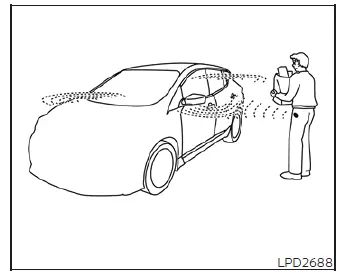
This hands-free proximity system allows you to completely secure or access your vehicle cabin without ever needing to physically retrieve the Intelligent Key transmitter from your pocket, briefcase, or handbag.
As long as you are personally carrying the registered transponder, you can simultaneously lock or unlock every single entry point on your Nissan Leaf by simply pressing any exterior request switch located within the designated range of operation.
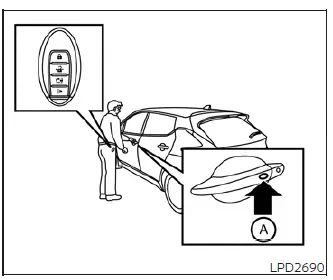
Locking doors
1. Ensure the vehicle is safely parked, transition the primary power switch to the complete OFF position, and make sure you have the key fob on your person.
2. Exit the vehicle and ensure that all passenger doors, as well as the rear trunk hatch, are fully snapped shut.
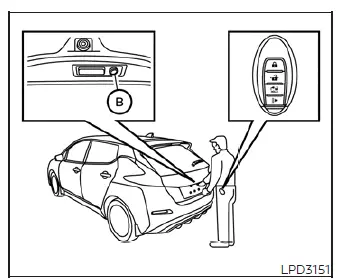
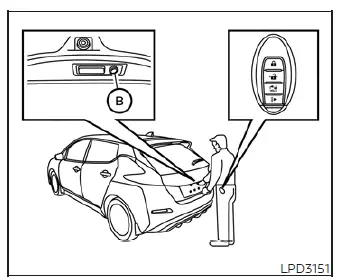
3. Press down on any available front door exterior handle request switch A or the specialized rear hatch request switch B while standing within the active sensor zone.
4. The centralized locking system will instantly activate, locking all side doors and the cargo lid simultaneously.
5. To visually and audibly confirm that the alarm is set, the exterior hazard indicator lamps will flash twice, accompanied by two short exterior confirmation chimes.
NOTE:
- If you prefer manual control, the exterior handle and rear hatch request switches can be completely deactivated at any time. Simply navigate to the "Settings" menu using the steering wheel controls on your vehicle information display cluster and turn the "Ext. Door Switch" feature to the OFF position.
Please note that the central locking circuit will refuse to activate if you press an exterior request switch while the driver's door remains open. However, for emergency scenarios, you can always manually lock the driver's door cylinder using the integrated mechanical key blade regardless of open door states.
- The vehicle is designed with intelligent safeguards that prevent the doors from locking via any request switch if the system detects an active Intelligent Key forgotten inside the cabin; an exterior warning beep will sound to alert you of the mistake. Note that if a key is left inside, you can still override this protection and lock the vehicle from the outside by utilizing a second registered Intelligent Key.
WARNING
Immediately after executing a lock command via the exterior request switch, always double-check the security status of your Nissan Leaf by firmly pulling on the door handles to ensure they are latched. Failing to verify the lock status or pulling the handle incorrectly during synchronization may cause the door to cycle back into an unlocked state without your knowledge, leaving your cabin and personal property vulnerable to theft.
CAUTION
- Before interacting with any exterior request switch, always take a quick moment to ensure that the physical key fob is securely in your possession, pocket, or bag.
- The external request switch panels are purely input triggers and will remain entirely unresponsive unless the transponder is within the matching frequency field detected by the vehicle's onboard security modules.
Lockout protection
To completely eliminate the frustrating scenario of being locked out of your own electric vehicle, the Nissan Leaf is equipped with advanced logic-based lockout protection routines within its keyless access software.
If the driver's side door is left open while a central lock command is given, and you subsequently drop the Intelligent Key inside the cabin before swinging the door shut, the vehicle will instantly scan the interior, detect the transponder signal, pop all door locks back to the fully unlocked position, and sound an alert chime.
NOTE:
The localized antenna arrays may occasionally fail to read the transponder signal if the Intelligent Key is held in the exact same hand or finger grip that is currently depressing the door handle request switch button. For reliable operation, keep your key fob stored inside your purse, jeans pocket, or hold it in your opposite hand when locking the vehicle.
CAUTION
Please be aware that the automated lockout protection system contains certain environmental boundaries and may fail to detect the key inside your Nissan Leaf under the following specific conditions:
- When the Intelligent Key is placed directly on top of the instrument panel assembly or near the base of the front windshield glass.
- When the key fob is buried inside the deep glove box compartment, center console storage bin, or hidden accessory trays.
- When the transmitter is tucked away inside the lower integrated door storage pockets.
- When the transponder unit is placed inside or immediately adjacent to metallic materials, shielding foils, or electronic devices.
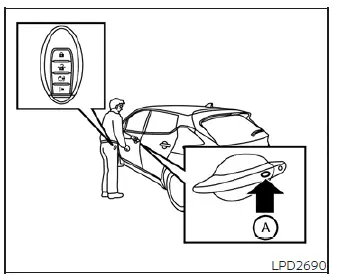
Unlocking doors
1. Approach the vehicle while carrying the registered Intelligent Key within the required 31.5-inch operational zone.
2. Press any front door handle request switch A or the rear hatch request switch B exactly once. The exterior hazard lights will flash once and an external warning chime will emit a single tone to signify that the specific door is unlocked.
3. Press that same front door handle request switch A or rear hatch request switch B a second time within 1 minute of the first press to unlock all remaining doors across the vehicle.
The hazard lights will flash once more and the exterior confirmation chime will sound a single beep to let you know the entire vehicle is accessible.
As a security precaution to prevent unauthorized cabin access, all doors will automatically cycle back into a fully locked state unless one of the following physical operations is performed within exactly 60 seconds after pressing the external request switch:
- Physically opening any side passenger door or lifting the rear cargo hatch.
- Stepping inside the cabin and pushing the primary vehicle power switch to the ACC or ON state.
NOTE:
If you prefer all doors to unlock on the very first press, the behavior of this Selective Unlock algorithm can be modified or disabled by adjusting the vehicle preferences through the main "Settings" menu on the cluster display.
Using the interior lights
The courtesy interior illumination system is programmed to turn on automatically for a set time limit whenever a door is unlocked, provided that the main overhead room light switch is left in the central DOOR position.
If you wish to turn these cabin lights off immediately without waiting for the automated delay timer to expire, you can override the countdown by performing any of the following driver actions:
- Pressing the start button to place the vehicle power switch directly into the active ON position.
- Using your key fob transmitter to execute an explicit lock command on the doors.
- Manually sliding the overhead room light switch back into its permanent "OFF" position.
Opening rear hatch
1. Approach the trunk of the vehicle while carrying the authorized Intelligent Key with you.
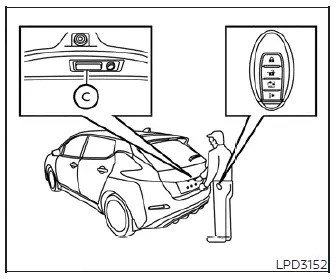
2. Reach under the lip of the tailgate trim panel and press the hidden electronic rear hatch opener switch C.
3. The rear cargo lock mechanism will release automatically, allowing you to lift and open the hatch gate easily.
 Operating range
The integrated NISSAN Intelligent Key functions are programmed to respond only when the transmitter fob is positioned within the specifically engineered proximity operating range ...
 How to use the remote keyless entry function
(lock) button
(unlock) button
(charge port lid) button
...
Other materials:
P2002 diesel particulate filter
DTC Logic
DTC DETECTION LOGIC
Diagnosis Procedure
1.CHECK DIESEL PARTICULATE FILTER
Refer to EC-995, "Component Inspection".
OK or NG
OK >> INSPECTION END
NG >> GO TO 2.
2.REPLACE DIESEL PARTICULATE FILTER
1. Replace diesel particulate filter.
2. Perform ???Dies ...
Basic inspection
DIAGNOSIS AND REPAIR WORKFLOW
Work Flow
OVERALL SEQUENCE
DETAILED FLOW
1.INTERVIEW FOR MALFUNCTION
Interview the symptom to the customer.
>> GO TO 2.
2.SYMPTOM CHECK
Check the symptom from the customer's information.
>> GO TO 3.
3.BASIC INSPECTION
Check the operation o ...
Luggage floor trim
Exploded View
2WD models
1. Rear pillar cap RH
2. Luggage side upper finisher RH
3. Luggage side lower finisher RH
4. Luggage floor board
5. Luggage side upper finisher LH
6. Rear pillar cap LH
7. Luggage side lower finisher LH
8. Seat belt hook LH
9. Shock absorber mask LH
10. Lug ...
