
Nissan Leaf 2018-2025 (ZE1) Owner's Manual : 12-volt battery saver system
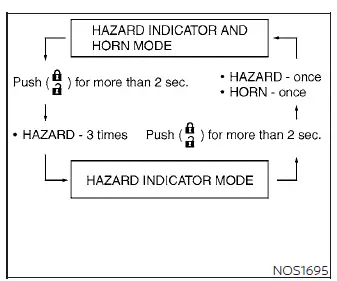
To preserve the operational integrity of your electric vehicle, an automated 12-volt battery saver system is integrated into the vehicle's power management logic. When all the following specific operating conditions are simultaneously met and sustained for a predetermined period of time, the battery saver system will automatically cut off the accessory power supply to prevent unnecessary 12-volt battery discharge and depletion:
- The primary power switch remains left in the ACC (Accessory) or ON position,
- All cabin passenger doors and the rear cargo hatch are completely closed, and
- The electronic gear selector of the Nissan Leaf is firmly set in the P (Park) position.
Warning signals
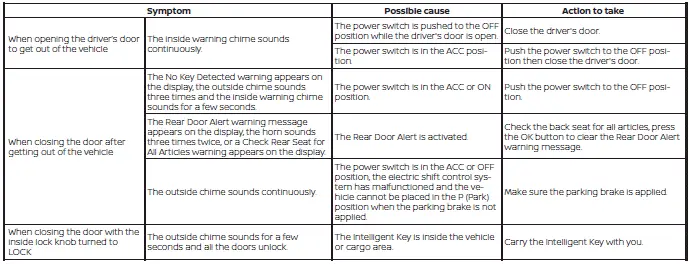
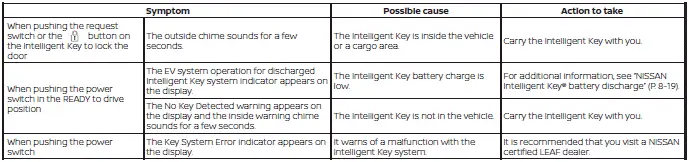
To help prevent the vehicle from moving unexpectedly due to any erroneous or accidental operation of the NISSAN Intelligent Key, and to provide advanced layers of protection to help prevent the vehicle from being stolen, a series of automated warning feedback loops are engineered into the vehicle. A localized acoustic chime or buzzer sounds from both inside the cabin and outside the vehicle perimeter, while a high-visibility structural warning is simultaneously displayed in the central instrument panel display group.
When a warning chime or electronic beep sounds, or when a critical graphic warning is displayed on your dashboard, be sure to safely stop and check the security status of the vehicle and the immediate proximity of your Intelligent Key.
Troubleshooting guide
Always verify the physical location of all registered Intelligent Keys that are uniquely programmed for your specific vehicle. If another authorized Intelligent Key is resting within the active wireless sensor range or remains forgotten inside the passenger cabin, the automated vehicle system may respond differently than expected or override standard lock commands.
 How to use the remote keyless entry function
(lock) button
(unlock) button
(charge port lid) button
...
 Hood
Hood
Before attempting to unlatch the front compartment, ensure that you securely close the outer charge port lid and disconnect any charging cables.
Firmly pull th ...
Other materials:
Diagnosis system (IPDM E/R)
Diagnosis Description
AUTO ACTIVE TEST
Description
In auto active test mode, the IPDM E/R sends a drive signal to the following
systems to check their operation.
• Oil pressure warning lamp (only for K9K engine models)
• Rear window defogger
• Front wiper motor
• Parking lamp
• ...
B1088 seat belt Pre-tensioner LH
DTC Logic
DTC DETECTION LOGIC
DTC CONFIRMATION PROCEDURE
1.CHECK SELF-DIAG RESULT
With CONSULT-III
1. Turn ignition switch ON.
2. Perform “Self Diagnostic Result� mode of “AIR BAG� using CONSULT-III.
Without CONSULT-III
1. Turn ignition switch ON.
2. Check the air bag warning la ...
Speed limiter
SPEED LIMITER : Switch Name and Function
SWITCHES AND INDICATORS
NOTE:
Shared with ASCD switch.
1. Speed limiter indicator
2. SET indicator
3. Set speed indicator
4. CANCEL switch
5. RES / + switch
6. SET / − switch
7. Speed limiter MAIN Switch
8. ASCD MAIN switch
A. On the ...
