
Nissan Leaf 2018-2025 (ZE1) Owner's Manual : How to enable/disable the Steering Assist
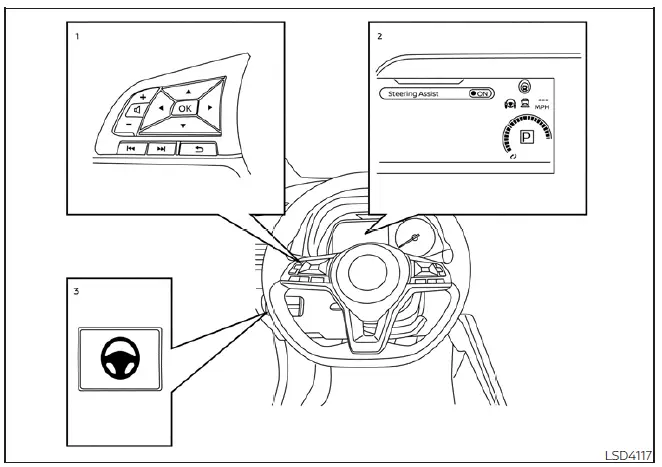
- Steering-wheel mounted control (right): Used for ProPILOT Assist settings and menu navigation.
- Vehicle information display: The digital hub for viewing driver assistance settings.
- Steering Assist switch: The physical toggle located on the instrument panel.
You can manage the Steering Assist functionality in your Nissan Leaf using the two methods outlined below.
Steering Assist switch:
To quickly toggle the Steering Assist function on or off, simply press the physical Steering Assist switch (3) located on the vehicle’s instrument panel.
The system is designed with a persistent memory; when you use the switch to change the Steering Assist state, your preference is saved. This means the system will remain in your chosen state (ON or OFF) even after the vehicle power is cycled. To revert your selection, you must press the switch again. Please be aware that operating this switch directly updates the "Steering Assist" configuration status found within the "Driver Assistance" settings menu on your vehicle information display.
Enabling/disabling via the vehicle information display:
- Use the
 button (1) on the steering wheel to navigate through the menu until "Settings" appears on the vehicle information display (2), then confirm by pressing the OK button (1).
 - Utilize the
 button (1) to highlight "Driver Assistance" and press the OK button (1) to enter the menu.
 - Select "Steering Assist" from the list and press the OK button (1) to toggle the feature's status.
If you are currently viewing the Cruise control screen on your information display, you can simply press the OK button on the steering wheel to quickly jump to the "Driver Assistance" settings display. Furthermore, any changes made to the Steering Assist status—whether performed via the instrument panel switch or the software settings menu—are retained by the Nissan Leaf even after the EV system is powered down and restarted.
How to cancel the ProPILOT Assist system
You can safely deactivate the active ProPILOT Assist system in your Nissan Leaf at any time using any of these methods:
- Press the CANCEL switch on the steering wheel.
- Lightly tap the brake pedal (note: this method does not apply while the vehicle is at a complete standstill).
- Press the master ProPILOT Assist switch to power the system down; the ProPILOT Assist status indicator will disappear from your display.
When the ProPILOT Assist system is canceled while the vehicle is at a standstill, the electronic parking brake will engage automatically to ensure the vehicle remains stationary.
WARNING
To prevent unintended vehicle movement or rolling, which carries a risk of serious personal injury or property damage, always follow a strict shutdown procedure before exiting your Nissan Leaf: ensure the ProPILOT Assist system is powered off via the switch, confirm the shift lever is set to the P (Park) position, and switch the EV system completely to the OFF position.
 Operating ProPILOT Assist
Automatic Emergency Braking (AEB) with Pedestrian Detection
Lane Departure Warning (LDW) and Intelligent Lane Intervention (I-LI)
Blind Spot Warning ( ...
 Intelligent Cruise Control (ICC) (for vehicles with ProPILOT Assist)
WARNING
Failure to strictly adhere to these warnings and operational instructions regarding the Intelligent Cruise Control (ICC) system in your Nissan Leaf could result in a serious accident, per ...
Other materials:
Rear suspension beam
Exploded View
1. Rear suspension beam
2. Rear suspension arm bracket
: Always replace after every
disassembly.
: N·m (kg-m, ft-lb)
Removal and Installation
REMOVAL
1. Remove tires. Refer to WT-7, "Removal and Installation".
2. Drain brake fluid. Refer to BR-12, "Draining ...
P1572 ASCD brake switch
DTC Logic
DTC DETECTION LOGIC
NOTE:
• If DTC P1572 is displayed with DTC P0605, first perform the trouble diagnosis
for DTC P0605. Refer
to EC-302, "DTC Logic".
• This self-diagnosis has the one trip detection logic. When malfunction A is
detected, DTC is not
stored in ECM me ...
P0102, P0103 MAF sensor
DTC Logic
DTC DETECTION LOGIC
DTC CONFIRMATION PROCEDURE
1.PRECONDITIONING
If DTC Confirmation Procedure has been previously conducted, always perform
the following procedure
before conducting the next test.
1. Turn ignition switch OFF and wait at least 10 seconds.
2. Turn ignition swit ...
