
Nissan Leaf 2018-2025 (ZE1) Owner's Manual : Intelligent Cruise Control (ICC) (for vehicles with ProPILOT Assist)
WARNING
Failure to strictly adhere to these warnings and operational instructions regarding the Intelligent Cruise Control (ICC) system in your Nissan Leaf could result in a serious accident, personal injury, or death.
- The ICC system is strictly a driver-assistance aid; it is not a substitute for active driving, nor does it function as a collision warning or avoidance system. This technology is optimized for highway and freeway use and is not designed for the unpredictable stop-and-go environments of city driving. It is your fundamental responsibility to remain focused on the road, operate your Nissan Leaf safely, and maintain full control of the vehicle at all times.
- The ICC system possesses inherent operational limitations and will not perform reliably across all traffic, meteorological, or road surface conditions. You must always stay alert, drive defensively, keep your vehicle properly positioned within its lane, and be ready to intervene immediately.
- Always abide by posted speed limits; never configure the ICC system to a speed that exceeds local legal requirements.
- The ICC system is not designed to detect or react to stationary objects or vehicles moving at very low speeds.
- Maintain a high level of vigilance whenever the ICC system is engaged. It is essential that you thoroughly read and understand your Owner's Manual before relying on any driver-assist technology. To prevent serious harm, never depend on the ICC to manage emergency situations or prevent accidents. Use this system only when road, traffic, and visibility conditions are appropriate.
ICC system operation
The Intelligent Cruise Control (ICC) system is engineered to help you maintain a safe, driver-selected following distance from the vehicle ahead. When the system detects a lead vehicle moving more slowly than your set speed, it automatically modulates the throttle and brakes to match that vehicle's pace. If the lead vehicle comes to a stop, the ICC system will gradually bring your Nissan Leaf to a complete halt and maintain sufficient braking force to hold the vehicle stationary. Please be aware, however, that the ICC system is calibrated to provide only up to 40% of the vehicle’s total braking capacity. Consequently, it is best utilized in traffic conditions where speeds are relatively consistent or change in a smooth, predictable manner. Should another vehicle suddenly cut into your lane or the vehicle in front of you decelerate rapidly, the system may not be able to apply sufficient braking power quickly enough to prevent the distance from closing dangerously. In such instances, the system will trigger an audible warning chime and flash visual alerts on the display, signaling that you must immediately take manual control of the brakes.
The ICC system will automatically cancel and issue an audible chime if your speed drops below approximately 15 mph (25 km/h) while no lead vehicle is being detected.
The ICC system operates according to these core behaviors:
- When the road ahead is clear of other vehicles, your Nissan Leaf will maintain the target speed you have previously set, within a range of approximately 20 to 90 mph (30 to 144 km/h).
- When a lead vehicle is detected, the system intelligently adjusts your throttle and braking to hold the specific following distance you have chosen. If that vehicle comes to a stop, your vehicle will follow suit and remain held at a standstill.
- If your vehicle is stopped for less than 3 seconds and the lead vehicle begins to pull away, the Nissan Leaf will resume following automatically.
- If your vehicle remains at a standstill for longer than 3 seconds, you must prompt the system to resume by pressing the RES+ switch or applying gentle pressure to the accelerator pedal.
- If the vehicle you are following exits your travel lane, the ICC system will automatically accelerate your vehicle back up to your pre-set cruising speed.
The ICC system does not provide warnings or active speed modulation when you approach stationary or slow-moving traffic. It is your responsibility to remain fully attentive to your surroundings, particularly when approaching areas like toll plazas, construction zones, or sudden traffic congestion, to ensure a safe distance is maintained at all times.
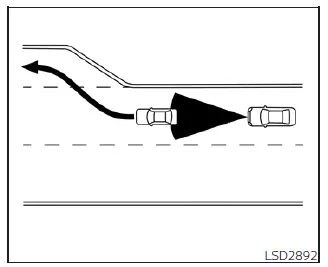
When cruising on the freeway, the Intelligent Cruise Control (ICC) system in your Nissan Leaf actively monitors the road ahead. If you approach a slower-moving vehicle, the system seamlessly adjusts your velocity to maintain the specific following distance you have pre-selected. Should that lead vehicle change lanes or exit the freeway, the ICC system will intelligently accelerate your Nissan Leaf back to your originally set cruising speed. While the system manages this acceleration, you should always remain attentive and prepared to take manual control to ensure smooth vehicle operation as you return to your target speed.
Please note that maintaining a precise set speed may become difficult on winding roads or steep hilly terrain. In such driving environments, the system’s ability to predict the road is limited, and you must be prepared to assume manual control of the accelerator and brake to manage your vehicle speed appropriately.
Under normal operating conditions, the ICC system provides a fluid driving experience by automatically modulating the throttle and brakes to harmonize your speed with the traffic flow, mirroring the movements of the vehicle in front of you.
If you need to accelerate manually for a lane change or an overtaking maneuver, simply depress the accelerator pedal. Conversely, if traffic ahead brakes suddenly or a vehicle cuts into your lane, apply the brake pedal immediately to maintain a safe distance. Vigilance is essential; always stay alert and ready to intervene whenever you are using the ICC system in your Nissan Leaf.
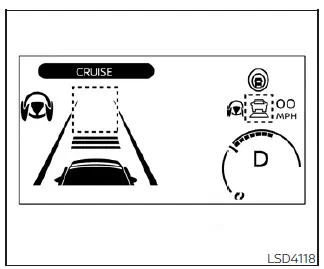
System set display with no vehicle detected ahead
No vehicle detected ahead
When the road ahead is clear, the ICC system functions similarly to a traditional cruise control. You set your desired vehicle speed based on road and traffic conditions, and the system diligently maintains that velocity until a vehicle is detected within your lane.
The currently active set speed is clearly indicated on your instrument cluster for easy reference.
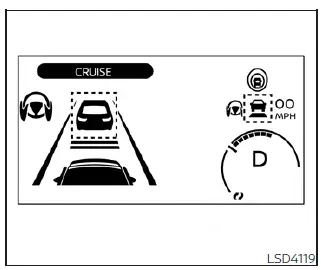
System set display with vehicle ahead
Vehicle detected ahead
As soon as the ICC system identifies a vehicle in your lane, it automatically begins to manage your throttle and braking inputs to match the speed of the vehicle ahead. By actively controlling these inputs, the system ensures that your Nissan Leaf maintains the precise distance gap you have selected, providing a more relaxed and consistent driving experience.
When the ICC system initiates braking, the vehicle’s brake lights will illuminate automatically to alert drivers behind you. Additionally, you may notice a mechanical noise while the system applies the brakes; this is a normal characteristic of the braking hardware and is not indicative of a system malfunction.
When the system has locked onto a lead vehicle, the "vehicle ahead" detection icon will illuminate, and the status indicator for distance control mode will appear as a solid green  .
.
Vehicle ahead stops
In scenarios where the lead vehicle decelerates to a complete stop, your Nissan Leaf will automatically follow suit, bringing your vehicle to a standstill. Once stopped, the system will continue to engage the brakes to keep you in place. While at a standstill, the message "(RES+) Press to start" will appear on your vehicle information display to guide your next action.
If your vehicle is held at a standstill for less than 3 seconds and the lead vehicle begins to pull away, your Nissan Leaf will automatically resume following without any further driver input.
Vehicle ahead accelerates
If your vehicle has been held at a stop for longer than 3 seconds and the vehicle ahead starts to move, you can trigger the system to resume following by either pressing the RES+ switch or gently tapping the accelerator pedal.
Vehicle ahead not detected
Once the lead vehicle has moved out of your lane or is no longer detected, the ICC system will gradually accelerate your Nissan Leaf to return to your previously stored set speed, after which it will maintain that velocity steadily.
When the road ahead clears and no lead vehicle is detected, the vehicle ahead detection indicator will deactivate. Concurrently, the speed control status indicator (maintain speed control mode) will illuminate with a green outline  .
.
In this mode, the ICC system of your Nissan Leaf will gradually accelerate the vehicle back to your previously set target speed. Should you require a more immediate burst of speed—for instance, to complete a maneuver quickly—you retain the ability to depress the accelerator pedal at any time to override the system's automated pace.
Please note that if the lead vehicle is no longer detected and your current speed drops below approximately 15 mph (25 km/h), the ICC system will reach its operational limit and automatically cancel.
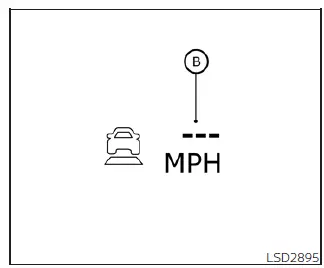
When passing another vehicle, your set speed indicator (B) will flash if your current vehicle speed exceeds the limit you previously programmed into the system. As you clear the space in front of the vehicle you are overtaking, the vehicle ahead detection indicator will turn off to signify that the path is now open.
Once you release the accelerator pedal after a manual burst of speed, the Nissan Leaf will smoothly return to the speed originally set within the ICC system. Even while the ICC is active, remember that you are always in control and can manually depress the accelerator pedal whenever rapid acceleration is necessary for your safety or driving convenience.
Cut-in detection
If another vehicle maneuvers into your traveling lane in close proximity to your Nissan Leaf, the ICC system may alert you to the change by flashing the vehicle ahead detection indicator on your display, helping you maintain awareness of your surroundings.
Approach warning
Should your vehicle close the distance to a lead vehicle too quickly—either because the car ahead has decelerated sharply or another vehicle has cut into your path—the system will provide an approach warning via an audible chime and a visual alert on the ICC display. You must immediately decelerate by applying the brake pedal to restore a safe following distance if:
- The system triggers an audible chime.
- The vehicle ahead detection indicator and set distance indicator begin to blink.
- You personally identify that the distance to the vehicle ahead has become insufficient for safe travel.
Be aware that the warning chime may not sound in every situation where vehicles are in close proximity. Common scenarios where the chime remains silent include:
- When both vehicles are moving at identical speeds and the gap between them remains constant.
- When the vehicle ahead is traveling at a higher speed than your Nissan Leaf, causing the distance between you to widen.
- When a vehicle cuts into your lane at a sufficient distance that does not trigger an immediate threat.
Furthermore, the warning chime will not activate if you are approaching stationary objects, parked cars, or vehicles moving at very low speeds, nor will it sound if you have manually overridden the system by depressing the accelerator pedal.
The approach warning chime may occasionally sound or the display may flash when the radar sensor identifies objects on the shoulder or side of the road. This can lead the ICC system to make minor adjustments to your speed. Such instances occur most frequently on winding, narrow, or hilly roads, or when entering/exiting sharp curves. In these complex environments, you must be prepared to manually control your speed and the distance to vehicles ahead.
Additionally, note that sensor sensitivity can be influenced by your specific driving habits, such as your lane position or steering inputs, as well as the condition of the vehicles in your vicinity (for example, if a lead vehicle has visible body damage or unconventional dimensions).
Acceleration when passing
When your Nissan Leaf is cruising above 44 mph and following a slower vehicle, you can utilize the ICC's passing assist feature. By activating the left turn signal, the ICC system will begin to accelerate your vehicle to help initiate a pass on the left, naturally reducing the distance to the lead vehicle. This feature is exclusive to the left-side turn signal. As you steer into the passing lane, if the sensor detects that the path ahead is clear, the ICC will continue to accelerate until you reach your set speed. If, however, the system detects another vehicle further ahead in the passing lane, it will accelerate only until it matches the speed of that new lead vehicle.
If you do not maneuver your Nissan Leaf into the left lane to execute a pass, the temporary acceleration will cease after a brief period, and the system will smoothly revert to your pre-set following distance. You retain the ability to override or stop this acceleration at any moment by simply depressing the brake pedal or pressing the CANCEL switch located on your steering wheel.
WARNING
To minimize the risk of a collision that could lead to severe injury or fatality, please observe the following critical safety information:
- This acceleration feature is triggered solely by the activation of your left turn signal. It will initiate a brief increase in speed even if you do not perform an actual lane change. Be mindful that this may occur in non-passing scenarios, such as when navigating left-hand highway exits.
- Before initiating any passing maneuver in your Nissan Leaf, you must visually confirm that the adjacent lane is completely clear. Traffic conditions can change in an instant; therefore, you should be prepared for sudden developments while passing.
- Always remain ready to manually steer or apply the brakes whenever conditions dictate.
- Never rely exclusively on the system; your active oversight is essential.
 How to enable/disable the Steering Assist
Steering-wheel mounted control (right): Used for ProPILOT Assist settings and menu navigation.
Vehicle information display: The digital hub for viewing driver ...
 ICC system limitations
WARNING
The following points outline the operational boundaries of the Intelligent Cruise Control (ICC) system. Operating your Nissan Leaf without regard for these limitations can lead to a serio ...
Other materials:
Forward-facing child restraint installation using LATCH
A critical safety limitation applies to the LATCH system: do not utilize the lower anchors if the combined weight of the child and the child restraint exceeds 65 lbs. (29.5 kg). If the total weight surpasses this limit, you must secure the child restraint using the vehicle's standard seat belt syste ...
P1652 starter motor system COMM
Description
ECM controls ON/OFF state of the starter relay, according to the engine and
vehicle condition. Models with no
Intelligent Key System transmit a control signal directly to IPDM E/R. On the
other hand, models with the Intelligent
Key System transmit a control signal to IPDM E/R by w ...
P1610 lock mode
Description
ECM forcibly switches to the mode that inhibits engine start, when engine
start operation is performed 5 times
or more while communication between ECM and BCM is not normal, or when engine
start operation is performed
5 times or more using the unregistered ignition key.
DTC Logic ...
