
Nissan Juke Owners Manual : Eco information
CAUTION
Do not adjust the display controls while driving so that full attention may given to vehicle operation.
The following ECO INFO mode will appear on the display by pushing the ECO information button, then turning the selection dial to scroll through the different screens.
While driving, only one ECO information screen is displayed. The vehicle must be stopped to scroll through the different screens.
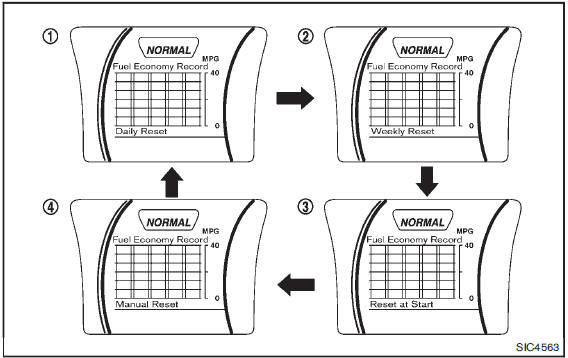
Daily Reset
Records of up to the past 4 days of fuel consumption can be shown on the display.
Weekly Reset
Records of up to the past 4 weeks of each week’s fuel consumption can be shown on the display.
NOTE:
When the clock is not set, the ECO information (daily and weekly) cannot be used.
Reset at Start
Records of up to the past 4 times of each time of ignition switch ON fuel consumption can be shown on the display.
Manual Reset
Records of up to the past 4 times of resetting fuel consumption can be shown on the display.
The displayed ECO INFO can be reset by pushing the ENTER button for longer than 1 second.
 Drive information
While in the Drive mode, push the Drive information button to display elapsed
time, average speed and trip distance. Pressing the Drive information button a second
time will display the G (gravi ...
 Security systems
Your vehicle has two types of security systems, as follows:
• Vehicle security system
• NISSAN Vehicle Immobilizer System
The security condition will be shown by the security indicator light. ...
Other materials:
Headlamp (LO) circuit
Component Function Check
1.CHECK HEADLAMP (LO) OPERATION
CONSULT-III ACTIVE TEST
1. Select “EXTERNAL LAMPS� of IPDM E/R active test item.
2. With operating the test items, check that the headlamp (LO) is turned ON.
Lo : Headlamp (LO) ON
Off : Headlamp (LO) OFF
Is the inspection result nor ...
Measurement of weights
Secure loose items to prevent weight shifts that could affect the balance of
your vehicle. When the vehicle is loaded, drive to a scale and weigh the front and
the rear wheels separately to determine axle loads.
Individual axle loads should not exceed either of the Gross Axle Weight Ratings
( ...
Lubricant
Description
MAINTENANCE OF LUBRICANT LEVEL
The compressor lubricant is circulating in the system together with the
refrigerant. It is necessary to fill compressor
with lubricant when replacing A/C system parts or when a large amount of
refrigerant leakage is
detected. It is important to alwa ...
