
Nissan Juke Service and Repair Manual : Back door opener system
System Diagram
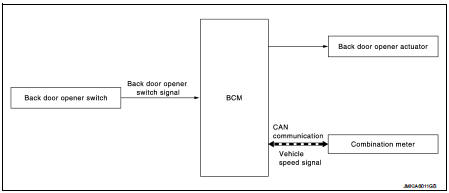
System Description
BACK DOOR OPENER OPERATION
When back door opener switch is pressed, BCM operates back door opener actuator.
NOTE
:
Back door opener actuator is not for locking the back door. The function is only
to open the back door.
OPERATION CONDITION
If the following conditions are satisfied, back door opener operation is performed.

NOTE
:
• When battery terminal is disconnected and reconnected during all doors unlock
state, back door may not
open.
• Regardless of door lock actuator state, BCM resets recognition of all doors unlock state approximately 30 seconds after battery terminal is disconnected and BCM recognizes that all doors are in lock state.
• When battery terminal is reconnected and back door does not open, have BCM recognize that all doors are in unlock state.
 Remote keyless entry system
Remote keyless entry function
REMOTE KEYLESS ENTRY FUNCTION : System Diagram
REMOTE KEYLESS ENTRY FUNCTION : System Description
DOOR LOCK AND UNLOCK OPERATION
• When door lock and unlock butto ...
 Diagnosis system (BCM)
Common item
COMMON ITEM : CONSULT-III Function (BCM - COMMON ITEM)
APPLICATION ITEM
CONSULT-III performs the following functions via CAN communication with BCM.
SYSTEM APPLICATION
BCM can perfo ...
Other materials:
Inside key antenna
Instrument center
INSTRUMENT CENTER : Removal and Installation
REMOVAL
1. Remove the multi display unit. Refer to AV-125, "Removal and
Installation".
2. Remove the inside key antenna (instrument center) (1) mounting
clip (A), and then remove inside key antenna (instrument
center).
...
Wiper and washer system
Wiring Diagram - WIPER AND WASHER SYSTEM -
For connector terminal arrangements, harness layouts, and alphabets in a
(option abbreviation; if not
described in wiring diagram), refer to GI-12, "Connector Information/Explanation
of Option Abbreviation".
...
B2195 anti-scanning
DTC Logic
DTC DETECTION LOGIC
DTC CONFIRMATION PROCEDURE
1.PERFORM DTC CONFIRMATION PROCEDURE
1. Turn ignition switch ON.
2. Check DTC in “Self Diagnostic Result� mode of “BCM� using CONSULT-III.
Is DTC detected?
YES >> Refer to SEC-62, "Diagnosis Procedure".
NO ...
