
Nissan Juke Owners Manual : Rear seats
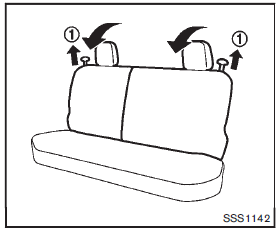
Folding
Before folding the rear seats:
Secure the seat belts on the seat belt hooks on the side wall. (See “Seat belt hooks� .) To fold the seatback, pull the adjusting knob1 .
To return the seatback to the seating position, lift up each seatback and push it to the upright position until it is latched.
CAUTION
When folding or returning the seatback(s) to the upright position, to avoid injury to yourself and others: • Make sure that the seat path is clear before moving the seat.
WARNING
• Do not fold down the rear seats when occupants are in the rear seat area or any objects are on the rear seats.
• Never allow anyone to ride in the cargo area or on the rear seats when they are in the fold-down position. Use of these areas by passengers without proper restraints could result in serious injury in an accident or sudden stop.
• Properly secure all cargo with ropes or straps to help prevent it from sliding or shifting. Do not place cargo higher than the seatbacks. In a sudden stop or collision, unsecured cargo could cause personal injury.
• When returning the seatbacks to the upright position, be certain they are completely secured in the latched position. If they are not completely secured, passengers may be injured in an accident or sudden stop.
 Front seats
Front manual seat adjustment
Forward and backward:
Pull the lever1 up and hold it while you slide the seat forward or backward
to the desired position. Release the lever to lock the seat in posi ...
 Head restraints/Headrests
WARNING
Head restraint/headrest supplement the other vehicle safety systems. They
may provide additional protection against injury in certain rear end collisions.
Adjustable head restraints/headre ...
Other materials:
Back door request switch
Component Function Check
1.CHECK FUNCTION
1. Select “INTELLIGENT KEY� of “BCM� using CONSULT-III.
2. Select “REQ SW-BD/TR� in “DATA MONITOR� mode.
3. Check that the function operates normally according to the following
conditions.
Is the inspection result normal?
YES >&g ...
Back door does not opened
Diagnosis Procedure
1.CHECK BACK DOOR OPENER SWITCH
Check back door opener switch.
Refer to DLK-69, "Component Function Check".
Is the inspection result normal?
YES >> GO TO 2.
NO >> Repair or replace the malfunctioning parts.
2.CHECK BACK DOOR OPENER ACTUATOR
C ...
System
Body control system
BODY CONTROL SYSTEM : System Description
OUTLINE
• BCM (Body Control Module) controls various electrical components.It
receives the information required from
CAN communication and the signals received from each switch and sensor.
• BCM has a combination switch reading ...
