
Nissan Juke Service and Repair Manual : B2627 outside antenna
DTC Logic
DTC DETECTION LOGIC

DTC CONFIRMATION PROCEDURE
1.PERFORM DTC CONFIRMATION PROCEDURE
1. Disconnect outside key antenna (passenger side) connector.
2. Perform “INTELLIGENT KEY� Self Diagnostic Result.
Is outside key antenna DTC detected? YES >> Refer to DLK-63, "Diagnosis Procedure".
NO >> Outside key antenna (passenger side) is O
Diagnosis Procedure
1.CHECK OUTSIDE KEY ANTENNA INPUT SIGNAL 1
1. Turn ignition switch OFF.
2. Check signal between BCM harness connector and ground using oscilloscope.
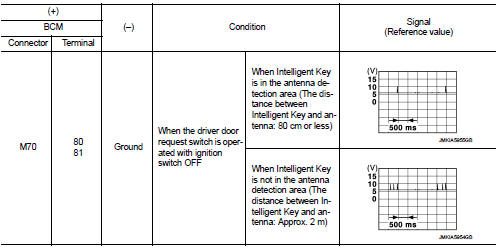
Is the inspection result normal? YES >> Replace BCM. Refer to BCS-93, "Removal and Installation".
NO >> GO TO 2.
2.CHECK OUTSIDE KEY ANTENNA CIRCUIT
1. Disconnect BCM connector and outside key antenna (passenger side) connector.
2. Check continuity between BCM harness connector and outside key antenna (passenger side) harness connector.

3. Check continuity between BCM harness connector and ground.

Is the inspection result normal? YES >> GO TO 3.
NO >> Repair or replace harness.
3.CHECK OUTSIDE KEY ANTENNA INPUT SIGNAL 2
1. Replace outside key antenna (passenger side). (New antenna or other
antenna)
2. Connect BCM connector and outside key antenna (passenger side) connector.
3. Check signal between BCM harness connector and ground using oscilloscope.
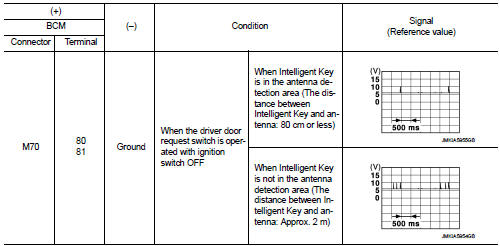
Is the inspection result normal? YES >> Replace outside key antenna (passenger side).
NO >> Replace BCM. Refer to BCS-93, "Removal and Installation".
 B2626 outside antenna
DTC Logic
DTC DETECTION LOGIC
DTC CONFIRMATION PROCEDURE
1.PERFORM DTC CONFIRMATION PROCEDURE
1. Disconnect outside key antenna (driver side) connector.
2. Perform “INTELLIGENT KEY� Self Di ...
 B2628 outside antenna
DTC Logic
DTC DETECTION LOGIC
DTC CONFIRMATION PROCEDURE
1.PERFORM DTC CONFIRMATION PROCEDURE
1. Disconnect outside key antenna (rear bumper) connector.
2. Perform “INTELLIGENT KEY� Self Di ...
Other materials:
Back door request switch
Component Function Check
1.CHECK FUNCTION
1. Select “INTELLIGENT KEY� of “BCM� using CONSULT-III.
2. Select “REQ SW-BD/TR� in “DATA MONITOR� mode.
3. Check that the function operates normally according to the following
conditions.
Is the inspection result normal?
YES >&g ...
Lights
Headlight assembly
Map light
Room light
High-mounted stop light
Rear combination light
Door mirror turn signal light (if so equipped)
Cargo light
License plate light
Fog light (if so equipped)
...
Glass
Use glass cleaner to remove smoke and dust film from the glass surfaces. It is
normal for glass to become coated with a film after the vehicle is parked in the
hot sun. Glass cleaner and a soft cloth will easily remove this film.
CAUTION
When cleaning the inside of the windows, do not use shar ...
