
Nissan Juke Service and Repair Manual : B2623 inside antenna
DTC Logic
DTC DETECTION LOGIC

DTC CONFIRMATION PROCEDURE
1.PERFORM DTC CONFIRMATION PROCEDURE
1. Select “INTELLIGENT KEY� of “BCM� using CONSULT-III.
2. Select “INSIDE ANT DIAGNOSIS� in “WORK SUPPORT� mode.
3. Perform inside key antenna (“INSIDE ANT DIAGNOSIS�) on “WORK SUPPORT� of “INTELLIGENT KEY�.
4. Check BCM for DTC.
Is inside key antenna DTC detected? YES >> Refer to DLK-59, "Diagnosis Procedure".
NO >> Inside key antenna (luggage room) is OK.
Diagnosis Procedure
1.CHECK INSIDE KEY ANTENNA INPUT SIGNAL 1
1. Turn ignition switch ON.
2. Check signal between BCM harness connector and ground using oscilloscope.
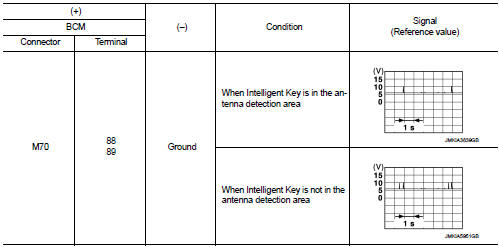
Is the inspection result normal? YES >> Replace BCM. Refer to BCS-93, "Removal and Installation".
NO >> GO TO 2.
2.CHECK INSIDE KEY ANTENNA CIRCUIT
1. Turn ignition switch OFF.
2. Disconnect BCM connector and inside key antenna (luggage room) connector.
3. Check continuity between BCM harness connector and inside key antenna (luggage room) harness connector.

4. Check continuity between BCM harness connector and ground.

Is the inspection result normal? YES >> GO TO 3.
NO >> Repair or replace harness.
3.CHECK INSIDE KEY ANTENNA INPUT SIGNAL 2
1. Replace inside key antenna (luggage room). (New antenna or other
antenna)
2. Connect BCM connector and inside key antenna (luggage room) connector.
3. Turn ignition switch ON.
4. Check signal between BCM harness connector and ground using oscilloscope.
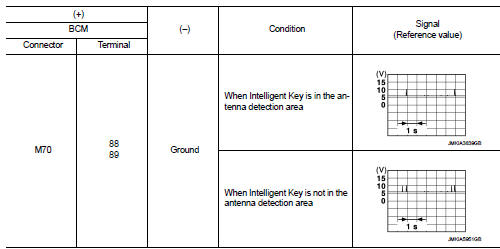
Is the inspection result normal? YES >> Replace inside key antenna (luggage room).
NO >> Replace BCM. Refer to BCS-93, "Removal and Installation".
 B2622 inside antenna
DTC Logic
DTC DETECTION LOGIC
DTC CONFIRMATION PROCEDURE
1.PERFORM DTC CONFIRMATION PROCEDURE
1. Select “INTELLIGENT KEY� of “BCM� using CONSULT-III.
2. Select “INSIDE ANT DIAGNOSIS†...
 B2626 outside antenna
DTC Logic
DTC DETECTION LOGIC
DTC CONFIRMATION PROCEDURE
1.PERFORM DTC CONFIRMATION PROCEDURE
1. Disconnect outside key antenna (driver side) connector.
2. Perform “INTELLIGENT KEY� Self Di ...
Other materials:
Security indicator lamp
Component Function Check
1.CHECK FUNCTION
1. Perform “THEFT IND� in “ACTIVE TEST� mode of “IMMU� of “BCM� using
CONSULT-III.
2. Check security indicator lamp operation.
Is the inspection result normal?
YES >> INSPECTION END
NO >> Go to SEC-159, "Diagnosis P ...
Key switch
Component Function Check
1.CHECK FUNCTION
1. Select “DOOR LOCK� of “BCM� using CONSULT-III.
2. Select “KEY ON SW� in “DATA MONITOR� mode.
3. Check that the function operates normally according to the following
conditions.
Is the inspection result normal?
YES >> Key sw ...
P1212 TCS communication line
Description
This CAN communication line is used to control the smooth engine operation
during the TCS operation. Pulse
signals are exchanged between ECM and “ABS actuator and electric unit (control
unit)�.
Be sure to erase the malfunction information such as DTC not only for “ABS
ac ...
