
Nissan Juke Service and Repair Manual : B2622 inside antenna
DTC Logic
DTC DETECTION LOGIC

DTC CONFIRMATION PROCEDURE
1.PERFORM DTC CONFIRMATION PROCEDURE
1. Select “INTELLIGENT KEY� of “BCM� using CONSULT-III.
2. Select “INSIDE ANT DIAGNOSIS� in “WORK SUPPORT� mode.
3. Perform inside key antenna (“INSIDE ANT DIAGNOSIS�) on “WORK SUPPORT� of “INTELLIGENT KEY�.
4. Check BCM for DTC.
Is inside key antenna DTC detected? YES >> Refer to DLK-57, "Diagnosis Procedure".
NO >> Inside key antenna (console) is OK.
Diagnosis Procedure
1.CHECK INSIDE KEY ANTENNA INPUT SIGNAL 1
1. Turn ignition switch ON.
2. Check signal between BCM harness connector and ground using oscilloscope.
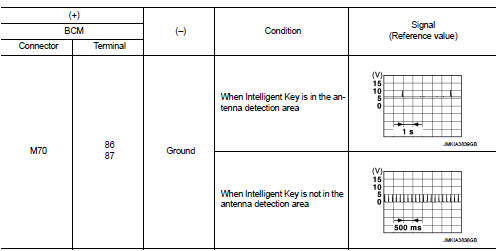
Is the inspection result normal? YES >> Replace BCM. Refer to BCS-93, "Removal and Installation".
NO >> GO TO 2.
2.CHECK INSIDE KEY ANTENNA CIRCUIT
1. Turn ignition switch OFF.
2. Disconnect BCM connector and inside key antenna (console) connector.
3. Check continuity between BCM harness connector and inside key antenna (console) harness connector.

4. Check continuity between BCM harness connector and ground.

Is the inspection result normal? YES >> GO TO 3.
NO >> Repair or replace harness.
3.CHECK INSIDE KEY ANTENNA INPUT SIGNAL 2
1. Replace inside key antenna (console). (New antenna or other antenna) 2. Connect BCM connector and inside key antenna (console) connector.
3. Turn ignition switch ON.
4. Check signal between BCM harness connector and ground using oscilloscope.
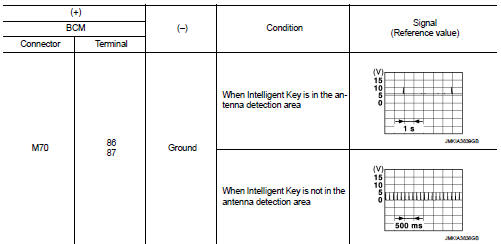
Is the inspection result normal? YES >> Replace inside key antenna (console).
NO >> Replace BCM. Refer to BCS-93, "Removal and Installation".
 B2621 inside antenna
DTC Logic
DTC DETECTION LOGIC
DTC CONFIRMATION PROCEDURE
1.PERFORM DTC CONFIRMATION PROCEDURE
1. Select “INTELLIGENT KEY� of “BCM� using CONSULT-III.
2. Select “INSIDE ANT DIAGNOSIS†...
 B2623 inside antenna
DTC Logic
DTC DETECTION LOGIC
DTC CONFIRMATION PROCEDURE
1.PERFORM DTC CONFIRMATION PROCEDURE
1. Select “INTELLIGENT KEY� of “BCM� using CONSULT-III.
2. Select “INSIDE ANT DIAGNOSIS†...
Other materials:
Take away warning does not operate
Diagnosis Procedure
1.CHECK DTC WITH BCM AND COMBINATION METER
Check that DTC is not detected with BCM and combination meter.
Is the inspection result normal?
YES >> GO TO 2.
NO-1 >> Refer to BCS-67, "DTC Index". (BCM)
NO-2 >> Refer to MWI-36, "DTC Index&qu ...
AWD warning light
The AWD warning light located in the instrument panel illuminates when the ignition
switch is turned to the ON position. It turns off soon after the engine is started.
If any malfunction occurs in the AWD system while the engine is running, or while
driving, the warning light will either rema ...
B2099 ignition relay off stuck
Description
The ignition relay integrated in IPDM E/R is operated with ignition switch ON
signal from the ignition switch.
DTC Logic
DTC DETECTION LOGIC
NOTE:
When IPDM E/R power supply voltage is low (Approx. 7 - 8 V for about 1 second),
the “DTC: B2099� may be detected.
1.PERFORM ...
