
Nissan Juke Service and Repair Manual : Sample/Wiring Diagram -Example-
Each section includes wiring diagrams.
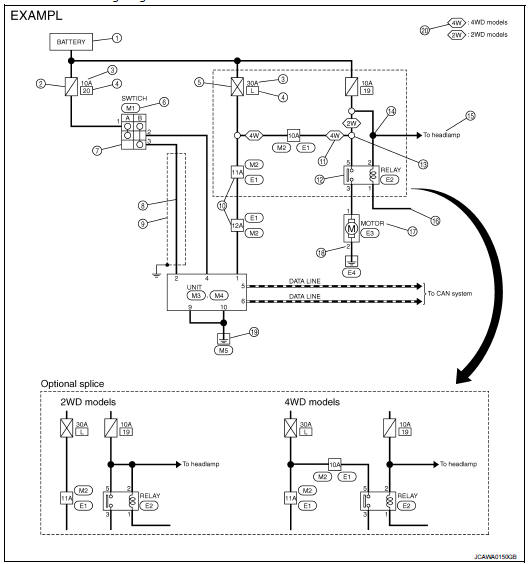
Description
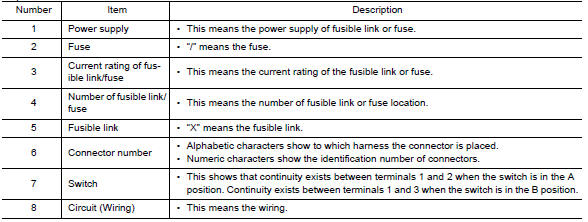
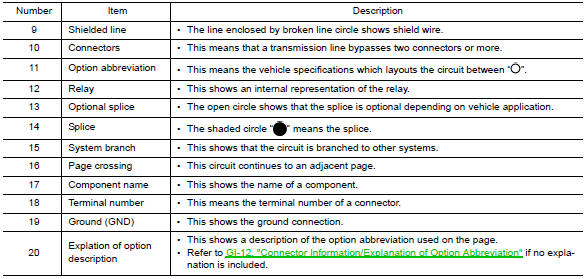
SWITCH POSITIONS
Switches are shown in wiring diagrams as if the vehicle is in the “normal� condition.
A vehicle is in the “normal� condition when: • ignition switch is “OFF�, • doors, hood and trunk lid/back door are closed, • pedals are not depressed, and • parking brake is released.
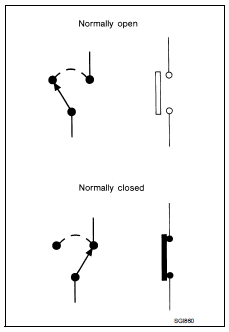
MULTIPLE SWITCH
The continuity of multiple switch is described in two ways as shown below.
• The switch chart is used in schematic diagrams.
• The switch diagram is used in wiring diagrams.

 Connector Symbols
Most of connector symbols in wiring diagrams are shown from the terminal
side.
• Connector symbols shown from the terminal side are enclosed by
a single line and followed by the direction mark ...
 Connector Information/Explanation of Option Abbreviation
CONNECTOR LIST
Connector information and harness layout are described in “POWER SUPPLY,
GROUND & CIRCUIT ELEMENTS�
Section.
EXPLANATION OF OPTION ABBREVIATION
HOW TO USE CONNECTOR IN ...
Other materials:
Service information for electrical incident
Work Flow
WORK FLOW
Control Units and Electrical Parts
PRECAUTIONS
• Never reverse polarity of battery terminals.
• Install only parts specified for a vehicle.
• Before replacing the control unit, check the input and output and functions of
the component parts.
• Do not apply ex ...
System
WITH AUTO A/C
WITH AUTO A/C : System Diagram
WITH AUTO A/C : System Description
OPERATION DESCRIPTION
• BCM detects that the rear window defogger switch turns ON when the ignition
switch is ON, and then transmits
the rear window defogger switch signal to IPDM E/R via CAN communication for ...
If your vehicle overheats
CAUTION
• Do not continue to drive if your vehicle overheats. Doing so could cause
engine damage or a vehicle fire.
• To avoid the danger of being scalded, never remove the radiator cap while the
engine is still hot.
When the radiator cap is removed, pressurized hot water will spurt out, ...
