
Nissan Juke Service and Repair Manual : B210B starter control relay
DTC Logic
DTC DETECTION LOGIC
NOTE
:
If DTC B210B is displayed with DTC U1000, first perform the trouble diagnosis
for DTC U1000. Refer to PCS-
30, "DTC Logic".
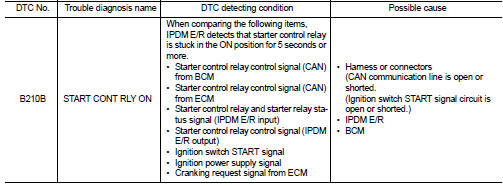
DTC CONFIRMATION PROCEDURE
1.PERFORM DTC CONFIRMATION PROCEDURE
1. Press push-button ignition switch under the following conditions to start engine, and wait 5 seconds or more.
- Selector lever: In the P position - Brake pedal: Depressed 2. Check DTC in “Self Diagnostic Result� mode of “IPDM E/R� using CONSULT-III.
Is DTC detected? YES >> Go to SEC-213, "Diagnosis Procedure".
NO >> GO TO 2.
2.PERFORM DTC CONFIRMATION PROCEDURE 2
1. Stop engine.
2. Perform DTC CONFIRMATION PROCEDURE for DTC P1650. Refer to EC-366, "DTC Logic" (MR16DDT) or EC-725, "DTC Logic" (HR16DE).
3. Turn ignition switch ON.
4. Check DTC in “Self Diagnostic Result� mode of “IPDM E/R� using CONSULT-III.
Is DTC detected? YES >> Refer to SEC-213, "Diagnosis Procedure".
NO >> INSPECTION EN
Diagnosis Procedure
1.INSPECTION START
Perform inspection in accordance with procedure that confirms DTC.
Which procedure confirms DTC? DTC confirmation procedure 1>>GO TO 2.
DTC confirmation procedure 2>>GO TO 5.
2.CHECK DTC OF BCM
Check DTC in “Self Diagnostic Result� mode of “BCM� using CONSULT-III.
Is DTC detected?
YES >> Perform the trouble diagnosis related to the detected DTC. Refer to BCS-67, "DTC Index".
NO >> GO TO 3.
3.CHECK IGNITION SWITCH START SIGNAL
1. Turn ignition switch OFF.
2. Disconnect IPDM E/R harness connector.
3. Check voltage between IPDM E/R harness connector and ground.

Is the inspection result normal? YES >> GO TO 4.
NO >> Repair or replace harness. Refer to STR-12, "CVT : Wiring Diagram".
4.PERFORM DTC CONFIRMATION PROCEDURE AGAIN
1. Reconnect IPDM E/R harness connector.
2. Turn ignition switch ON.
3. Select “Self Diagnostic Result� mode of “IPDM E/R� using CONSULT-III.
4. Touch “ERASE�.
5. Perform DTC CONFIRMATION PROCEDURE for DTC B210B. Refer to SEC-213, "DTC Logic".
Is DTC detected? YES >> Replace IPDM E/R. Refer to PCS-63, "Removal and Installation".
NO >> INSPECTION END
5.PERFORM DTC CONFIRMATION PROCEDURE AGAIN
1. Turn ignition switch ON.
2. Select “Self Diagnostic Result� mode of “IPDM E/R� using CONSULT-III.
3. Touch “ERASE�.
4. Perform DTC CONFIRMATION PROCEDURE for DTC B210B. Refer to SEC-213, "DTC Logic".
Is DTC detected? YES >> Replace IPDM E/R. Refer to PCS-63, "Removal and Installation".
NO >> INSPECTION END
 B20A0 cranking request circuit
DTC Logic
DTC DETECTION LOGIC
NOTE:
If DTC B20A0 is displayed with DTC U1000, first perform the trouble diagnosis
for DTC U1000. Refer to PCS-
59, "DTC Logic".
DTC CONFIRMATION PROC ...
 B210C starter control relay
DTC Logic
DTC DETECTION LOGIC
NOTE:
• If DTC B210C is displayed with DTC U1000, first perform the trouble diagnosis
for DTC U1000. Refer to
PCS-30, "DTC Logic".
• When IPDM E/R po ...
Other materials:
P1652 starter motor system COMM
Description
ECM controls ON/OFF state of the starter relay, according to the engine and
vehicle condition. Models with no
Intelligent Key System transmit a control signal directly to IPDM E/R. On the
other hand, models with the Intelligent
Key System transmit a control signal to IPDM E/R by w ...
AEB with Pedestrian Detection system operation
Vehicle ahead detection indicator
AEB with Pedestrian Detection emergency warning indicator
AEB with Pedestrian Detection system warning light
The Automatic Emergency Braking (AEB) with Pedestrian Detection system in your Nissan Leaf is en ...
LAN System can system (type 7)
DTC/CIRCUIT DIAGNOSIS
Main line between IPDM-E and DLC circuit
Diagnosis Procedure
1.CHECK CONNECTOR
1. Turn the ignition switch OFF.
2. Disconnect the battery cable from the negative terminal.
3. Check the following terminals and connectors for damage, bend and loose
connection (connector s ...
