
Nissan Leaf 2018-2025 (ZE1) Owner's Manual : AEB with Pedestrian Detection system operation
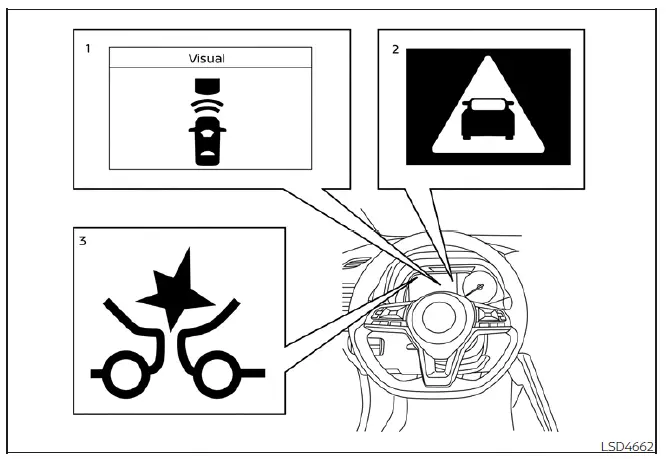
- Vehicle ahead detection indicator
- AEB with Pedestrian Detection emergency warning indicator
- AEB with Pedestrian Detection system warning light
The Automatic Emergency Braking (AEB) with Pedestrian Detection system in your Nissan Leaf is engineered to provide proactive safety support. It functions at speeds starting from approximately 3 mph (5 km/h). Specifically, the pedestrian detection capability is active when the vehicle is traveling between 6 - 37 mph (10 - 60 km/h).
When the system detects a potential risk of a forward collision with a vehicle, it initiates a two-stage warning process. Initially, it alerts the driver by flashing the vehicle ahead detection indicator accompanied by an audible chime, while simultaneously applying partial braking to reduce speed. If you apply the brakes quickly and forcefully, but the system determines that the risk of collision remains, it will automatically supplement your braking efforts by increasing the overall braking force.
Should the risk of collision become imminent and you do not take corrective action, the AEB with Pedestrian Detection system issues a secondary, more urgent warning. This includes flashing the red emergency warning indicator, emitting a continuous audible alert, and automatically applying maximum braking pressure to mitigate or avoid the impact.
When the system detects a potential forward impact with a pedestrian, it follows a similar rigorous safety protocol. It immediately alerts you via the flashing red emergency warning indicator and an audible chime, while applying partial braking. If you attempt to brake manually but the system identifies that a high risk of impact persists, it will instantly increase the braking force. In instances where a collision is deemed imminent and you fail to respond, the system will automatically engage hard, emergency-level braking to protect the pedestrian.
Note: The Nissan Leaf brake lights will illuminate automatically whenever the system triggers any level of braking intervention.
Depending on variables such as your current speed, the proximity to the vehicle or pedestrian, and existing road conditions, this system serves to either prevent a frontal collision entirely or significantly reduce the severity of impact if a collision is unavoidable.
The system is designed to prioritize driver input; therefore, if you are actively steering, accelerating, or braking, the AEB with Pedestrian Detection system may delay its intervention or remain in standby mode to prevent conflict with your manual controls.
Automatic braking will be interrupted or canceled if the system detects the following:
- You initiate a steering maneuver to steer away from the obstacle.
- You depress the accelerator pedal, signaling an intent to maintain or increase speed.
- The vehicle or pedestrian is no longer detected in your forward path.
If the AEB with Pedestrian Detection system has brought your Nissan Leaf to a complete stop, the vehicle will remain held in a stationary position for approximately 2 seconds before the system releases the brakes.
Turning the AEB with Pedestrian Detection system on/off
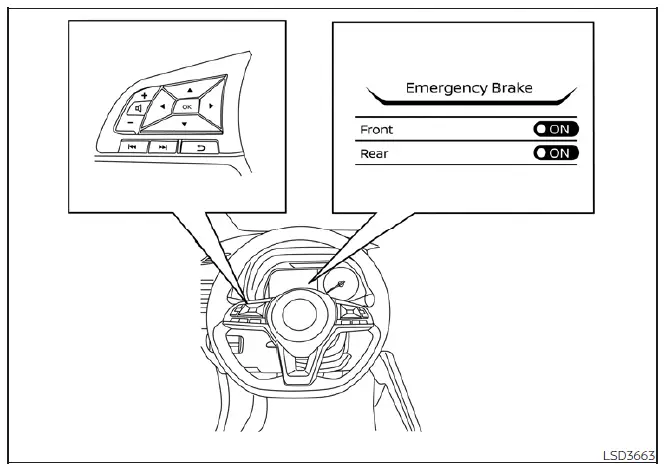
You can manage the status of the AEB with Pedestrian Detection system through the vehicle information display settings:
1. Press the  button until the "Settings" menu appears on the display. Using the
  buttons, navigate to "Driver Assistance," then confirm your selection by pressing the OK button.
2. Select the "Emergency Brake" menu option and press the OK button.
3. Select "Front" and use the OK button to toggle the system status between ON and OFF.
When the system is successfully deactivated, the AEB with Pedestrian Detection system warning light will illuminate to inform you that the feature is inactive.
Note: For maximum safety, the AEB with Pedestrian Detection system in your Nissan Leaf is designed to default to the ON position every time the EV system is restarted.
 Automatic Emergency Braking (AEB) with Pedestrian Detection
WARNING
Failure to strictly adhere to the safety warnings and operational guidelines for the Automatic Emergency Braking (AEB) with Pedestrian Detection system could result in a collision, leadin ...
 AEB with Pedestrian Detection system limitations
WARNING
The following section details the inherent operational limitations of the Automatic Emergency Braking (AEB) with Pedestrian Detection system. Failure to remain fully engaged as the driver ...
Other materials:
Rear wiper arm
Exploded View
1. Rear wiper motor
2. Rear wiper blade
3. Rear wiper arm
4. Rear wiper arm cover
5. Rear wiper pivot seal
A : Model for cold areas
: Pawl
: N·m (kg-m, in-lb)
: N·m (kg-m, ft-lb)
Removal and Installation
REMOVAL
1. Operate rear wiper to the auto stop position.
2. Re ...
Blower fan resistor
Exploded View
1. A/C unit assembly
2. Blower fan resistor*1
3. Sub harness*1
4. Power transistor*2
5. Sub harness*2
6. Blower motor
• *1: Manual air conditioner
• *2: Automatic air conditioner
Removal and Installation
REMOVAL
1. Remove instrument panel assembly. Refer to IP-13, ...
TCM branch line circuit
Diagnosis Procedure
1.CHECK CONNECTOR
1. Turn the ignition switch OFF.
2. Disconnect the battery cable from the negative terminal.
3. Check the following terminals and connectors for damage, bend and loose
connection (unit side and connector
side).
- TCM
- Harness connecotor F1
- Harness ...
