
Nissan Juke Service and Repair Manual : B2108 steering lock relay
DTC Logic
DTC DETECTION LOGIC
NOTE
:
If DTC B2108 is displayed with DTC U1000, first perform the trouble diagnosis
for DTC U1000. Refer to PCS-
30, "DTC Logic".

DTC CONFIRMATION PROCEDURE
1.PERFORM DTC CONFIRMATION PROCEDURE
1. Press push-button ignition switch under the following conditions and wait 1 second or more.
- Selector lever: In the P position - Brake pedal: Not depressed 2. Check DTC in “Self Diagnostic Result� mode of “IPDM E/R� using CONSULT-III.
Is DTC detected? YES >> Go to SEC-138, "Diagnosis Procedure".
NO >> INSPECTION END
Diagnosis Procedure
1.CHECK STEERING LOCK RELAY
Check voltage between IPDM E/R harness connector and ground.
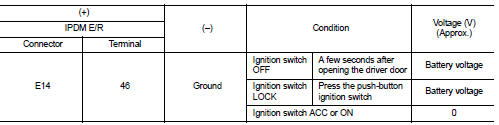
Is the inspection result normal? YES >> GO TO 2.
NO >> Replace IPDM E/R. Refer to PCS-34, "Removal and Installation".
2.CHECK INTERMITTENT INCIDENT
Refer to GI-42, "Intermittent Incident".
>> INSPECTION END
 B20A0 cranking request circuit
DTC Logic
DTC DETECTION LOGIC
NOTE:
If DTC B20A0 is displayed with DTC U1000, first perform the trouble diagnosis
for DTC U1000. Refer to PCS-
30, "DTC Logic".
DTC CONFIRMATION PROC ...
 B2109 steering lock relay
DTC Logic
DTC DETECTION LOGIC
NOTE:
• If DTC B2109 is displayed with DTC U1000, first perform the trouble diagnosis
for DTC U1000. Refer to
PCS-30, "DTC Logic".
• When IPDM E/R po ...
Other materials:
ESP off indicator lamp
Component Function Check
1.CHECK ESP OFF INDICATOR LAMP FUNCTION (1)
Check that ESP OFF indicator lamp in combination meter turns ON for approx. 1
second after ignition switch is
turned ON.
CAUTION:
Never start engine.
Is the inspection result normal?
YES >> GO TO 2.
NO >> ...
Precaution for Liquid Gasket
REMOVAL OF LIQUID GASKET
• After removing the mounting bolts and nuts, separate the mating
surface using a seal cutter and remove the liquid gasket.
CAUTION:
Be careful not to damage the mating surfaces.
• In areas where the cutter is difficult to use, use a plastic hammer to
lightly tap ...
Service data and specifications (SDS)
DRIVE BELT (MR16DDT)
DRIVE BELT (MR16DDT) : Drive Belt
DRIVE BELT
DRIVE BELT (HR16DE)
DRIVE BELT (HR16DE) : Drive Belt
DRIVE BELT
Belt Deflection
*: When engine is cold.
Belt Tension and Frequency
*: When engine is cold.
DRIVE BELT (K9K)
DRIVE BELT (K9K) : Drive Belt
DRIVE BELT ...
