
Nissan Juke Service and Repair Manual : A/C on signal
Component Function Check
1.CHECK A/C ON SIGNAL
 With CONSULT-III
1. Turn ignition switch ON.
2. Operate blower motor.
3. Select “AIR CONDITIONER� of “BCM� using CONSULT-III.
4. Select “AIR COND SW� in “DATA MONITOR� mode.
5. Check A/C ON signal when the A/C switch is operated.
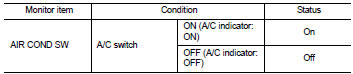
Is the inspection result normal? YES >> INSPECTION END
NO >> Refer to HAC-75, "Diagnosis Procedure".
Diagnosis Procedure
1.CHECK A/C ON SIGNAL
1. Turn ignition switch OFF.
2. Disconnect A/C auto amp. connector.
3. Turn ignition switch ON.
4. Check output waveform between A/C auto amp. harness connector and ground with using oscilloscope
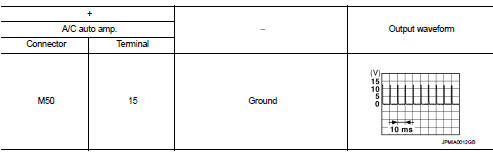
Is the inspection result normal? YES >> Replace A/C auto amp. Refer to HAC-91, "Removal and Installation".
NO >> GO TO 2.
2.CHECK A/C ON SIGNAL CIRCUIT FOR OPEN
1. Turn ignition switch OFF.
2. Disconnect BCM connector.
3. Check continuity between A/C auto amp. harness connector and BCM harness connector.
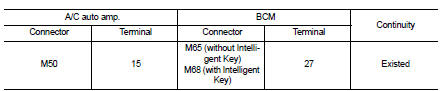
Is the inspection result normal? YES >> GO TO 3.
NO >> Repair harness or connector.
3.CHECK A/C ON SIGNAL CIRCUIT FOR SHORT
Check continuity between A/C auto amp. harness connector and ground.

Is the inspection result normal? YES >> Replace BCM. Refer to BCS-93, "Removal and Installation" (with Intelligent Key) or BCS-161, "Removal and Installation" (without Intelligent Key).
NO >> Repair harness or connector.
 Power supply and ground circuit
A/C auto AMP. : Diagnosis Procedure
1.CHECK SYMPTOM
Check symptom (A or B).
Which symptom is detected?
A >> GO TO 2.
B >> GO TO 5.
2.CHECK FUSE
1. Turn ignition switch OFF.
2 ...
 Blower fan on signal
Component Function Check
1.CHECK BLOWER FAN ON SIGNAL
With CONSULT-III
1. Turn ignition switch ON.
2. Select “AIR CONDITIONER� of “BCM� using CONSULT-III.
3. Select “FAN ON SIG� in †...
Other materials:
Parking brake shoe
Adjustment
1. Adjust parking brake lever stroke. Refer to PB-2, "Inspection and
Adjustment".
2. Perform parking brake break-in (drag on) operation by driving vehicle under
the following conditions:
• Drive forward
• Vehicle speed: Approx. 43 km/h (27 MPH) set (constant and forw ...
Intelligent key
Component Function Check
1.CHECK FUNCTION
1. Select “INTELLIGENT KEY� of “BCM� using CONSULT-III.
2. Select “RKE OPE COUN1� in “DATA MONITOR� mode.
3. Check that the function operates normally according to the following
conditions.
Is the inspection result normal?
YES >& ...
Precaution Necessary for Steering Wheel Rotation after Battery Disconnect
NOTE:
• Before removing and installing any control units, first turn the ignition
switch to the LOCK position, then disconnect
both battery cables.
• After finishing work, confirm that all control unit connectors are connected
properly, then re-connect both
battery cables.
• Always us ...
