
Nissan Juke Service and Repair Manual : Water pump
Exploded View
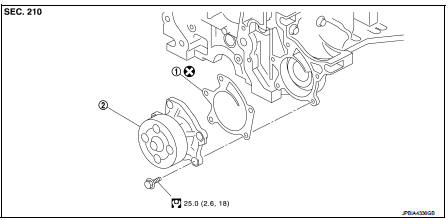
1. Gasket
2. Water pump
 : N·m (kg-m, ft-lb)
 : Always replace after every
disassembly.
Removal and Installation
REMOVAL
1. Drain engine coolant from radiator. Refer to CO-11, "Draining".
CAUTION:
• Perform this step when the engine is cold.
• Never spill engine coolant on drive belt.
2. Steer front wheel to the right.
3. Remove front fender protector (RH). Refer to EXT-22, "Exploded View".
4. Remove drive belt. Refer to EM-155, "Removal and Installation".
5. Remove water pump.
• Engine coolant will leak from cylinder block, so have a receptacle ready below.
CAUTION:
• Handle water pump vane so that it does not contact any other parts.
• Water pump cannot be disassembled and should be replaced as a unit.
INSTALLATION
Install in the reverse order of removal.
Inspection
INSPECTION AFTER REMOVAL
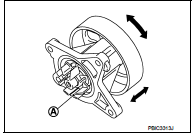
• Check visually that there is no significant dirt or rusting on water pump body and vane (A).
• Check that there is no looseness in vane shaft, and that it turns smoothly when rotated by hand.
• Replace water pump, if necessary.
INSPECTION AFTER INSTALLATION
• Check for leakage of engine coolant using the radiator cap tester adapter (commercial service tool) and the radiator cap tester (commercial service tool). Refer to CO-11, "Inspection".
• Start and warm up the engine. Check visually that there is no leakage of engine coolant.
 Cooling fan
Exploded View
1. Fan motor
2. Fan shroud
3. Cooling fan
A. Apply on fan motor shaft
: N·m (kg-m, in-lb)
: Apply genuine high strength thread
locking sealant or equivalent.
Removal and In ...
 Thermostat
Exploded View
1. Thermostat housing
2. Gasket
3. Rubber ring
4. Thermostat
5. Water inlet
6. Clamp
7. Radiator hose (upper)
A. To radiator
Engine front
: N·m (kg-m, ft-lb)
: Always ...
Other materials:
Intelligent Lane Intervention (I-LI)
WARNING
Failure to strictly follow the safety warnings and operational instructions for the proper use of the I-LI system could result in an unintended vehicle path, loss of control, and subsequent serious injury or death.
The I-LI system is a driver-assist ...
Charge air cooler
Exploded View
1. Air inlet hose
2. Clamp
3. Air inlet tube
4. Air inlet hose
5. Charge air cooler
6. Air inlet hose
7. Air inlet tube
8. Turbocharger
9. Air inlet tube assembly
A. 1st step: 5.0 N·m (0.51 kg-m, 44 ft-lb)
2nd step: 7.0 N·m (0.71 kg-m, 62 ftlb)
B. Paint mark
C. ...
How to switch the display
With the primary power switch sitting in the active ON position, you can easily activate the system by pressing the physical hardware CAMERA button on the console bezel or by moving the electronic shift selector lever into the R (Reverse) position to automatically operate the Intelligent Around View ...
