
Nissan Juke Service and Repair Manual : Washer pump
Exploded View
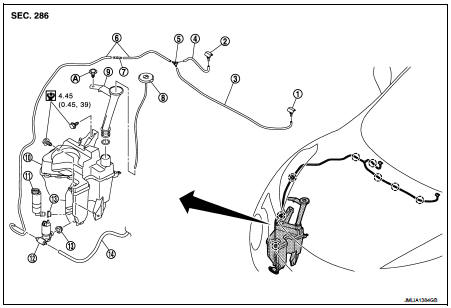
1. Front washer nozzle LH
2. Front washer nozzle RH
3. Front washer tube LH
4. Front washer tube RH
5. Check valve
6. Front washer tube
7. Joint
8. Washer tank inlet cap
9. Washer tank inlet
10. Washer tank
11. Headlamp washer pump
12. Washer pump
13. Packing
14. Rear washer tube
A : Clip
 : Clip
 : N·m (kg·m, in-lb
Removal and Installation
REMOVAL
1. Remove fender protector RH (front). Refer to EXT-22, "Removal and Installation".
2. Disconnect washer pump connector.
3. Disconnect front washer tube and rear washer tube.
4. Remove washer pump from the washer tank.
5. Remove packing from washer tank.
INSTALLATION
Note the following items, and then install in the reverse order of removal.
CAUTION:
• Check that there is no leakage after installation or replace packing with new
part if it has been damage.
• Never twist the packing when installing the washer pump.
 Washer tank
Exploded View
1. Front washer nozzle LH
2. Front washer nozzle RH
3. Front washer tube LH
4. Front washer tube RH
5. Check valve
6. Front washer tube
7. Joint
8. Washer tank inlet cap
...
 Headlamp washer pump
Exploded View
1. Front washer nozzle LH
2. Front washer nozzle RH
3. Front washer tube LH
4. Front washer tube RH
5. Check valve
6. Front washer tube
7. Joint
8. Washer tank inlet cap
...
Other materials:
Microphone signal circuit
Description
Power is supplied from audio unit to microphone. The microphone transmits the
sound voice to the audio unit.
Diagnosis Procedure
1.CHECK CONTINUITY BETWEEN AUDIO UNIT AND MICROPHONE CIRCUIT
1. Turn ignition switch OFF.
2. Disconnect audio unit connector and microphone connector.
...
Diagnosis system (IPDM E/R)
Consult-III Function (IPDM E/R)
APPLICATION ITEM
CONSULT-III performs the following functions via CAN communication with IPDM
E/R.
SELF DIAGNOSTIC RESULT
Refer to PCS-25, "DTC Index".
DATA MONITOR
Monitor item
ACTIVE TEST
Test item
...
Electric ignition system
Electric ignition system : System Diagram
Electric ignition system : System Description
INPUT/OUTPUT SIGNAL CHART
*1: CVT models
*2: M/T models
*3: ECM determines the start signal status by the signals of engine speed and
battery voltage.
SYSTEM DESCRIPTION
Firing order: 1 ...
