
Nissan Juke Service and Repair Manual : Headlamp washer pump
Exploded View
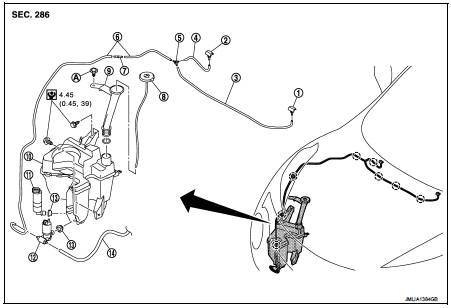
1. Front washer nozzle LH
2. Front washer nozzle RH
3. Front washer tube LH
4. Front washer tube RH
5. Check valve
6. Front washer tube
7. Joint
8. Washer tank inlet cap
9. Washer tank inlet
10. Washer tank
11. Headlamp washer pump
12. Washer pump
13. Packing
14. Rear washer tube
A : Clip
 : Clip
 : N·m (kg·m, in-lb)
Removal and Installation
REMOVAL
1. Remove fender protector RH (front). Refer to EXT-22, "Removal and Installation".
2. Disconnect headlamp washer pump connector.
3. Disconnect headlamp washer tube joint.
4. Remove headlamp washer pump from the washer tank.
5. Remove the packing from the washer tank.
INSTALLATION
Note the following items, and then install in the reverse order of removal.
CAUTION:
• Check that there is no leakage after installation or replace packing with new
part if it has been damage.
• Never twist the packing when installing the headlamp washer pump.
 Washer pump
Exploded View
1. Front washer nozzle LH
2. Front washer nozzle RH
3. Front washer tube LH
4. Front washer tube RH
5. Check valve
6. Front washer tube
7. Joint
8. Washer tank inlet cap
...
 Washer level switch
Removal and Installation
The washer level switch must be replaced together with the washer tank as an
assembly. Refer to WW-67,
"Removal and Installation". ...
Other materials:
P0963 pressure control solenoid A
DTC Logic
DTC DETECTION LOGIC
DTC CONFIRMATION PROCEDURE
1.PREPARATION BEFORE WORK
If another "DTC CONFIRMATION PROCEDURE" occurs just before, turn ignition
switch OFF and wait for at
least 10 seconds, then perform the next test.
>> GO TO 2.
2.CHECK DTC DETECTION
1. S ...
P0744 torque converter
Description
This malfunction is detected when the torque converter clutch does not
lock-up as instructed by the TCM. This
is not only caused by electrical malfunction (circuits open or shorted), but
also by mechanical malfunction such
as control valve sticking, improper solenoid valve operati ...
ECU diagnosis information
IPDM E/R
Reference Value
VALUES ON THE DIAGNOSIS TOOL
TERMINAL LAYOUT
PHYSICAL VALUES
*1: MR16DDT engine models
*2: Except MR16DDT engine models
*3: CVT models
*4: M/T models
*5: With daytime running light system
*6: Without daytime running light system
*7: K9K engine mo ...
