
Nissan Leaf 2018-2025 (ZE1) Owner's Manual : Vehicle-to-vehicle distance control mode limitations
WARNING
Below are the critical operational limitations for the Intelligent Cruise Control (ICC) system in your Nissan Leaf. Operating the vehicle without strict adherence to these guidelines could result in a loss of control, leading to serious injury or death.
- The ICC system is engineered specifically for use on dry, straight, open roads with light to moderate traffic flow. It is strongly advised against using the system in dense city traffic, heavy urban congestion, or unpredictable driving environments.
- The ICC system does not possess the capability to automatically adapt to changing road surface conditions. It is designed for steady-state, evenly flowing traffic. Do not engage the system on roads featuring sharp curves, or when surfaces are compromised by ice, deep snow, heavy rainfall, or dense fog.
- Due to the inherent performance limits of radar-based distance control, you must never rely exclusively on the ICC system. This technology cannot compensate for careless, distracted, or inattentive driving, nor can it overcome the physical limitations imposed by low visibility during severe weather. Always be prepared to decelerate by manually depressing the brake pedal, adjusting your speed based on the actual distance to the vehicle ahead and prevailing environmental conditions to ensure a safe following gap.
- Should the vehicle ahead come to a complete stop, the ICC system will decelerate your Nissan Leaf to a standstill within its operational parameters.
Once the system detects that your vehicle has reached a full stop, it will disengage, sound a warning chime, and cease speed control. To ensure your vehicle remains stationary, you must immediately and firmly depress the brake pedal.
- Maintain constant situational awareness. You must be ready to manually override the system to establish a proper following distance. The ICC system may occasionally fail to maintain your selected distance or set speed depending on unique traffic dynamics or environmental factors.
- The radar sensor may fail to detect lead vehicles under specific road or weather circumstances. To prevent potential collisions, never use the ICC system under the following conditions:
- On roads with heavy traffic congestion or sharp, twisting curves.
- On surfaces with compromised traction, such as ice, packed snow, or loose gravel.
- During adverse weather events, including heavy rain, thick fog, or blizzard conditions.
- When the front bumper area around the distance sensor is obstructed by mud, ice, snow, or road grime.
- On steep downhill grades (where the Nissan Leaf may exceed the set speed, potentially leading to brake overheating from excessive automatic braking).
- On roads characterized by frequent, undulating uphill and downhill gradients.
- When traffic flow is erratic, making it impossible to maintain a consistent interval due to constant acceleration and deceleration.
- In the presence of significant electromagnetic interference from other radar-emitting sources.
- In complex traffic scenarios, objects or other vehicles may unexpectedly enter the radar's detection zone, potentially triggering abrupt automatic braking. Always stay alert and avoid engaging the ICC system in any environment or condition described in this warning section.
The radar sensor utilized by your Nissan Leaf will typically not detect the following types of objects:
- Stationary vehicles or objects, as well as very slow-moving traffic.
- Pedestrians, cyclists, or debris currently in the roadway.
- Oncoming traffic traveling in the opposing lane.
- Motorcycles that are positioned off-center within the travel lane.
The sensor functions by analyzing signals reflected from the vehicle ahead. Consequently, if the sensor cannot receive a clear reflection from the lead vehicle, the ICC system will be unable to maintain your selected following distance.
The following conditions may further hinder the sensor's ability to accurately detect a lead vehicle, potentially leading to improper system operation:
- When high volumes of road spray, heavy snow, or debris kicked up by other vehicles degrade the sensor's clarity.
- When your Nissan Leaf is loaded with excessively heavy baggage in the rear seating area or cargo compartment, which may alter the vehicle's pitch and affect the radar's alignment.
The Intelligent Cruise Control (ICC) system in your Nissan Leaf is engineered to continuously monitor the health and performance of its own radar sensor within established operational parameters.
Should the sensor become obscured by mud, road grime, or other physical obstructions, the system will automatically deactivate to ensure safety. However, please be aware that if the sensor is covered by thin layers of ice, or if it is masked by materials such as a transparent or translucent vinyl bag, the ICC system may fail to detect the interference.
In such scenarios, the distance control mode might not cancel as expected, potentially resulting in the system failing to maintain a safe following distance from the vehicle ahead. To ensure optimal reliability, make it a habit to regularly inspect and clean the radar sensor area on your Nissan Leaf.
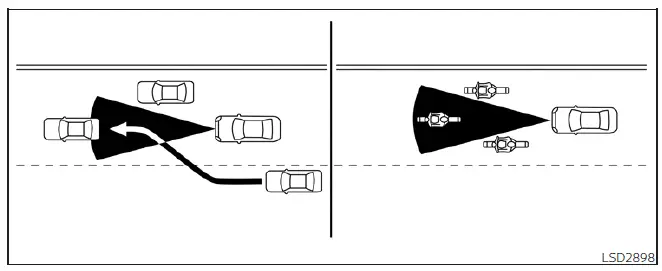
The radar sensor has a defined detection zone with specific spatial limits. For the ICC to function correctly and maintain your chosen following distance, a lead vehicle must remain within this active detection field.
Be aware that a vehicle ahead may drift out of the radar's detection zone due to its positioning within the lane. Motorcycles, for instance, may go undetected if they are traveling off-center. Similarly, a vehicle merging into your lane may not be recognized by your Nissan Leaf until it has fully completed its lane change and is centered in front of your radar.
If these conditions arise, the Nissan Leaf ICC system may alert you by flashing the system indicator and emitting an audible chime. In such moments, you must immediately assume manual control to maintain a safe and appropriate distance from the traffic ahead.
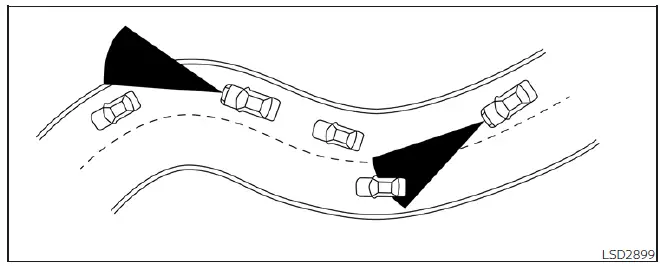
When navigating winding, hilly, curved, or narrow roads, as well as zones marked by construction, the ICC sensor may erroneously detect vehicles in adjacent lanes or temporarily lose track of the vehicle directly ahead. This fluctuation in detection can cause the ICC system to trigger unexpected deceleration or acceleration.
System performance can also be influenced by your own driving inputs, such as sharp steering maneuvers, lane positioning, or the physical condition of your Nissan Leaf.
Should you experience unexpected system behavior, such as the system indicator blinking or a sudden warning chime, you must be prepared to manually intervene and manage the distance between your vehicle and the traffic ahead.
System temporarily unavailable
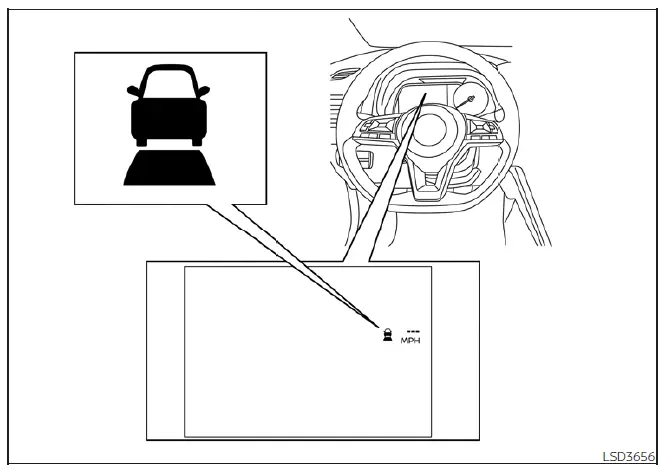
There are specific operational environments where the ICC system in your Nissan Leaf may become temporarily unavailable.
During these intervals, the system may automatically cancel, rendering it unable to maintain your previously selected following distance.
Condition A
The ICC system will automatically disengage under the following conditions. In these cases, a chime will sound to notify you, and the system will prevent you from setting a new cruising speed until the conditions are cleared:
- When the Vehicle Dynamic Control (VDC) system is manually turned off.
- When the VDC system is actively intervening to maintain traction.
- When a vehicle ahead is not detected and your current speed is below 15 mph (24 km/h).
- When the system determines that the lead vehicle or your Nissan Leaf has reached a complete standstill.
- When the gear selector is positioned outside of D (Drive) or B mode.
- When the electronic parking brake is engaged.
- When the vehicle detects significant wheel slippage.
- When the radar signal transmission experiences a temporary interruption.
Action to take
Once the circumstances that triggered the system cancellation are no longer present, you must first deactivate the system using the steering wheel ICC switch. After a brief moment, press the ICC switch again to reactivate the Intelligent Cruise Control system in your Nissan Leaf and resume normal operation.
Condition B
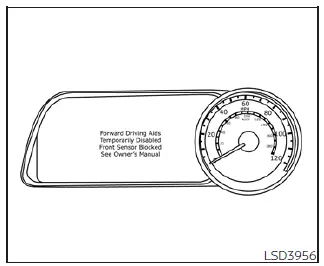
In cases of severe inclement weather—such as heavy rain, dense fog, or thick snow—that obstructs the front radar sensor, the ICC system will automatically disengage. You will hear an audible chime, and the "Forward Driving Aids Temporarily Disabled Front Sensor Blocked See Owner's Manual" warning message will appear clearly on your vehicle information display.
Action to take
The system is designed to recover automatically once the environmental conditions improve and the sensor's view is no longer obscured; at that point, the warning message will disappear from the display. However, if the "Forward Driving Aids Temporarily Disabled Front Sensor Blocked See Owner's Manual" warning persists even after the weather has cleared, the system requires professional diagnostics. It is recommended that you visit an authorized Nissan dealer to have your Nissan Leaf inspected by trained technicians.
Condition C
The Intelligent Cruise Control system will also automatically cancel if the radar sensor area on the front bumper is covered by physical debris, such as accumulated mud, dirt, heavy snow, ice, or other road-borne obstructions.
You will be alerted by an audible chime, and the "Forward Driving Aids Temporarily Disabled Front Sensor Blocked See Owner's Manual" warning will notify you via the vehicle information display.
Action to take
If this alert appears, safely maneuver your Nissan Leaf to a secure location, shift to the P (Park) position, and power down the EV system. Inspect the front bumper; if the radar sensor area is obstructed, carefully clean the surface to remove the debris. Once the sensor is clear, restart your vehicle. If the warning message remains active after you have thoroughly cleaned the sensor area, we recommend contacting a professional Nissan service center to have the system professionally checked.
Condition D
When driving through areas with limited environmental "signatures" or road structures—such as crossing long bridges, traversing expansive deserts, crossing large, featureless snowfields, or driving adjacent to long, uniform walls—the system may periodically illuminate the orange warning light and display the "Forward Driving Aids Temporarily Disabled Front Sensor Blocked See Owner's Manual" message due to a lack of radar reflection points.
Action to take
Once you have exited these specific driving environments and the system can once again detect sufficient environmental features, simply turn the system back on via the ICC switch to resume usage.
Condition E
If the Intelligent Cruise Control system experiences an internal fault or is otherwise not operating according to specifications, an audible chime will sound and the orange ICC system warning light will illuminate.
Action to take
If this warning light appears, please park your Nissan Leaf in a safe area. Power the EV system off completely, wait a moment, and then restart the vehicle. Attempt to resume your drive and re-engage the ICC system.
If you find that the system still cannot be engaged, or if the warning indicator remains persistently illuminated, it strongly suggests a technical malfunction. While your Nissan Leaf remains fully drivable under normal conditions, the cruise control system requires expert attention. We recommend that you bring your vehicle to a certified Nissan LEAF service dealer to have the system diagnosed and repaired correctly.
Should the Intelligent Cruise Control (ICC) system be temporarily unavailable, you may still be able to utilize the conventional (fixed-speed) cruise control mode if conditions permit.
 Vehicle-to-vehicle distance control mode
In the vehicle-to-vehicle distance control mode, the Intelligent Cruise Control (ICC) system in your Nissan Leaf automatically monitors and maintains a driver-selected following ...
 System maintenance
The Intelligent Cruise Control (ICC) radar sensor for your Nissan Leaf is integrated directly into the front fascia, specifically positioned to provide a clear, unobstructed view ...
Other materials:
Audible reminders
Brake pad wear warning
Your disc brake pads are engineered with audible wear indicators. When a brake pad has reached its service limit and requires replacement, it will emit a distinct high-pitched scraping noise while the vehicle is in motion.
Initially, this sound may only be audible wh ...
Meters and gauges
1. Tachometer
2. Engine coolant temperature gauge
3. Vehicle information display
— Odometer/twin trip odometer
— Trip computer
— Torque vectoring AWD (AWD model)
— Outside air temperature
4. Fuel gauge
5. Speedometer
6. Warning/indicator lights
7. Instrument brightness control kn ...
Excessive operation frequency
Description
ESP function, TCS function, ABS function, EBD function and brake limited slip
differential (BLSD) function
operates in excessive operation frequency.
Diagnosis Procedure
1.CHECK BRAKING FORCE
Check brake force using a brake tester.
Is the inspection result normal?
YES >> ...
