
Nissan Leaf 2018-2025 (ZE1) Owner's Manual : Vehicle-to-vehicle distance control mode
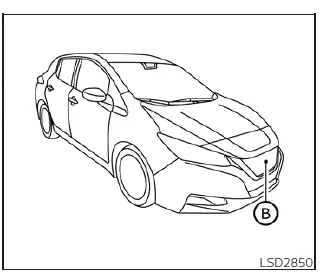
In the vehicle-to-vehicle distance control mode, the Intelligent Cruise Control (ICC) system in your Nissan Leaf automatically monitors and maintains a driver-selected following distance from the vehicle directly ahead. The system dynamically adjusts your speed based on the movement of that lead vehicle—up to your pre-programmed set speed—ensuring a smooth and consistent driving experience. When the road ahead is clear of obstacles or slower traffic, the system effortlessly maintains your chosen set speed.
The ICC system is engineered to significantly enhance the convenience and comfort of your driving experience, particularly when following another vehicle traveling in the same lane and direction on highways or multi-lane roads.
If the radar sensor B detects a slower-moving vehicle in your path, the system proactively reduces the Nissan Leaf's speed. By modulating the powertrain, it allows your vehicle to follow the lead car at the specific distance interval you have selected.
To achieve this, the system maintains precise control over the throttle and, when necessary, engages the vehicle's braking system (applying up to approximately 40% of the total available braking power) to ensure the gap remains consistent.
The sophisticated radar sensor utilized by the Nissan Leaf has an effective detection range extending approximately 650 ft (200 m) ahead, providing ample time for the system to react to changes in traffic flow.
Vehicle-to-vehicle distance control mode operation
The vehicle-to-vehicle distance control mode is meticulously designed to preserve your chosen following distance, automatically reducing your speed to match a slower-moving vehicle ahead. If the vehicle you are following begins to slow down, the system will decelerate accordingly; should that vehicle come to a complete stop, your Nissan Leaf will also decelerate until it reaches a standstill. It is important to remember that because the ICC system applies a maximum of 40% of the vehicle's total braking capability, it may not be sufficient for emergency stopping situations.
This intelligent feature is optimized for scenarios where traffic conditions are relatively stable or where changes in speed occur gradually. If a vehicle abruptly merges into your lane or if the vehicle directly ahead performs a sudden, hard braking maneuver, the distance between your vehicles may shrink rapidly, as the ICC system’s deceleration capacity is limited and may not react quickly enough to prevent a closer gap.
Should such a situation arise, the ICC system will trigger a high-pitched warning chime and cause the system display to blink, serving as an immediate alert for the driver to intervene and take corrective action.
The system will automatically cancel and emit a warning chime if your vehicle speed drops below approximately 15 mph (24 km/h) while no vehicle is detected ahead. Furthermore, the system will disengage if the vehicle speed exceeds the maximum set cruise limit.
The following parameters are actively managed by the Nissan Leaf while in vehicle-to-vehicle distance control mode:
- When the lane ahead is open and free of traffic, the system maintains the specific cruising speed selected by the driver. This set speed range is adjustable between approximately 20 and 90 mph (32 and 144 km/h).
- When a lead vehicle is detected, the system automatically adjusts your velocity to maintain the precise following distance you have chosen. If the lead vehicle comes to a full stop, the Nissan Leaf will decelerate and come to a halt within the operational limitations of the system.
Once the system confirms the vehicle has reached a standstill, it will provide a warning chime to indicate that the ICC system is canceling.
- When the lead vehicle moves out of your lane, or if you change lanes to an empty one, the Nissan Leaf will accelerate smoothly to return to and maintain your previously set cruising speed.
Please be aware that the ICC system does not provide speed control or warnings when you are approaching stationary objects or very slow-moving vehicles. Always remain fully engaged in the driving process to ensure you maintain a safe distance from other motorists, especially when approaching toll booths, stop-and-go traffic, or urban congestion.
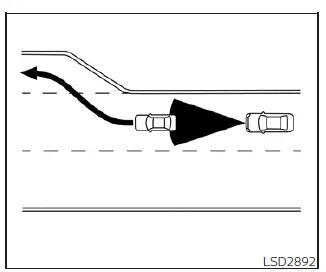
When you are cruising on the freeway and close the distance to a slower vehicle, the ICC system will seamlessly adjust your speed to keep your desired following interval. If that vehicle exits the highway or switches lanes, the Nissan Leaf will automatically accelerate back up to your target speed. Stay attentive during this acceleration phase to ensure you retain complete control over your vehicle’s trajectory.
While the system is advanced, it may not be able to hold the exact set speed on winding roads or steep inclines. Should the system struggle to maintain speed in these conditions, you must be prepared to assume manual control of the accelerator.
While the system handles standard distance regulation by accelerating and decelerating, your input remains vital. Always be prepared to depress the accelerator pedal yourself if you need additional power for a rapid lane change. Similarly, do not hesitate to apply the brake pedal if you need to decelerate more aggressively than the system is currently doing—such as when a vehicle suddenly cuts into your path or the lead vehicle brakes hard. Always remain alert and ready to react when utilizing the ICC system in your Nissan Leaf.
Vehicle-to-vehicle distance control mode switches
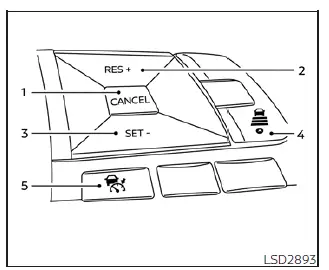
The Intelligent Cruise Control (ICC) system in your Nissan Leaf is intuitively managed via the primary ICC switch and four dedicated control buttons, all conveniently positioned on the steering wheel for easy access while driving.
- CANCEL switch: Immediately deactivates the ICC system while retaining your previously set cruising speed in the system's memory for quick resumption.
- RES+ switch: Resumes your last saved cruising speed or increases the set speed incrementally with each press.
- SET- switch: Captures and sets your current velocity as the new cruise speed, or decreases the set speed incrementally when pressed during operation.
- DISTANCE switch: Allows you to customize the following gap maintained between your Nissan Leaf and the vehicle ahead. You can toggle between three presets:
- Long
- Middle
- Short
- ICC switch: The master control used to power the system on and off.
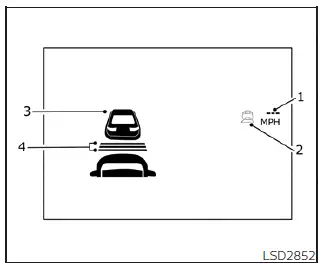
Vehicle-to-vehicle distance control mode display and indicators
All critical system information is clearly communicated through the Nissan Leaf vehicle information display.
- Set vehicle speed indicator: Displays your currently active cruising speed. For Canadian models, this information is conveniently presented in km/h.
- System status indicator: Uses color-coded signals to denote the current operational state of the ICC system:
- ICC system ON indicator (gray): Confirms that the main ICC master switch is active and the system is in standby mode.
- ICC system SET indicator (green): Confirms that a cruising speed has been successfully locked in and the system is actively maintaining it.
- ICC system warning (yellow): Indicates that a potential malfunction has been detected within the ICC system and requires inspection.
- Vehicle ahead detection indicator: A visual cue that alerts you when the system successfully senses another vehicle in your lane.
- Set distance indicator: Provides a visual representation of the following distance interval currently selected via the DISTANCE switch.
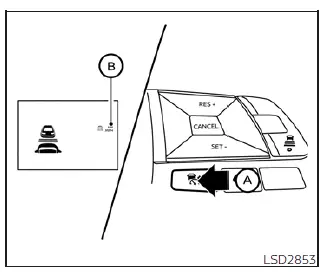
Operating vehicle-to-vehicle distance control mode
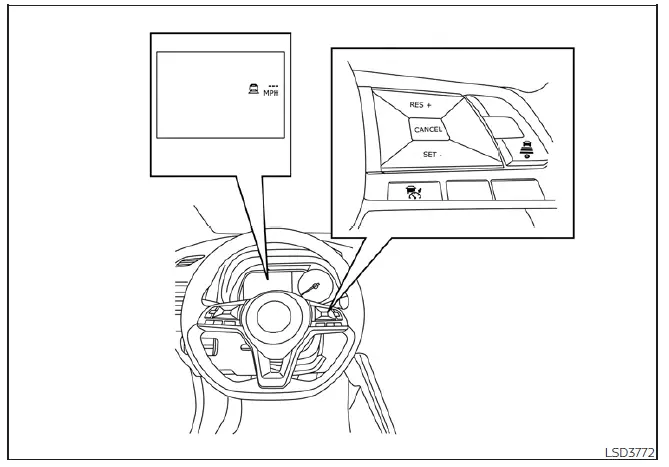
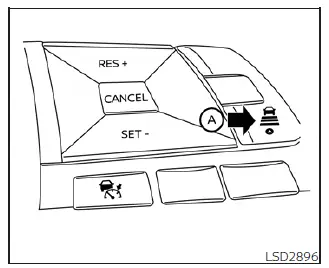
To initialize the system, perform a quick push and release of the ICC switch A. The Nissan Leaf will display the gray ICC system ON indicator, the currently selected distance, and the set speed indicator B, signaling that the system is now in standby mode and ready for you to establish your cruising speed.
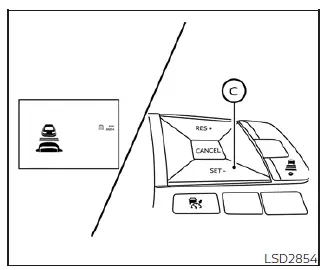
To finalize your cruising speed, simply accelerate your Nissan Leaf to your preferred velocity and press the SET- switch C. Upon release, the green ICC system set indicator, the vehicle ahead detection icon, the distance settings, and the set vehicle speed indicator B will illuminate, confirming the system is fully engaged.
Once you remove your foot from the accelerator pedal, the vehicle will seamlessly maintain the set speed.
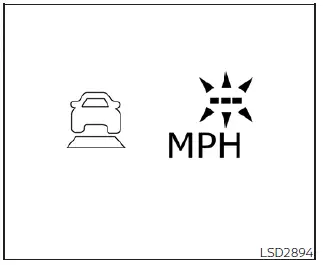
If you attempt to engage the system using the SET- switch while the following conditions are present, the system will not activate, and the ICC indicators will blink for approximately 2 seconds to alert you:
- Traveling below 20 mph (32 km/h) without a vehicle ahead to follow.
- The shift lever is positioned in any gear other than D (Drive) or B mode.
- The parking brake is currently engaged.
- You are actively depressing the brake pedal.
Furthermore, if you press the SET- switch while the following circumstances are detected, the system will not set, and a warning chime will sound alongside an on-screen notification:
- When the Vehicle Dynamic Control (VDC) system is disabled. To proceed, reactivate the VDC system, turn the ICC system off, and then restart the activation process.
- When the VDC system is actively intervening.
- When a wheel is experiencing slippage. Ensure that road traction is restored before attempting to engage the ICC system in your Nissan Leaf again.
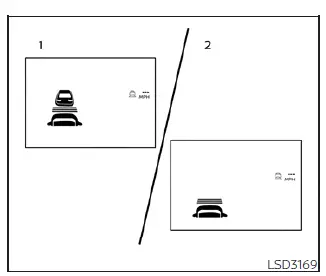
- System set display showing a detected vehicle ahead.
- System set display showing no vehicle detected in the lane.
The driver maintains full control over the desired cruising speed, which is adjusted based on current road conditions. When the lane ahead is empty, the Nissan Leaf ICC system performs just like traditional cruise control, maintaining your specified speed. The current target speed is always clearly shown on the display for your reference.
Vehicle detected ahead
When the system detects a vehicle traveling in your lane ahead, the Intelligent Cruise Control (ICC) system in your Nissan Leaf automatically manages your speed by modulating the throttle and applying the brakes. This ensures your vehicle smoothly adjusts to match the speed of the slower lead vehicle while maintaining the specific following distance you have previously selected.
NOTE:
- To alert drivers behind you, the stop lights on your Nissan Leaf will illuminate automatically whenever the ICC system applies the brakes.
- You may occasionally hear a subtle mechanical sound while the brake system is operating; this is a normal characteristic of the system's function and does not indicate a malfunction.
As soon as a lead vehicle is detected, the vehicle ahead detection indicator will illuminate on your instrument panel to confirm active monitoring.
The ICC system continuously provides real-time information by displaying your currently set speed and your chosen following distance on the vehicle information display.
Vehicle ahead not detected
When the path in front of your Nissan Leaf becomes clear, the ICC system will initiate a smooth, gradual acceleration to return the vehicle to your previously set cruising speed, which it will then maintain consistently.
Once the system no longer senses a vehicle in your lane, the vehicle ahead detection indicator will automatically turn off.
If another vehicle merges into your lane while you are accelerating to your set speed, or at any point while the ICC system is operational, the system will immediately resume distance control to safely maintain your selected gap.
Please note that if the lead vehicle is no longer detected while your speed is below approximately 15 mph (24 km/h), the system will automatically cancel its operation.
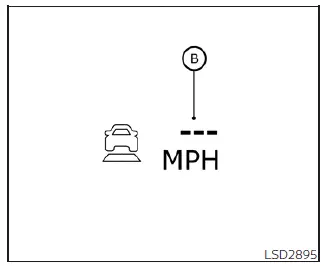
When you need to pass another vehicle, the set speed indicator B may flash if your vehicle's speed temporarily exceeds the cruise set point. The vehicle detection indicator will deactivate once the lane ahead is open. Once you release the accelerator pedal, your Nissan Leaf will automatically decelerate and return to your originally set cruising speed.
Even with the ICC system engaged, you retain the ability to depress the accelerator pedal at any time if you require rapid acceleration, such as during a dynamic lane change.
How to change the set vehicle speed
To cancel your preset cruising speed, you can use any of these three methods:
- Push the CANCEL switch; the set vehicle speed indicator will turn off, indicating the system is in standby.
- Lightly tap the brake pedal, which instantly cancels the speed setting and extinguishes the indicator.
- Turn the main ICC switch off, which will fully deactivate the system and turn off all related indicators.
To reset your Nissan Leaf to a faster cruising speed, choose one of the following methods:
- Manually depress the accelerator pedal; once you reach your desired higher speed, push and release the SET- switch.
- Push and hold the RES+ switch to accelerate; the set speed will increase in increments of approximately 5 mph (5 km/h).
- Push and quickly release the RES+ switch to adjust your speed incrementally; each tap will increase the set speed by approximately 1 mph (1 km/h).
To reset your Nissan Leaf to a slower cruising speed, choose one of the following methods:
- Lightly tap the brake pedal to slow the vehicle; once you reach your desired lower speed, push and release the SET- switch.
- Push and hold the SET- switch to decelerate; the set speed will decrease in increments of approximately 5 mph (5 km/h).
- Push and quickly release the SET- switch to adjust your speed incrementally; each tap will decrease the set speed by approximately 1 mph (1 km/h).
To resume your last saved cruising speed, push and release the RES+ switch. The Nissan Leaf will smoothly return to that speed, provided your current vehicle speed is above 20 mph (32 km/h).
How to change the set distance to the vehicle ahead
You can adjust the following distance to the vehicle ahead at any time to better suit changing traffic conditions or personal preference.
Each time you press the DISTANCE switch A, the system will cycle through the available following distances—Long, Middle, and Short—returning to the Long setting after each full cycle.
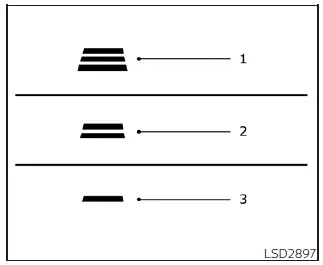
Approximate distance at 60 mph (97 km/h) [ft (m)]
- Long: 200 ft (60 m)
- Middle: 150 ft (45 m)
- Short: 90 ft (30 m)
- The actual physical distance between your Nissan Leaf and the vehicle ahead will adjust dynamically based on your current vehicle speed.
The higher your current vehicle speed, the further the system will maintain that selected distance to ensure optimal safety.
Approach warning
If your Nissan Leaf approaches a lead vehicle too closely—either because that vehicle has rapidly decelerated or because another driver has cut into your lane—the Intelligent Cruise Control (ICC) system will actively warn you via an audible chime and visual alerts on the ICC system display. You should immediately take control and decelerate by pressing the brake pedal to maintain a safe following distance if:
- The warning chime sounds.
- The vehicle ahead detection indicator begins to blink.
It is important to understand that the warning chime may not trigger in certain scenarios where the closing distance between vehicles is not considered critical by the sensors, such as:
- When both vehicles are traveling at a constant speed and the gap between them remains stable.
- When the lead vehicle is accelerating, causing the distance between you and that vehicle to increase.
- When a vehicle cuts into your lane at a speed or angle that does not immediately trigger the sensor's proximity threshold.
Additionally, the warning chime will not activate if:
- You are approaching vehicles that are completely stationary or moving at very slow speeds.
- You are actively depressing the accelerator pedal, which signals the system that the driver is in control and intentionally overriding the ICC settings.
NOTE:
The approach warning chime and display flashes may occasionally trigger if the ICC sensor detects large objects on the side of the road or adjacent to your Nissan Leaf.
Under these specific conditions, the ICC system may inadvertently initiate deceleration or acceleration. The sensor may encounter these detection errors when the vehicle is driven on winding, narrow, or hilly roads, or when entering and exiting sharp curves. In such driving environments, you must remain alert and manually control the distance to the vehicle ahead.
Furthermore, sensor performance and sensitivity can be influenced by your specific driving style (such as lane positioning or aggressive steering), heavy traffic patterns, or the physical condition of the vehicles around you (for example, if a nearby vehicle has significant body damage that interferes with radar reflection).
Acceleration when passing
When the ICC system in your Nissan Leaf is engaged at speeds above 43 mph and you are following a slower vehicle, activating your left turn signal will prompt the ICC to automatically initiate a subtle acceleration. This feature is designed to assist you in passing on the left by closing the gap to the lead vehicle. Please note that only the left-side turn signal activates this specific function. As you steer your Nissan Leaf into the passing lane, if the system detects no vehicle ahead, it will continue to accelerate until your pre-set cruise speed is reached. If it does detect another vehicle in the passing lane, it will accelerate only up to that vehicle's following speed. If you decide not to steer into the left lane, the acceleration will conclude after a short period, and the system will smoothly return to your previously set following distance. You can cancel this acceleration at any time by simply pressing the brake pedal or the CANCEL switch located on the steering wheel.
WARNING
To significantly reduce the risk of a collision that could lead to serious injury or death, please observe the following safety mandates:
- This acceleration feature is triggered exclusively by the left turn signal; it will briefly increase speed even if you have not yet initiated a lane change. Be mindful that this can also occur in non-passing scenarios, such as when navigating left-side highway exits.
- Always verify that the adjacent lane is completely clear before attempting to pass another vehicle. Traffic conditions can change in an instant during the passing maneuver.
- Maintain the ability to manually steer or apply the brakes at all times.
- Never rely solely on automated driver-assist systems; you are the final authority on vehicle operation.
Automatic cancellation
For your safety, the ICC system will sound a warning chime and automatically disengage control under the following conditions:
- When a lead vehicle is no longer detected and your Nissan Leaf speed drops below 15 mph (24 km/h).
- When the system determines that the vehicle has come to a complete standstill.
- When the shift lever is moved out of the D (Drive) position or away from B mode.
- When the parking brake is engaged.
- When the Vehicle Dynamic Control (VDC) system is manually turned off.
- When the VDC system is actively intervening to stabilize the vehicle.
- When the radar sensor becomes obstructed by mud, ice, or other debris, impairing distance measurement.
- When the vehicle detects significant wheel slip.
- When the radar signal experiences a temporary, critical interruption.
 Intelligent Cruise Control (ICC) (for vehicles without ProPILOT Assist)
WARNING
Failure to follow these safety warnings and operational instructions regarding the Intelligent Cruise Control (ICC) system could lead to a loss of vehicle control, r ...
 Vehicle-to-vehicle distance control mode limitations
WARNING
Below are the critical operational limitations for the Intelligent Cruise Control (ICC) system in your Nissan Leaf. Operating the vehicle without strict adherence to these guidelines coul ...
Other materials:
Tail lamp circuit
Without daytime running light system
WITHOUT DAYTIME RUNNING LIGHT SYSTEM : Component Function
1.CHECK TAIL LAMP OPERATION
CONSULT-III ACTIVE TEST
1. Select “EXTERNAL LAMPS� of IPDM E/R active test item.
2. With operating the test items, check that the tail lamp is turned ON.
TAIL : Tail L ...
P1614 chain of IMMU-KEY
DTC Logic
DTC DETECTION LOGIC
DTC CONFIRMATION PROCEDURE
1.PERFORM DTC CONFIRMATION PROCEDURE 1
1. Contact Intelligent Key backside to push-button ignition switch.
2. Check DTC in “Self Diagnostic Result� mode of “ENGINE� using CONSULT-III.
Is DTC detected?
YES >> Go to SEC- ...
Symptom diagnosis
COMBINATION SWITCH SYSTEM SYMPTOMS
Symptom Table
1. Perform “Data Monitor� of CONSULT-III to check for any malfunctioning
item.
2. Check the malfunction combinations.
3. Identify the malfunctioning part from the agreed combination and repair or
replace the part.
...
