
Nissan Leaf 2018-2025 (ZE1) Owner's Manual : System Temporarily Unavailable
The ICC system may enter a state of temporary unavailability under the following conditions:
In these specific scenarios, the ICC system may not cancel automatically, yet it might fail to maintain the previously selected following distance from the lead vehicle.
System Temporarily Unavailable
The Intelligent Cruise Control system in your Nissan Leaf is designed to remain in a standby state, but it may become temporarily unavailable under several distinct environmental or operational conditions.
Condition A
The ICC system is programmed to cancel automatically under the following circumstances. When this occurs, an audible chime will sound, and the system will reject any attempts to be set:
- Any of the vehicle doors are open.
- The driver's seat belt is not securely fastened.
- Your Nissan Leaf is traveling at a speed below 15 mph (25 km/h) without a lead vehicle detected.
- Your vehicle has been held at a complete standstill by the ICC system for approximately 3 minutes or longer.
- The shift lever is moved out of the D (Drive) position or B mode.
- The electronic parking brake is manually or automatically applied.
- The Vehicle Dynamic Control (VDC) system is manually toggled off.
- The Automatic Emergency Braking with Pedestrian Detection system initiates a high-force braking event.
- The VDC system (including the integrated traction control system) activates to stabilize the vehicle.
- A wheel slip event is detected.
- The radar sensor’s ability to measure distance becomes impaired due to mud, dirt, or other physical obstructions on the sensor area.
- The radar signal experiences a temporary, unexplained interruption.
Action to take:
Once the conditions preventing operation have been resolved, deactivate the system using the ProPILOT Assist master switch. You can then reactivate the ProPILOT Assist system to resume normal functionality.
Note: If the ICC system is canceled while your Nissan Leaf is at a standstill due to the following conditions, the electronic parking brake will engage automatically:
- Any door is opened.
- The driver's seat belt is unfastened.
- The vehicle has been stopped by the system for 3 minutes or longer.
- The shift lever is moved out of D or B mode.
- The VDC system is turned off.
- Distance measurement is impaired due to sensor obstruction.
- The radar signal is interrupted.
Condition B
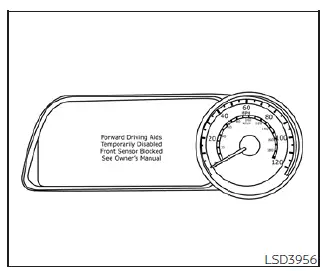
During severe weather—such as heavy rain, dense fog, or thick snow—the front radar sensor may become blocked. In such events, the ICC system will cancel automatically, an alert chime will sound, and the warning message "Forward Driving Aids Temporarily Disabled Front Sensor Blocked See Owner's Manual" will appear on your information display.
Action to take:
Once the adverse weather conditions subside, the warning message will clear from your display, and the system will resume normal operation. If the "Forward Driving Aids Temporarily Disabled Front Sensor Blocked See Owner's Manual" message persists, the system requires professional inspection. We recommend visiting an authorized NISSAN dealer for a service check.
Condition C
If the front bumper radar sensor is obscured by accumulated road grime, mud, or other debris, the ICC system will automatically cancel to ensure safety.
An audible chime will sound, and the "Forward Driving Aids Temporarily Disabled Front Sensor Blocked See Owner's Manual" warning message will appear in your Nissan Leaf instrument cluster.
Action to take:
If this warning message appears, bring your vehicle to a safe stop, move the shift lever to the P (Park) position, and power off the EV system. Inspect the front bumper and gently clean the radar sensor area of any dirt or obstructions. Restart your Nissan Leaf. Should the "Forward Driving Aids Temporarily Disabled Front Sensor Blocked See Owner's Manual" warning continue to display, have the system inspected by your NISSAN dealer.
Condition D
When driving on expansive roads with minimal surrounding structures—such as long bridges, vast deserts, snowy plains, or stretches flanked by long walls—the radar sensor may struggle to establish a consistent reference point. In these environments, the system may illuminate the warning light and display the message "Forward Driving Aids Temporarily Disabled Front Sensor Blocked See Owner's Manual" on your instrument cluster.
Action to take:
Once you have returned to a driving environment with more distinct road structures or landmarks, you can reactivate the system using the steering wheel controls to resume standard operation in your Nissan Leaf.
ICC system malfunction
In the unlikely event of an internal Intelligent Cruise Control (ICC) system malfunction, the system will automatically deactivate to ensure safety. You will be alerted by an audible chime, and the speed control status warning light will illuminate in orange on the dashboard.
Action to take:
If this warning light persists, find a safe location to pull over and bring your vehicle to a complete stop. Power down the EV system, wait a few moments, and then restart your Nissan Leaf to see if the ICC system resets successfully. If you are still unable to engage the cruise control or if the warning indicator remains illuminated, the system may have a deeper mechanical or software issue. While you can continue to drive the vehicle normally, the ICC system will remain inactive until it is professionally inspected. We highly recommend visiting an authorized NISSAN certified dealer to have your Nissan Leaf serviced by qualified technicians.
Note: Even if the advanced ICC system is temporarily unavailable due to a malfunction, you may still be able to utilize the conventional cruise control mode for standard speed maintenance.
ICC sensor maintenance
The radar sensor is strategically positioned on the front exterior of your Nissan Leaf.
To ensure the ICC system functions with the precision you expect, please adhere to these maintenance guidelines:
- Keep the designated sensor area on the front bumper and the emblem surface free of dirt, ice, and debris.
- Avoid any physical impacts, vibrations, or damage to the areas surrounding the radar sensor.
- Do not apply stickers, decals, or transparent films, and do not install aftermarket accessories near the sensor, as these can easily cause signal degradation or system failure.
- Do not attach metallic objects, such as brush guards or aftermarket grilles, near the sensor area, as these materials can cause significant interference or malfunctions.
- Do not attempt to alter, paint, or remove the front bumper assembly yourself.
If you are planning any cosmetic customizations or body repairs to your front bumper, it is essential to consult with an authorized NISSAN certified dealer to ensure the radar systems are recalibrated correctly.
The camera unit for the ProPILOT Assist system is located on the inside of the windshield, just above the rearview mirror.
To maintain peak performance and avoid system errors, please observe the following care instructions for the camera sensor:
- Keep the windshield glass clean and clear at all times, especially in the area directly in front of the camera.
- Avoid attaching any stickers, film, or accessories in the immediate vicinity of the camera housing.
- Do not place highly reflective materials, such as white paper, mirrors, or shiny sunshades, on the dashboard. Reflections from these items can confuse the camera, negatively impacting its ability to detect lane markings accurately.
- Do not strike or apply pressure to the camera unit. Never attempt to touch the camera lens or remove the hardware screws on the camera unit itself.
If the camera unit sustains damage, such as from an accident or a cracked windshield, it is strongly recommended that you contact your NISSAN certified dealer to ensure the safety systems of your Nissan Leaf are restored properly.
 ICC system limitations
WARNING
The following points outline the operational boundaries of the Intelligent Cruise Control (ICC) system. Operating your Nissan Leaf without regard for these limitations can lead to a serio ...
 Steering Assist
WARNING
Failure to strictly adhere to these safety warnings and operational guidelines for the Steering Assist system in your Nissan Leaf could lead to a serious accident, personal injury, or dea ...
Other materials:
Tail lamp circuit
Without daytime running light system
WITHOUT DAYTIME RUNNING LIGHT SYSTEM : Component Function
1.CHECK TAIL LAMP OPERATION
CONSULT-III ACTIVE TEST
1. Select “EXTERNAL LAMPS� of IPDM E/R active test item.
2. With operating the test items, check that the tail lamp is turned ON.
TAIL : Tail L ...
B1037, B1039, B1041 crash zone sensor
DTC Logic
DTC DETECTION LOGIC
DTC CONFIRMATION PROCEDURE
1.CHECK SELF-DIAG RESULT
With CONSULT-III
1. Turn ignition switch ON.
2. Perform “Self Diagnostic Result� mode of “AIR BAG� using CONSULT-III.
Without CONSULT-III
1. Turn ignition switch ON.
2. Check the air bag warning la ...
None of the power windows can be operated using any
switch
Diagnosis Procedure
1.CHECK BCM POWER SUPPLY AND GROUND CIRCUIT
Check BCM power supply and ground circuit. Refer to the following.
• With Intelligent Key: Refer to BCS-87, "Diagnosis Procedure".
• Without Intelligent Key: Refer to BCS-155, "Diagnosis Procedure".
Is t ...
