
Nissan Juke Service and Repair Manual : Starter motor drive control
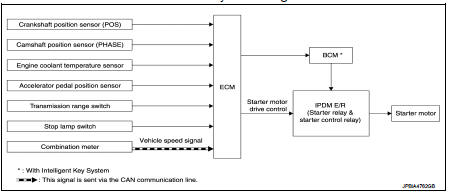
Starter motor drive control : System Diagram
Starter motor drive control : System DescriptionINPUT/OUTPUT SIGNAL CHART
INPUT/OUTPUT SIGNAL CHART
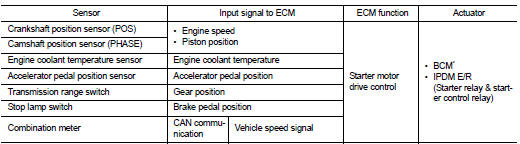
*: With Intelligent Key system SYSTEM DESCRIPTION
When rapid deceleration occurs during engine runs or idle speed decreases due
to heavy load conditions,
ECM detects a decrease in idle speed and restarts the engine to secure
reliability in handleability by transmitting
a cranking request signal to IPDM E/R for activating the starter motor under the
following conditions:
• Selector lever: P or any position other than N
• Idle switch: ON (Accelerator pedal not depressed)
• Brake switch: ON (Brake pedal depressed)
Models with no Intelligent Key System transmit a control signal directly to IPDM E/R. On the other hand, models with the Intelligent Key System transmit a control signal to IPDM E/R by way of BCM via CAN communication.
IPDM E/R detects an operating state of the starter motor relay and the starter motor control relay and transmits a feed back signal to ECM via CAN Communication.
 Cooling fan control
Cooling fan control : System Diagram
Cooling fan control : System Description
INPUT/OUTPUT SIGNAL CHART
*: The ECM determines the start signal status by the signals of engine speed
and batter ...
 Evaporative emission system
Evaporative emission system: System
Diagram
Evaporative emission system : System
Description
INPUT/OUTPUT SIGNAL CHART
*: ECM determines the start signal status by the signals of engine spee ...
Other materials:
P0850 PNP switch
Description
When the selector lever position is P or N (CVT), Neutral position (M/T),
park/neutral position (PNP) signal is
ON.
DTC Logic
DTC DETECTION LOGIC
DTC CONFIRMATION PROCEDURE
1.INSPECTION START
Do you have CONSULT-III?
Do you have CONSULT-III?
YES >> GO TO 2.
NO >& ...
How to read the displayed lines
Guiding lines which indicate the vehicle width and distances to objects with
reference to the bumper lineA are displayed on the monitor.
Distance guide lines:
Indicate distances from the bumper.
• Red line1 : approx. 1.5 ft (0.5 m)
• Yellow line2 : approx. 3 ft (1 m)
• Green line3 : a ...
Ring gear shaft
Exploded View
1. Pinion lock nut
2. Companion flange
3. Drive pion oil seal
4. Pinon rear bearing
5. Transfer case
6. Gasket
7. Filler plug
8. Collapsible spacer
9. Drive pinion adjust shim
10. Drive pinion
11. Pinion front bearing
12. Ring gear
13. Ring gear shaft
14. Ring ...
