
Nissan Juke Service and Repair Manual : Removal and Installation Procedure for CVT Unit Connector
REMOVAL
Rotate bayonet ring (1) counterclockwise, pull out CVT unit harness connector (2) upward and remove it.
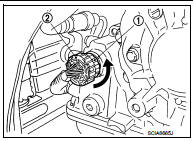
INSTALLATION
1. Align Δ marking on CVT unit harness connector terminal body with marking on bayonet ring, insert CVT unit harness connector, and then rotate bayonet ring clockwise.
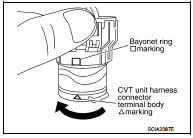
2. Rotate bayonet ring clockwise until Δ marking on CVT unit harness connector terminal body is aligned with the slit on bayonet ring as shown in the figure (correctly fitting condition), install CVT unit harness connector to CVT unit harness connector terminal body.
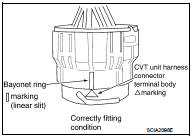
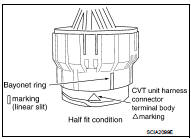
CAUTION:
• Securely align Δ marking on CVT unit harness connector
terminal body with bayonet ring slit. Then, be careful not
to make a half fit condition as shown in the figure.
• Never mistake the slit of bayonet ring for other dent portion.
 Precaution for G Sensor Removal/Installation or Replacement
CAUTION:
To remove/install or replace G sensor, refer to TM-182, "Description". ...
 Precaution
NOTE:
If any malfunction occurs in the RE0F10A model transaxle, replace the entire
transaxle assembly.
• Before connecting or disconnecting the TCM harness connector,
turn ignition switch OFF a ...
Other materials:
Center stem assembly
Exploded View
1. Filler plug
2. Gasket
3. Drain plug
4. Breather tube
5. Clip
6. Breather hose
7. Breather
8. sub-harness clip
9. sub-harness
10. Rear cover
11. Center stem
12. Side bearing (right)
13. Side bearing adjusting shim (right)
14. Side oil seal (right)
15. Connec ...
For side and rollover collision : When SRS is not activated in a collision
CAUTION:
Due to varying models and option levels, not all parts listed in the chart below
apply to all vehicles.
WORK PROCEDURE
1. Before performing any of the following steps, ensure that all vehicle body
and structural repairs have been
completed.
2. Check the SRS components and the rel ...
Trouble diagnosis
System Diagram
Condition of Error Detection
DTC (e.g. U1000 and U1001) of CAN communication is indicated on SELF-DIAG
RESULTS on CONSULT-III
if a CAN communication signal is not transmitted or received between units for 2
seconds or more.
CAN COMMUNICATION SYSTEM ERROR
• CAN communica ...
