
Nissan Juke Service and Repair Manual : Brake pedal
Inspection and Adjustment
INSPECTION
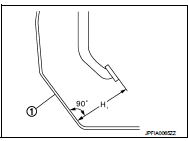
Brake Pedal Height
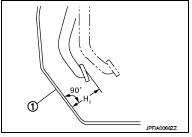
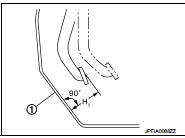
Check the height (H1) between the dash lower panel (1) and the
brake pedal upper surface.
H1 : Refer to BR-136, "Brake Pedal".
CAUTION:
Remove the floor trim.
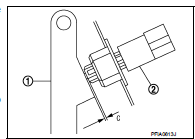
Stop Lamp Switch
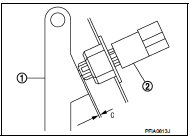
Check the clearance (C) among the brake pedal lever (1) and the
stop lamp switch (2) threaded end.
C : Refer to BR-136, "Brake Pedal".
CAUTION:
The stop lamp must turn off when the brake pedal is released.
NOTE:
Pull the brake pedal pad to make the clearance between the stop lamp switch threaded end and the brake peal lever.
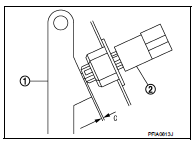
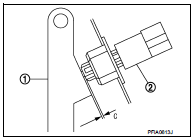
Brake Switch/Brake Pedal Position Switch Check the clearance (C) among the brake pedal lever (1) and the brake switch/brake pedal position switch (2) threaded end.
C : Refer to BR-136, "Brake Pedal".
NOTE
:
Pull the brake pedal pad to make the clearance between the brake
switch/brake pedal position switch threaded end and the brake peal
lever.
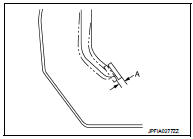
Brake Pedal Play
Press the brake pedal. Check the brake pedal play (A) (stroke until
fluid pressure occurs).
A : Refer to BR-136, "Brake Pedal".
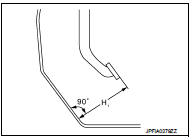
Depressed Brake Pedal Height Check the height between the dash lower panel (1) and the brake pedal upper surface (H2) when depressing the brake pedal at 490 N (50 kg, 110 lb) while turning engine ON.
H2 : Refer to BR-136, "Brake Pedal".
CAUTION:
Remove the floor trim.
ADJUSTMENT
Brake Pedal Height
1. Remove instrument lower panel. Refer to IP-13, "Removal and Installation".
2. Disconnect the stop lamp switch and brake switch/brake pedal position switch harness connector.
3. Loosen the stop lamp switch and brake switch/brake pedal position switch 45° counterclockwise.
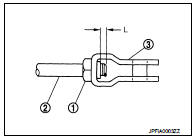
4. Loosen the lock nut (2) of input rod (1).
5. Rotate the input rod, adjust the brake pedal to the specified height (H1).
CAUTION:
The threaded end of the input rod must project to the inner
side (L) of the clevis (3).
H1 : Refer to BR-136, "Brake Pedal".
6. Tighten the lock nut. Refer to BR-111, "Exploded View".
7. Adjust the clearance between the brake pedal lever and the stop lamp switch and brake switch/brake pedal position switch threaded end after adjusting the brake pedal height.
Stop Lamp Switch
1. Remove instrument lower panel. Refer to IP-13, "Removal and Installation".
2. Disconnect the harness connector from stop lamp switch.
3. Loosen the stop lamp switch 45° counterclockwise.
4. Press-fit the stop lamp switch (2) until the stop lamp switch hits the brake pedal lever (1) 45° clockwise while pulling the brake pedal pad slightly.
CAUTION:
• The clearance (C) between the brake pedal lever and stop
lamp switch threaded and must be the specified value.
C : Refer to BR-136, "Brake Pedal".
• The stop lamp must be turned off when the brake pedal is released.
Brake Switch/Brake Pedal Position Switch 1. Remove instrument lower panel. Refer to IP-13, "Removal and Installation".
2. Disconnect the harness connector from brake switch/brake pedal position switch.
3. Loosen the brake switch/brake pedal position switch 45° counterclockwise.
4. Press-fit the brake switch/brake pedal position switch (2) until the brake switch/brake pedal position switch hits the brake pedal lever (1) 45° clockwise while pulling the brake pedal pad slightly.
CAUTION:
The clearance (C) between the brake pedal lever and brake
switch/brake pedal position switch threaded and must be
the specified value.
C : Refer to BR-136, "Brake Pedal".
Depressed Brake Pedal Height 1. Perform the air bleeding. Refer to BR-81, "Bleeding Brake System".
2. Check the height between the dash lower panel (1) and the brake pedal upper surface (H2) when depressing the brake pedal at 490 N (50 kg, 110 lb) while turning engine ON.
H2 : Refer to BR-136, "Brake Pedal".
CAUTION:
Remove the floor trim.

 Brake fluid
Inspection
BRAKE FLUID LEVEL
• Check that the fluid level in the reservoir tank is within the specified
range (MAX – MIN lines).
• Visually check for any brake fluid leakage around the reser ...
Other materials:
B2621 inside antenna
DTC Logic
DTC DETECTION LOGIC
DTC CONFIRMATION PROCEDURE
1.PERFORM DTC CONFIRMATION PROCEDURE
1. Select “INTELLIGENT KEY� of “BCM� using CONSULT-III.
2. Select “INSIDE ANT DIAGNOSIS� in “WORK SUPPORT� mode.
3. Perform inside key antenna (“INSIDE ANT DIAGNOSIS�) on “WORK ...
P1614 chain of IMMU-KEY
DTC Logic
DTC DETECTION LOGIC
DTC CONFIRMATION PROCEDURE
1.PERFORM DTC CONFIRMATION PROCEDURE
1. Turn ignition switch ON.
2. Check DTC in “Self Diagnostic Result� mode of “ENGINE� using CONSULT-III.
Is DTC detected?
YES >> Refer to SEC-195, "Diagnosis Procedure".
...
Connector Information/Explanation of Option Abbreviation
CONNECTOR LIST
Connector information and harness layout are described in “POWER SUPPLY,
GROUND & CIRCUIT ELEMENTS�
Section.
EXPLANATION OF OPTION ABBREVIATION
HOW TO USE CONNECTOR INFORMATION
Description
...
