
Nissan Leaf 2018-2025 (ZE1) Owner's Manual : Rear sonar system (RSS)
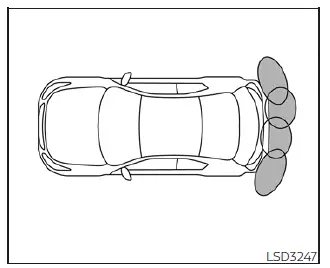
The Rear Sonar System (RSS) is designed to enhance your parking confidence by providing audible tones that alert you to the presence of obstacles located near the rear bumper of your Nissan Leaf.
Whenever the "DISPLAY" key is engaged, the sonar detection view will automatically populate on your touch-screen interface. For additional situational awareness, a secondary sonar status view is simultaneously provided within the primary vehicle information display, ensuring you have clear, real-time reference data while maneuvering.
WARNING
- The RSS is an auxiliary convenience feature and is not a substitute for standard, attentive parking practices.
- As the driver, you retain ultimate responsibility for safety during parking and all other vehicle maneuvers.
Always perform a visual sweep of your surroundings and confirm that the path is clear before initiating any parking sequence in your Nissan Leaf.
- It is essential to thoroughly read and understand the operational limitations of the RSS described throughout this section.
Note that the color-coded segments of the sonar indicator and the distance guide lines displayed in your rear-view interface represent varying levels of proximity to detected objects.
- Severe weather conditions or external sources of ultrasonic noise—such as high-pressure air from truck brakes, automatic car wash machinery, or pneumatic tools—can disrupt the system's performance, potentially leading to inaccurate readings or false alerts.
- This system is primarily intended to aid the driver in detecting large, stationary obstacles to help prevent accidental damage to your vehicle.
- The system is not designed to reliably detect small, low-profile, or fast-moving objects.
Always maneuver at low, controlled speeds. Be aware that the system cannot detect small items located below the level of the bumper, and it may fail to recognize objects positioned extremely close to the vehicle's body or flat against the ground.
- The RSS may fail to detect certain materials, including highly absorbent or "fluffy" textures like snow, cloth, cotton, wool, or glass. Furthermore, thin materials such as rope, wire, chains, or complex wedge-shaped objects may not provide a sufficient ultrasonic return for reliable detection.
If your Nissan Leaf sustains any impact damage to the rear bumper fascia that results in bending or misalignment, the effective sensing zone may be compromised. This can lead to erratic obstacle measurement or the occurrence of false alarms.
CAUTION
- High levels of ambient or internal noise—such as a high-volume audio system or having the vehicle windows open—can mask the system's audible tones, making them difficult to hear.
- To maintain peak performance, keep the sonar sensors integrated into the rear bumper fascia free from obstructions like packed snow, thick ice, or heavy mud accumulations.
Avoid using hard or sharp tools to clean the sensors, as this can damage their surface. If the sensors remain covered, the accuracy and reliability of the sonar system will be significantly degraded.
 Hill start assist system
WARNING
Never rely exclusively on the hill start assist system to prevent the vehicle from rolling backward on an incline. Always maintain a high level of vigilance.
When s ...
 System operation
The system provides both visual and audible feedback regarding rearward obstacles whenever the shift lever is placed into the R (Reverse) position.
Sonar Operation Table
...
Other materials:
ACC warning does not operate
Diagnosis Procedure
1.CHECK COMBINATION METER BUZZER
Check combination meter buzzer.
Refer to WCS-40, "Component Function Check".
Is the inspection result normal?
YES >> GO TO 2.
NO >> Repair or replace the malfunctioning parts.
2.REPLACE BCM
1. Replace BCM. Ref ...
Front seat belt
Exploded View
1. Adjuster cover
2. Anchor bolt
3. Shoulder anchor
4. Spacer
5. Retaining washer
6. Seat belt adjuster
7. Seat belt pre-tensioner retractor
(Passenger side)
8. Outer anchor
9. Seat belt pre-tensioner retractor
(Driver side)
10. Seat belt buckle
11. Wave washer
&n ...
IPDM-E branch line circuit
Diagnosis Procedure
1.CHECK CONNECTOR
1. Turn the ignition switch OFF.
2. Disconnect the battery cable from the negative terminal.
3. Check the terminals and connectors of the IPDM E/R for damage, bend and loose
connection (unit side
and connector side).
Is the inspection result normal?
Y ...
