
Nissan Juke Service and Repair Manual : Drive belt idler pulley
Removal and Installation
REMOVAL
1. Remove drive belt. Refer to EM-155, "Removal and Installation".
2. Remove the lock nut, and then remove the plate (7), idler pulley (6), and washer (5).
1 : Alternator bracket
3. Remove the center shaft (2) together with the spacer (3) with inserting the adjusting bolt (4).
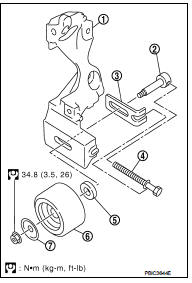
INSTALLATION
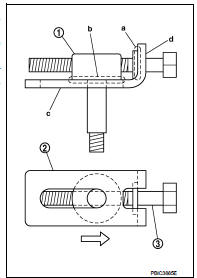
1. Insert the center shaft (1) into the slide groove of the spacer (2).
Fully screw in the adjusting bolt (3) in the belt loosening direction
( ).
).
• At that time, place the flange (a) of the adjusting bolt and the
seat (b) of the center shaft on the spacer.
2. Place each surface (c and d) of the spacer on the alternator bracket. Install the washer, idler pulley, and plate, and then temporarily tighten the lock nut.
 : 4.4 N·m (0.45 kg-m, 39 in-lb)
3. Install removed parts in the reverse order of removal.

 Air cleaner and air duct
Exploded View
1. Hose clamp
2. PCV hose
3. Hose clamp
4. Air cleaner filter
5. Air cleaner filter case
6. Grommet
7. Inlet air duct (lower)
8. Grommet
9. Inlet air duct (upper)
10. ...
Other materials:
Headlamp washer circuit
Component Function Check
1.CHECK HEADLAMP WASHER OPERATION
CONSULT-III ACTIVE TEST
1. Select “HEAD LAMP WASHER� of IPDM E/R active test item.
2. With operating the test item, check headlamp operation.
On :Headlamp washer ON operation
Off :Stop the headlamp washer.
Is headlamp washer opera ...
P0225 APP sensor
DTC Logic
DTC DETECTION LOGIC
NOTE:
• If DTC P0225 is displayed with DTC P0641, first perform trouble diagnosis for
DTC P0641. Refer to
EC-974, "DTC Logic".
Diagnosis Procedure
1.CHECK GROUND CONNECTIONS
1. Turn ignition switch OFF.
2. Check ground connection E38. Refer to Gr ...
Diagnosis and repair work flow
Work Flow
OVERALL SEQUENCE
DETAILED FLOW
1.GET INFORMATION FOR SYMPTOM
1. Get the detailed information from the customer about the symptom (the
condition and the environment
when the incident/malfunction occurred).
2. Check operation condition of the function that is malfunctioning.
> ...
