
Nissan Leaf 2018-2025 (ZE1) Owner's Manual : How to enable/disable the rear sonar system
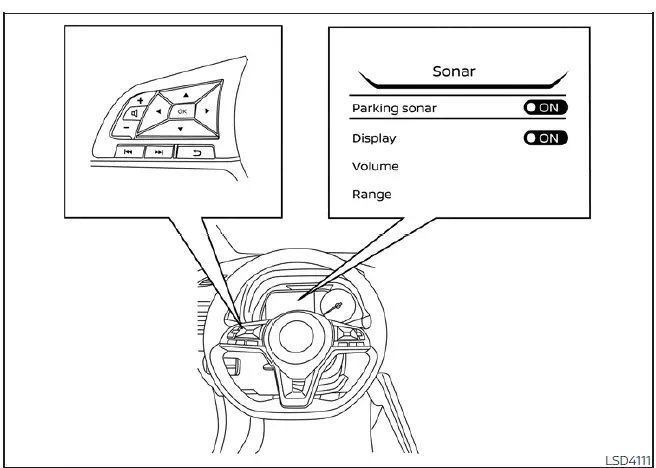
The Rear Sonar System in your Nissan Leaf is designed for seamless operation, automatically activating whenever the power switch is in the ON position and the shift lever is moved into the R (Reverse) position.
To customize the settings for your parking convenience, follow these steps to enable, disable, or adjust the system:
1. Press the
 button repeatedly until "Settings" appears on the vehicle information display, then press OK. Use the
 button to highlight "Driver Assistance," and confirm by pressing the OK button.
2. Select "Parking Aids" from the menu and press the OK button.
3. Select "Sonar" and press the OK button to toggle the system status as needed.
- Select "Parking sonar" to manually turn the monitoring system on or off.
- Select "Display" to toggle the visual sonar status graphics on or off on your screens.
- Select "Volume" to calibrate the audible alert intensity to "High," "Med.," or "Low" based on your preference.
- Select "Range" to define the proximity threshold for alerts by choosing "Far," "Med.," or "Near."
The system is designed with a default-on logic; it will automatically reactivate whenever the Nissan Leaf EV system is power-cycled.
Sonar limitations
WARNING
The following operational limitations apply to the Rear Sonar System. It is critical to operate your Nissan Leaf with full awareness of these constraints to avoid the risk of serious injury or property damage.
- For safety, the system automatically deactivates at vehicle speeds exceeding 6 mph (10 km/h) and will only reactivate once your speed drops below this threshold.
- External ultrasonic noise sources—such as a truck's compressed-air brakes, pneumatic drills, or high-pressure spray in an automatic car wash—can overwhelm the system, potentially resulting in reduced detection performance or unwarranted false activations.
- The system is not capable of preventing contact with small, low, or rapidly moving objects. Always reverse slowly. Be mindful that the sensors cannot detect small items located below the bumper line or objects resting flat on the ground.
- Detection performance is diminished for objects made of sound-absorbing or "fluffy" materials (e.g., thick snow, cloth, cotton, or glass wool), thin items like rope, wire, or chains, and sharp, wedge-shaped objects that may deflect ultrasonic waves away from the sensors.
- The system's detection reliability decreases at speeds above 3 mph (5 km/h) and it may struggle to recognize objects with irregular angles or those that are moving laterally relative to your path.
- Never apply stickers (even transparent ones), install aftermarket accessories, or paint over the sensors. Any material blocking the sensor surface will significantly impair the system's ability to monitor your surroundings.
System temporarily unavailable
If the system detects a persistent obstruction—a condition referred to as "sonar blockage"—it will automatically deactivate for your protection. The system will remain unavailable until the blockage is cleared and the sensors are restored to a clear state.
Blockages are typically caused by environmental factors like heavy splashes, dense mist, or fog, as well as physical obstructions like ice, frost, or accumulated road grime on the sensor faces.
Action to take:
Once the environmental conditions clear or the physical obstructions are removed, the system will resume its normal monitoring functions automatically.
System maintenance
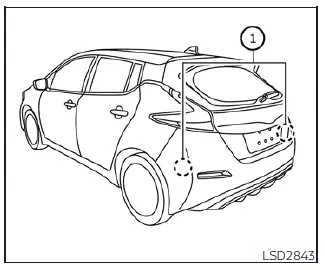
The ultrasonic sonar sensors are integrated into the rear bumper fascia. To ensure consistent performance, it is vital to keep the area around these sensors clean and free of debris.
As noted previously, temporary ambient conditions such as heavy rain, mist, or fog may lead to short-term signal interference. Similarly, the accumulation of ice, frost, or dried mud can trigger a "blocked" status.
Regularly inspect your Nissan Leaf and gently remove any buildup around the sensor locations. Never attach decorative stickers, install obstructive accessories, or apply additional layers of paint near the sensors, as these will permanently degrade system accuracy.
Finally, take care not to strike or scratch the bumper area around the sensors. If the bumper fascia sustains impact damage during a collision, we strongly recommend visiting your local NISSAN dealer to have the sensor alignment and system calibration verified.
 System operation
The system provides both visual and audible feedback regarding rearward obstacles whenever the shift lever is placed into the R (Reverse) position.
Sonar Operation Table
...
 Cold weather driving
CAUTION
To maintain the long-term integrity and health of your Nissan Leaf Li-ion battery, it is crucial that you do not store the vehicle in ambient temperatures below -13ºF (-25ºC) for a dura ...
Other materials:
Rear seat belt
Exploded View
2WD models
1. Anchor bolt
2. Outer seat belt retractor RH
3. Shoulder anchor
4. Space
5. Retaining washer
6. Seat belt hook
7. Outer anchor
8. Outer seat belt retractor LH
9. Center seat belt finisher
10. Center seat belt buckle
11. RH seat belt buckle
12. Center ...
Intake sensor
Exploded View
Refer to HA-43, "Exploded View (Automatic Air Conditioning)". (HR16DE)
Refer to HA-97, "Exploded View (Automatic Air Conditioning)". (MR16DDT)
Removal and Installation
REMOVAL
1. Remove evaporator.
• Refer to HA-55, "EVAPORATOR : Removal and Installat ...
Hood
WARNING
• Make sure the hood is completely closed and latched before driving.
Failure to do so could cause the hood to fly open and result in an accident.
• If you see steam or smoke coming from the engine compartment, to avoid injury
do not open the hood.
When opening the hood:
1. Pull ...
