
Nissan Leaf 2018-2025 (ZE1) Owner's Manual : Rear Automatic Braking (RAB)
WARNING
Failure to strictly adhere to the safety warnings and operational instructions regarding the Rear Automatic Braking (RAB) system in your Nissan Leaf could result in a collision, causing serious personal injury or even death.
- The RAB system is designed strictly as a supplemental driver-assistance aid; it is not a substitute for standard safe driving procedures.
Always utilize your side and rearview mirrors, and physically turn your head to check your surroundings in the direction of travel before and during all reversing maneuvers. Never rely exclusively on the RAB system to prevent obstacles from entering your path.
It remains your fundamental responsibility as the driver to remain vigilant, drive defensively, and maintain absolute control of your Nissan Leaf at all times.
- Recognize that the RAB system has inherent operational limitations and may not be effective in every possible backing scenario.
- Environmental factors, including inclement weather, or proximity to external ultrasonic interference—such as those produced by automatic car washes, a heavy truck's compressed-air brakes, or the use of industrial pneumatic drills—may significantly impair system function, leading to reduced performance or unexpected false activations.
The Rear Automatic Braking (RAB) system provides an essential layer of safety by assisting the driver during reversing maneuvers when the vehicle detects solid objects directly behind it.
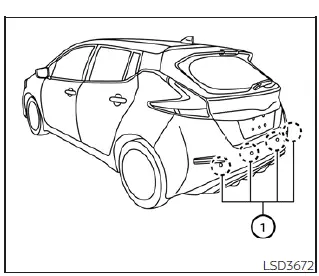
The RAB system utilizes a series of dedicated parking sensors (1) integrated into the rear bumper of your Nissan Leaf to identify and monitor potential obstacles positioned behind the vehicle.
Note: While you can independently and temporarily disable the audible sonar parking function through the vehicle settings, the core RAB system will remain active to provide emergency braking assistance.
 Conventional (fixed speed) cruise control mode
Note: In the conventional (fixed speed) cruise control mode, the ProPILOT Assist system provides no approach warnings, automatic emergency braking, or active steering assistance.
This mode allows ...
 RAB system operation
RAB warning light and dedicated system warning indicator
Steering-wheel-mounted control switches (located on the left side)
Center infotainment and in ...
Other materials:
Power supply and ground circuit
Diagnosis Procedure
1.CHECK FUSES AND FUSIBLE LINK
Check that the following IPDM E/R fuses or fusible links are not blown.
Is the fuse fusing?
YES >> Replace the blown fuse or fusible link after repairing the affected
circuit if a fuse or fusible link is
blown.
NO >> GO TO 2. ...
Headlamp washer circuit
Component Function Check
1.CHECK HEADLAMP WASHER OPERATION
CONSULT-III ACTIVE TEST
1. Select “HEAD LAMP WASHER� of IPDM E/R active test item.
2. With operating the test item, check headlamp operation.
On :Headlamp washer ON operation
Off :Stop the headlamp washer.
Is headlamp washer opera ...
All defogger system dose not operate
Description
Rear window defogger and door mirror defogger do not operate when rear window
defogger switch operated.
Diagnosis Procedure
1.CHECK REAR WINDOW DEFOGGER SWITCH
Check rear window defogger switch.
Refer to DEF-26, "WITH AUTO A/C : Component Function Check" (With Auto A/C ...
