
Nissan Leaf 2018-2025 (ZE1) Owner's Manual : RAB system operation
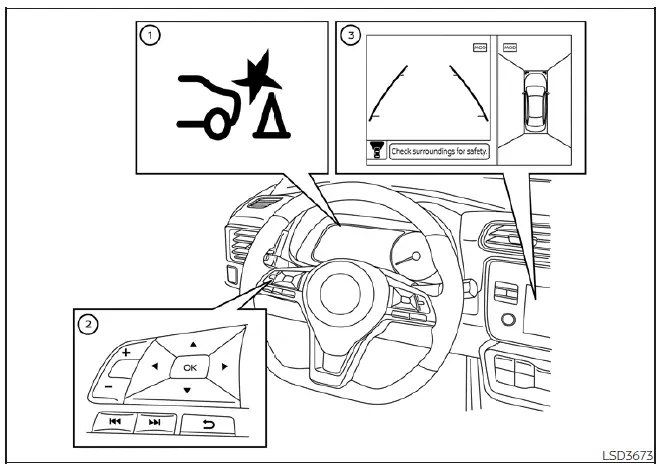
- RAB warning light and dedicated system warning indicator
- Steering-wheel-mounted control switches (located on the left side)
- Center infotainment and information display
The RAB system is active whenever the shift lever is placed in the R (Reverse) position and the vehicle is traveling at a speed below approximately 9 mph (15 km/h).
If the system detects an imminent risk of collision with an obstacle while you are reversing, it will provide clear alerts: the RAB system warning indicator will flash on the vehicle information display, a distinct red frame will appear on the center display (specifically for vehicles equipped with the Intelligent Around View Monitor system), and an audible chime will sound three times. Simultaneously, the system will automatically apply the brakes. Following this automated emergency braking event, you must immediately depress the brake pedal yourself to ensure the vehicle remains stationary and to maintain necessary brake pressure.
Note:
- The vehicle’s brake lights will illuminate automatically when the RAB system performs an emergency stop.
- You may hear a distinct mechanical noise when the brakes are applied by the system; this is normal operation and does not indicate a system malfunction.
Turning the RAB system on/off
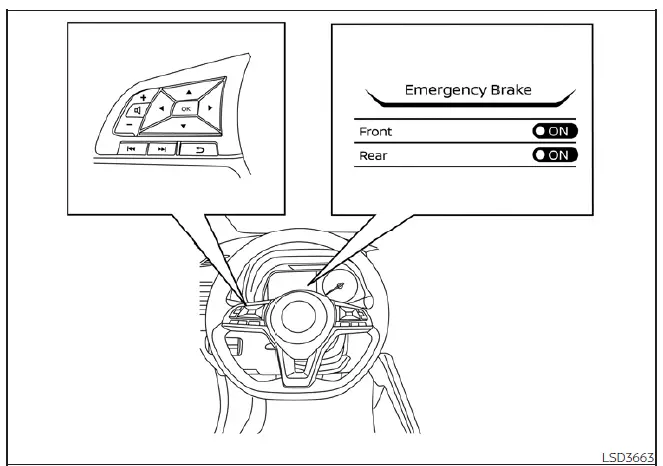
To customize the status of the Rear Automatic Braking system, follow these steps using the steering wheel controls:
1. Press the  button repeatedly until the "Settings" menu appears on the vehicle information display, then press the OK button. Navigate using the
  buttons to highlight "Driver Assistance," and confirm your choice by pressing OK.
2. Select the "Emergency Brake" option and press the OK button.
3. Select "Rear" and use the OK button to toggle the system between the ON and OFF states.
When you deactivate the RAB system, the corresponding warning light will illuminate to confirm that the feature is currently disabled.
Note: For your continued safety, the RAB system in your Nissan Leaf is configured to turn on automatically every time you restart the EV system.
 Rear Automatic Braking (RAB)
WARNING
Failure to strictly adhere to the safety warnings and operational instructions regarding the Rear Automatic Braking (RAB) system in your Nissan Leaf could result in a collision, causing s ...
 RAB system limitations
WARNING
The following points outline critical limitations of the Rear Automatic Braking (RAB) system in your Nissan Leaf. Failure to understand and respect these operational boundaries, or ignori ...
Other materials:
B1115 satellite sensor RH
DTC Logic
DTC DETECTION LOGIC
DTC CONFIRMATION PROCEDURE
1.CHECK SELF-DIAG RESULT
With CONSULT-III
1. Turn ignition switch ON.
2. Perform “Self Diagnostic Result� mode of “AIR BAG� using CONSULT-III.
Without CONSULT-III
1. Turn ignition switch ON.
2. Check the air bag warning la ...
Precaution for Supplemental Restraint System (SRS) "AIR BAG" and "SEAT BELT
PRE-TENSIONER"
The Supplemental Restraint System such as “AIR BAG� and “SEAT BELT PRE-TENSIONER�,
used along
with a front seat belt, helps to reduce the risk or severity of injury to the
driver and front passenger for certain
types of collision. Information necessary to service the system safely is
...
Exploded View
1. Main muffler
2. Mounting rubber
3. Ring gasket
4. Center tube
5. Exhaust gas temperature sensor 2
6. Diesel particulate filter assembly
7. Gasket
8. Stud bolt
9. Diesel particulate filter inlet tube
10. Gasket
A. To exhaust manifold
B. To pressure hose
: N·m (kg-m, ft-lb)
: ...
