
Nissan Leaf 2018-2025 (ZE1) Owner's Manual : Conventional (fixed speed) cruise control mode
Note: In the conventional (fixed speed) cruise control mode, the ProPILOT Assist system provides no approach warnings, automatic emergency braking, or active steering assistance.
This mode allows you to maintain a steady driving speed between 25 and 90 mph (40 to 144 km/h) without needing to keep your foot on the accelerator pedal, offering a traditional cruise control experience in your Nissan Leaf.
WARNING
- In conventional (fixed speed) cruise control mode, the system does not detect vehicles ahead or calculate vehicle-to-vehicle distance. Consequently, no warning chime will sound if you approach a slower vehicle too closely.
- You must remain vigilant and pay special attention to the distance between your Nissan Leaf and the traffic ahead to prevent the risk of a collision.
- Always verify your current system status and settings in the Intelligent Cruise Control (ICC) system display.
- Do not engage the conventional (fixed speed) cruise control mode under the following driving conditions:
- When it is not possible to maintain a constant, safe speed.
- In heavy, stop-and-go traffic or in areas where traffic speed varies significantly.
- On winding, mountainous, or excessively hilly roads.
- On slippery or low-traction road surfaces, including those affected by rain, snow, or ice.
- In areas with extreme crosswinds that could affect vehicle stability.
- Failure to adhere to these restrictions could lead to a loss of vehicle control and result in a serious accident.
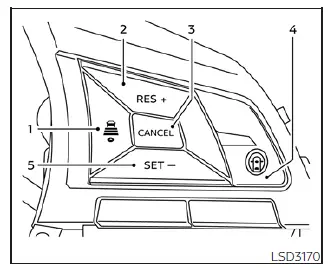
Conventional (fixed speed) cruise control switches
- DISTANCE switch: (Note: Distance settings are primarily utilized in vehicle-to-vehicle distance control mode).
- Long
- Middle
- Short
- RES+ switch: Resumes your previously set cruising speed or increases the speed incrementally.
- CANCEL switch: Deactivates the cruise control system without erasing the previously set speed from the memory.
- ProPILOT Assist switch: The master control used to activate or toggle between cruise control modes.
- SET- switch: Sets your desired cruising speed or reduces the speed incrementally.
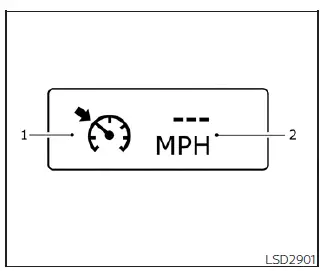
Conventional (fixed speed) cruise control mode display and indicators
System status is clearly visible within the Nissan Leaf vehicle information display:
- Cruise indicator: Communicates the condition of the ICC system through color coding:
- Cruise control ON indicator (gray): Indicates the ProPILOT Assist master switch is active.
- Cruise control SET indicator (green): Confirms that your cruising speed is currently set and active.
- Cruise control warning (yellow): Indicates a detected malfunction within the ICC system.
- Set vehicle speed indicator: Displays your chosen cruising speed (in km/h for Canadian models).
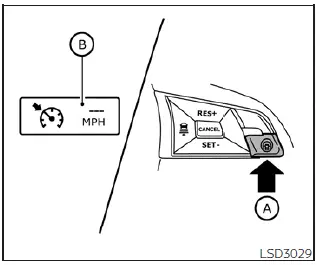
Operating conventional (fixed speed) cruise control mode
To activate the conventional (fixed speed) cruise control mode, press and hold the ProPILOT Assist switch (A) for approximately 1.5 seconds.
Upon activation, the conventional cruise control display and indicators (B) will appear in the instrument cluster.
After the 1.5-second hold, the standard ICC vehicle-to-vehicle display will turn off, and the cruise indicator will appear, signaling that you are ready to set your desired speed. Pressing the ProPILOT Assist switch again will turn the system off completely. The system also resets to off whenever the vehicle power switch is placed in the OFF position.
To switch back to the standard ICC system, simply release the ProPILOT Assist switch, then quickly press and release it again to enter the vehicle-to-vehicle distance control mode.
CAUTION
To prevent the accidental engagement of cruise control while driving your Nissan Leaf, always ensure the ProPILOT Assist switch is turned off when you are not actively using the ICC system.
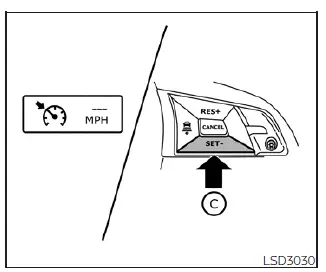
To set your cruising speed, accelerate to your desired pace, then press and release the SET- switch  . The cruise indicator will turn green, and the set vehicle speed will appear on the display. You may then remove your foot from the accelerator, and your Nissan Leaf will maintain the chosen speed.
- If you need to pass another vehicle, press the accelerator pedal. Once you release the pedal, the system will automatically return the vehicle to the previously set speed.
- Be aware that the vehicle may struggle to maintain the exact set speed when traversing steep inclines or declines. In these instances, you should manually manage your speed using the accelerator or brake pedals.
To cancel the preset speed, utilize any of the following methods:
1. Press the CANCEL switch; the vehicle speed indicator will dim, indicating standby.
2. Tap the brake pedal; the system will immediately disengage, and the speed indicator will turn off.
3. Turn the ProPILOT Assist switch off; all cruise and speed indicators will disappear.
To increase your cruising speed, use one of these three methods:
1. Accelerate manually. Once you reach the new target speed, press and release the SET- switch to lock it in.
2. Press and hold the RES+ switch. Release the switch once the Nissan Leaf reaches your desired higher speed.
3. Quickly tap the RES+ switch to increase the set speed by approximately 1 mph (1 km/h) per tap.
To decrease your cruising speed, use one of these three methods:
1. Tap the brake pedal to slow down. When you reach the desired lower speed, press and release the SET- switch.
2. Press and hold the SET- switch. Release the switch once the vehicle decelerates to your target speed.
3. Quickly tap the SET- switch to decrease the set speed by approximately 1 mph (1 km/h) per tap.
To resume your previously stored speed, press and release the RES+ switch. The system will resume the last set speed once the Nissan Leaf is traveling over 25 mph (40 km/h).
 Radio frequency statement
For USA
This device complies with Part 15 of the FCC Rules. Its operation is subject to the following two conditions:
1. This device must not cause harmful interference; and
2. This dev ...
 Rear Automatic Braking (RAB)
WARNING
Failure to strictly adhere to the safety warnings and operational instructions regarding the Rear Automatic Braking (RAB) system in your Nissan Leaf could result in a collision, causing s ...
Other materials:
Reverse idler shaft and gear
Exploded View
1. Reverse output gear
2. Snap ring
3. Reverse baulk ring
4. Return spring
5. Needle bearing
6. Seal washer
7. Reverse idler shaft
8. Spacer
9. Reverse input gear
10. Lock washer
11. Spring washer
: Replace the parts as a set.
: Always replace after every
disass ...
Motor compartment check locations
Fuse/Fusible link holder
Brake fluid reservoir
12-volt battery
Fuse holder
Windshield-washer fluid reservoir
Fuse/Fusible link holder
Coolant reservoir cap
NOTE:
Depending on your specific model and ...
Exhaust valve timing control
Exhaust valve timing control : System Diagram
Exhaust valve timing control: System Description
INPUT/OUTPUT SIGNAL CHART
SYSTEM DESCRIPTION
This mechanism hydraulically controls cam phases continuously with the fixed
operating angle of the exhaust
valve.
The ECM receives signals such ...
