
Nissan Leaf 2018-2025 (ZE1) Owner's Manual : ProPILOT Assist system operation
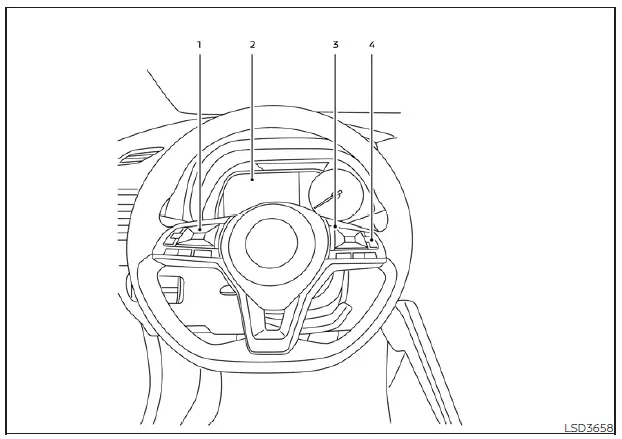
- Steering-wheel-mounted control (left): Dedicated to managing vehicle settings and menu navigation.
- Vehicle information display: The primary interface for viewing system status, alerts, and active driver assistance graphics.
- Steering-wheel-mounted control (right): Housing the ProPILOT Assist cruise and distance configuration switches.
- ProPILOT Assist switch: The master toggle for system engagement.
The ProPILOT Assist system integrates two primary, sophisticated functions designed to support the driver of the Nissan Leaf:
1. Intelligent Cruise Control (ICC)
The ICC system provides advanced speed management and can be configured into one of two distinct modes:
- Conventional (fixed speed) cruise control mode: Designed for maintaining a steady, driver-selected speed without active distance monitoring.
Steering Assist functionality is disabled while the system is operating in the conventional (fixed speed) cruise control mode.
- Vehicle-to-vehicle distance control mode: The ICC system monitors the road ahead and maintains a driver-selected following gap from the lead vehicle within a velocity range of 0 to 90 mph (0 to 144 km/h). Drivers can set their preferred cruising speed between 20 to 90 mph (30 to 144 km/h). When the vehicle in front begins to decelerate, your Nissan Leaf will automatically and smoothly adjust its speed, eventually coming to a complete halt if the lead vehicle stops. When fully stopped, the ICC system proactively maintains the necessary braking force to hold your vehicle in a stationary position.
If your vehicle is stationary for less than 3 seconds and the lead vehicle begins to pull away, the Nissan Leaf will resume movement automatically.
- If your vehicle remains at a standstill for more than 3 seconds, you must prompt the system to resume following by either pressing the RES+ switch or applying light pressure to the accelerator pedal.
- In scenarios where no lead vehicle is detected within your defined following distance, the vehicle will accelerate to and maintain the specific speed you have programmed. Please note that this speed-only mode requires a minimum setting of 20 mph (30 km/h) for activation.
Even if you have manually disabled the Automatic Emergency Braking (AEB) with Pedestrian Detection through the "Settings" menu, the system will automatically re-enable AEB with Pedestrian Detection whenever the ICC function is active to provide an added layer of safety.
2. Steering Assist
The Steering Assist function provides subtle, continuous steering torque to help keep your Nissan Leaf precisely centered within its detected travel lane.
When there is no lead vehicle present, Steering Assist is programmed to remain inactive at speeds below 37 mph (60 km/h).
ProPILOT Assist switches
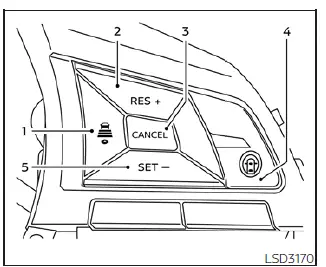
- DISTANCE switch: Adjusts the following gap between your vehicle and the one ahead. You can toggle between three presets:
- Long
- Middle
- Short
- RES+ switch: Restores your previously memorized set speed or allows you to increase the target speed incrementally.
- CANCEL switch: Safely deactivates the active ProPILOT Assist system functions without clearing the current settings.
- ProPILOT Assist switch: The master toggle used to power the entire ProPILOT Assist system on or off.
- SET- switch: Captures your current speed as the cruise target or allows you to decrease the set speed incrementally.
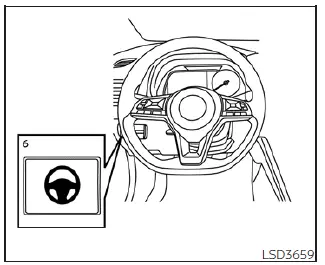
- Steering Assist switch: A dedicated toggle for enabling or disabling the lane-centering Steering Assist function.
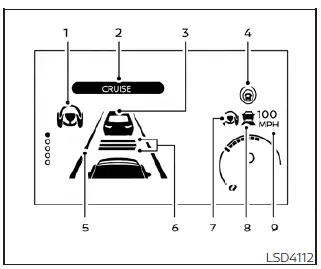
The ProPILOT Assist system display and indicators
- Steering Assist indicator: Provides real-time visual feedback on the operational status of the Steering Assist function through color-coded alerts on your Nissan Leaf display:
- Gray: Steering Assist is in standby mode and ready for engagement.
- Green: Steering Assist is actively providing steering torque to help keep the vehicle centered.
- Orange: Indicates a system malfunction requiring professional inspection.
- ProPILOT Assist activation: Illuminates on the instrument cluster to confirm the system has been successfully engaged.
- Vehicle ahead detection indicator: A clear visual signal confirming whether the front-mounted sensors have successfully locked onto a lead vehicle.
- ProPILOT Assist status indicator: Reflects the overall system readiness:
- White: The ProPILOT Assist system is powered on but currently in standby mode.
- Blue: The system is fully active and providing driving assistance.
- Lane marker indicator: Displays the system's ability to perceive lane boundaries on the road:
- No markers displayed: Indicates that the Steering Assist function is currently disabled.
- Gray: The system is on, but no lane markings are currently detected.
- Green: Lane markings are successfully detected, and the system is actively monitoring lane position.
- Yellow: Alerts the driver that the system has detected the vehicle drifting out of its current lane.
- Set distance indicator: Provides a visual representation of the following distance gap you have selected for your Nissan Leaf.
- Steering Assist status indicator/warning: Communicates the status and health of the Steering Assist feature:
- No indicator: The feature is turned off.
- Gray: System is in standby mode.
- Green: System is actively assisting with steering inputs.
- Yellow: Signals a system malfunction that necessitates immediate attention.
- Speed control status indicator/warning: Uses distinct colors and icons to provide status updates on the Intelligent Cruise Control (ICC) of your Nissan Leaf:
- Gray: ICC is currently in standby.
- Solid green
 : ICC (distance control mode) is active. The system has detected a vehicle ahead and is automatically adjusting your speed to match the lead vehicle's pace.
 - Green outline
 : ICC (maintain speed mode) is active. No lead vehicle is detected, and your Nissan Leaf is maintaining your pre-selected cruising speed.
 - Orange: A malfunction has been detected within the ICC system.
- Set vehicle speed indicator: Clearly displays the specific speed value currently set for your cruise control.
Turning the conventional (fixed speed) cruise control mode on
When utilizing the conventional (fixed speed) cruise control mode in your Nissan Leaf, please be aware that the ProPILOT Assist system does not provide approach warnings, automatic emergency braking, or steering assistance.
To engage the conventional (fixed speed) cruise control mode, press and hold the ProPILOT Assist steering wheel switch for approximately 1.5 seconds. This action overrides the standard ProPILOT functionality, allowing you to maintain a constant speed without active distance or steering support.
 ProPILOT Assist
WARNING
Failure to adhere strictly to the warnings and operational instructions regarding the proper use of the ProPILOT Assist system in your Nissan Leaf could result in loss of vehicle control, ...
 Operating ProPILOT Assist
Automatic Emergency Braking (AEB) with Pedestrian Detection
Lane Departure Warning (LDW) and Intelligent Lane Intervention (I-LI)
Blind Spot Warning ( ...
Other materials:
Evaporative emission system
Inspection
1. Visually inspect EVAP vapor lines for improper attachment and for cracks,
damage, loose connections,
chafing and deterioration.
2. Check EVAP canister as follows:
a. Block port (B). Orally blow air through port (A).
Check that air flows freely through port (C).
b. Block port (A ...
P2100, P2103 throttle control motor relay
DTC Logic
DTC DETECTION LOGIC
DTC CONFIRMATION PROCEDURE
1.PRECONDITIONING
If DTC Confirmation Procedure has been previously conducted, always turn
ignition switch OFF and wait at
least 10 seconds before conducting the next test.
TESTING CONDITION:
Before performing the following proced ...
P1611 ID discord, IMMU-ECM
DTC Logic
DTC DETECTION LOGIC
DTC CONFIRMATION PROCEDURE
1.PERFORM DTC CONFIRMATION PROCEDURE
1. Turn ignition switch ON.
2. Check DTC in “Self Diagnostic Result� mode of “ENGINE� using CONSULT-III.
Is DTC detected?
YES >> Refer to SEC-193, "Diagnosis Procedure".
...
