
Nissan Juke Service and Repair Manual : Power transistor
Exploded View
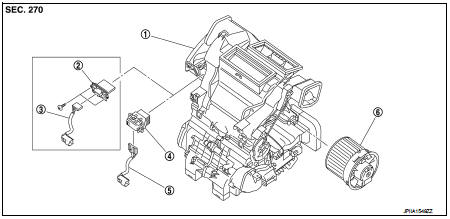
1. A/C unit assembly
2. Blower fan resistor*1
3. Sub harness*1
4. Power transistor*2
5. Sub harness*2
6. Blower motor
• *1: Manual air conditioner • *2: Automatic air conditioner
Removal and Installation
REMOVAL
1. Remove instrument panel assembly. Refer to IP-13, "Removal and
Installation". (LHD models)
2. Remove glove box assembly. Refer to IP-13, "Removal and Installation". (RHD
models)
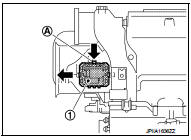
3. Disconnect power transistor connector.
4. Slide power transistor (1) to the left while pressing lever (A), and then remove power transistor.
INSTALLATION
Install in the reverse order of removal.
 Refrigerant pressure sensor
Exploded View
Refer to HA-94, "Exploded View".
Removal and Installation
REMOVAL
Refer to HA-96, "REFRIGERANT PRESSURE SENSOR : Removal and Installation".
INSTALLATION
Insta ...
 Door motor
Exploded View
LEFT SIDE
1. A/C unit assembly
2. Intake door lever
3. Intake door motor
4. Air mix door motor
5. Upper air mix door rod
6. Upper air mix door lever
7. Lower air mix door l ...
Other materials:
Camshaft
*: Total indicator reading
Valve Lifter
Valve Clearance
*:Approximately 80°C (176°F)
Available Valve Lifter
...
Precaution Necessary for Steering Wheel Rotation after Battery Dis
NOTE:
• Before removing and installing any control units, first turn the ignition
switch to the LOCK position, then disconnect
both battery cables.
• After finishing work, confirm that all control unit connectors are connected
properly, then re-connect both
battery cables.
• Always us ...
P0171 fuel injection system function
DTC Logic
DTC DETECTION LOGIC
With the Air/Fuel Mixture Ratio Self-Learning Control, the actual mixture
ratio can be brought closely to the
theoretical mixture ratio based on the mixture ratio feedback signal from the
A/F sensors 1. The ECM calculates
the necessary compensation to correct th ...
