
Nissan Juke Service and Repair Manual : Power supply and ground circuit
Diagnosis Procedure
1.CHECK FUSES AND FUSIBLE LINK
Check that the following IPDM E/R fuses or fusible links are not blown.

Is the fuse fusing? YES >> Replace the blown fuse or fusible link after repairing the affected circuit if a fuse or fusible link is blown.
NO >> GO TO 2.
2.CHECK POWER SUPPLY CIRCUIT
1. Turn the ignition switch OFF.
2. Disconnect IPDM E/R connector.
3. Check voltage between IPDM E/R harness connector and the ground.
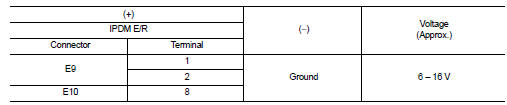
Is the measurement value normal? YES >> GO TO 3.
NO >> Repair the harness or connector.
3.CHECK GROUND CIRCUIT
Check continuity between IPDM E/R harness connectors and the ground.

Does continuity exist? YES >> INSPECTION END
NO >> Repair the harness or connector.
 B2099 ignition relay off stuck
Description
• IPDM E/R operates the ignition relay when it receives an ignition switch ON
signal from BCM via CAN communication.
• Turn the ignition relay OFF by pressing the push-button ignit ...
 Removal and installation
IPDM E/R
Exploded View
1. IPDM E/R cover A
2. IPDM E/R
3. IPDM E/R cover B
Removal and Installation
CAUTION:
IPDM E/R integrated relays are not serviceable parts, and must not be removed
...
Other materials:
Unit removal and installation
Transaxle assembly
Exploded View
1. Transaxle assembly
: Refer to "INSTALLATION" in
TM-30, "Removal and Installation" for the locations and tightening torque.
Removal and Installation
CAUTION:
Never reuse CSC (Concentric Slave Cylinder). Because CSC slides back to the
...
P0139 HO2S2
DTC Logic
DTC DETECTION LOGIC
The heated oxygen sensor 2 has a much longer switching time
between rich and lean than the air fuel ratio (A/F) sensor 1. The oxygen
storage capacity of the three way catalyst 1 causes the longer
switching time. To judge the malfunctions of heated oxygen sensor
2, ...
Precautions For Refrigerant System Service
GENERAL REFRIGERANT PRECAUTION
WARNING:
• Never breathe A/C refrigerant and lubricant vapor or mist. Exposure may
irritate eyes, nose and
throat. Use only approved recovery/recycling equipment to discharge HFC-134a
(R-134a) refrigerant.
Ventilate work area before resuming service if acci ...
