
Nissan Leaf 2018-2025 (ZE1) Owner's Manual : Windows
Power windows
WARNING
- Ensure that all passengers have their hands, fingers, and other belongings safely inside the vehicle while it is in motion and before operating the controls to close the windows. It is highly recommended to use the integrated window lock switch to prevent any unexpected or accidental use of the power windows by children or other occupants.
- To minimize the risk of serious injury or death caused by the unintended operation of the vehicle or its systems—including dangerous entrapment in a moving window or accidental door lock activation—never leave young children, individuals who require assistance, or pets unattended inside the cabin. Furthermore, the internal temperature of a completely closed Nissan Leaf can escalate rapidly on a warm day, quickly reaching hazardous levels that pose an immediate, significant risk of heatstroke, severe injury, or death to people and animals.
The electric power windows are engineered to operate seamlessly when the primary power switch is set to either the ACC or ON position. For added convenience, the system also remains active for approximately 45 seconds after the power switch has been transitioned to the OFF position. However, if either the driver's door or the front passenger's door is opened during this 45-second grace period, power to all windows is immediately canceled to secure the vehicle.
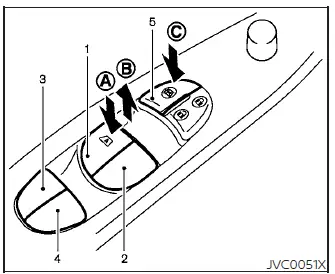
- Driver side automatic one-touch window switch
- Front passenger side window switch
- Rear left passenger side window switch
- Rear right passenger side window switch
- Master window safety lock button
Main power window switch (driver's side)
To manually lower or raise any window, simply push down on side A or pull up on side B of the corresponding control switch and hold it in place until the glass reaches your desired position. The centralized main switches located on the driver's door armrest give you full command to open or close all four windows in your Nissan Leaf simultaneously.
Locking passengers' windows
When you engage the master safety lock button C by pushing it in, the passenger switches are deactivated, meaning only the driver's side window can be operated. To restore full functionality and passenger control to the rest of the Nissan Leaf cabin, simply press the lock button a second time to release it.
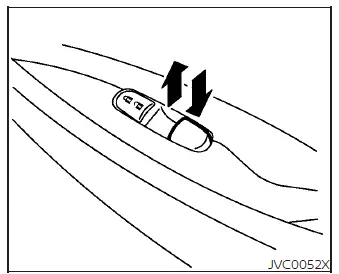
Passenger side power window switch
The dedicated passenger side power window switch is designed to operate only its corresponding front window. To lower the window to let fresh air into your Nissan Leaf, or to close it up, push down or pull up on the individual switch and hold it until the glass adjusts perfectly.
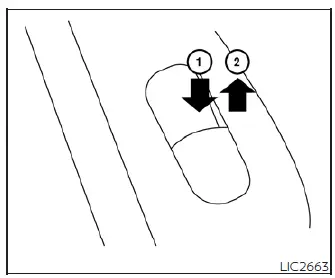
Rear power window switch
The rear passenger power window switches are configured to independently adjust only their respective left or right side windows. To lower the rear glass, push the switch and hold it downward in position 1. To raise the window and seal the rear cabin of your Nissan Leaf, pull the edge of the switch upward in direction 2.
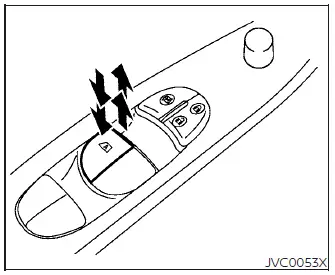
Automatic operation
The highly convenient automatic one-touch operation feature is available exclusively for the power window switch that features an "A" mark clearly stamped on its surface.
To fully open or close the window with a single touch, completely press down or pull up the switch and release it immediately; there is no need to hold the switch in place. The window will intelligently continue moving automatically until it is fully lowered or raised. If you need to stop the window at an intermediate position during this sequence, simply tap or lift the switch briefly in the opposite direction.
Alternatively, a light, partial push or pull on the switch allows for precise manual adjustments, causing the glass to move open or closed only until the driver releases the switch.
WARNING
Please note that there are small physical clearance gaps remaining immediately before the window reaches its fully closed position where objects cannot be reliably detected by the sensors. It is vital to ensure that all passengers have their hands, fingers, and belongings safely inside the cabin before closing the window completely.
To maximize occupant safety, if the electronic control unit detects an obstruction caught in the window frame while the glass is rolling up, the automatic anti-pinch system triggers and the window will be immediately lowered to prevent injury.
This protective auto-reverse safety function can be successfully activated when the window is being rolled up via automatic operation, provided the vehicle's power switch is in the active ON position, or during the 45-second grace period after the power switch has been transitioned to the OFF position.
Depending on your immediate driving environment or rough road conditions, the sensitive auto-reverse function may occasionally trigger unintentionally if the vehicle experiences a sharp impact, severe vibration, or heavy load that the system interprets as an object being caught in the window.
If the windows do not close automatically
If the automatic closing function of your power windows fails to operate properly or stops responding after a power disruption, follow this standard step-by-step calibration procedure to reinitialize and restore your Nissan Leaf power window system.
1. Begin by placing the vehicle's main power switch firmly in the ON position.
2. Ensure that the corresponding side passenger or driver door is fully closed.
3. Push down on the control switch to open the window completely, keeping the glass rolled down all the way.
4. Pull upward on the power window switch and hold it continuously to close the window, and make sure to continue holding the switch in the up position for more than 3 seconds after the glass has closed completely.
5. Release your grip on the power window switch. Test the system by executing a standard automatic one-touch command to confirm that the calibration and system initialization are complete.
Should the automatic one-touch functionality fail to operate correctly even after completing this configuration procedure, your power window regulators may require professional adjustment.
For optimal diagnosis and expert technician support, it is highly recommended that you visit an authorized, NISSAN certified LEAF dealer to have this technical service completed.
 Cup holders
Front
CAUTION
Avoid abrupt starting, sharp cornering, and sudden braking when the central cup holder is being used to prevent spilling your beverages. If ...
 Interior lights
The interior illumination system can be set to manually turn on via switch position 1, allowing the cabin lights to remain lit regardless of whether the doors are open or closed. ...
Other materials:
Rocker cover
Exploded View
1. Blow-by hose
2. Rocker cover
3. Gasket
4. Camshaft position sensor
5. O-ring
A. To turbocharger air inlet pipe
: N·m (kg-m, in-lb)
: Always replace after every
disassembly.
Removal and Installation
REMOVAL
1. Remove air cleaner case. Refer to EM-280, "Explode ...
Navigation system
Symptom Table
RELATED TO NAVIGATION
NOTE:
Combined part of AV switch and NAVI control unit.
RELATED TO HANDS-FREE PHONE
• Check that the cellular phone is the corresponding type (Bluetooth™
enabled) and Bluetoothâ„¢ turns ON.
• Malfunction may occur due to the version change of the p ...
High voltage precautions
High-voltage components
WARNING
The advanced electric vehicle (EV) system in your Nissan Leaf operates using high-voltage electricity, reaching levels up to approximately 400 volts DC. Please be aware that these internal components can remain extremely hot during operation, immed ...
