
Nissan Leaf 2018-2025 (ZE1) Owner's Manual : Interior lights
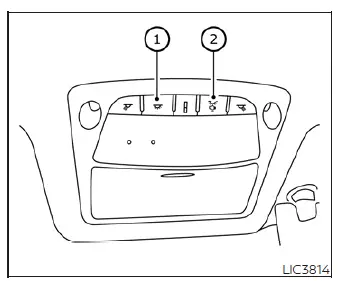
The interior illumination system can be set to manually turn on via switch position 1, allowing the cabin lights to remain lit regardless of whether the doors are open or closed. To conserve energy, these lights will automatically go off after a predetermined period of time unless the main power switch of your Nissan Leaf is placed in the active ON position while any passenger door remains open.
For seamless everyday convenience, the interior lights can be set to operate automatically when any of the vehicle doors are opened by selecting switch position 2. If you prefer to completely turn off the interior lights even when a door is left open, simply toggle the switch; the cabin illumination will then remain completely deactivated, regardless of any physical door position.
The illuminated cabin lights will immediately go off when the vehicle power switch is placed in the ON position, or as soon as the driver's door is securely closed and locked from the outside. To prevent accidental drainage, the system is engineered so that the lights will also safely go off after a specific period of time even when the passenger doors are left wide open.
CAUTION
Do not leave the interior illumination active for extended periods of time while the vehicle's primary power switch is remaining in the auxiliary OFF position.
Leaving these lamps illuminated without the vehicle being active could result in an unexpectedly discharged 12-volt auxiliary battery, leaving your electric vehicle unable to initialize system start.
Console light
The integrated console light is programmed to turn on automatically whenever the exterior parking lights or main headlights are illuminated, casting a subtle glow over the center controls of your Nissan Leaf.
The ambient console light brightness can be precisely adjusted according to your preference by using the illumination brightness control sub-menu located within the central vehicle information display cluster.
Map lights
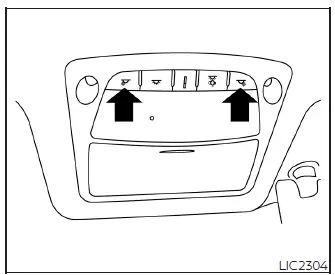
Press the individual localized button to instantly turn the front driver or passenger map lights on for directional reading illumination.
To turn them off when no longer needed, simply press the exact same button again to release the control link.
Room light
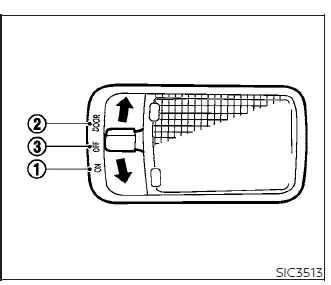
The main cabin room light switch features a versatile three-position mechanical toggle sliding across ON, DOOR, and OFF settings.
ON position
When the control switch is pushed into the permanent ON position 1, the overhead ceiling light will illuminate continuously to light up the rear cabin of your Nissan Leaf.
DOOR position
When the control switch is toggled into the central DOOR position 2, the main ceiling light is primed to illuminate automatically under the following explicit parameters:
- Whenever the vehicle power switch is placed in the LOCK position:
- The rear overhead light remains on for approximately 15 seconds to assist your exit.
- When the passenger doors are unlocked by pushing the remote key fob UNLOCK
 button or by pressing the exterior door handle request switch, while the primary power switch is in the LOCK position:
- The cabin illumination remains on for a period of about 15 seconds.
- When any passenger door is opened and subsequently closed while the main power switch resides in the LOCK position:
- The courtesy timer keeps the light activated for about 15 seconds before fading out.
- When any cabin door is physically opened while the vehicle power switch is set to the active ACC or ON position:
- The light remains on constantly while the door stays open.
As soon as that specific door is fully closed, the ceiling light turns off immediately to prevent driver distraction.
- The light remains on constantly while the door stays open.
To protect your auxiliary systems, the interior light will automatically turn off after 10 minutes of continuous inactivity if it accidentally remains illuminated, effectively preventing the vehicle's 12-volt battery from becoming completely discharged.
OFF position
When the control switch is shifted into the manual OFF position 3, the overhead ceiling light will not illuminate at all, completely overriding any door or lock trigger conditions.
Cargo light
The integrated luggage area light illuminates automatically the moment the rear hatch is lifted open, providing convenient visibility for loading items. When the rear hatch is pushed down and closed completely, this cargo light goes off automatically to secure the storage compartment of your Nissan Leaf.
 Windows
Power windows
WARNING
Ensure that all passengers have their hands, fingers, and other belongings safely inside the vehicle while it is in motion and before operating the controls t ...

Other materials:
Precaution for Supplemental Restraint System (SRS) "AIR BAG" and "SEAT BELT
PRE-TENSIONER"
The Supplemental Restraint System such as “AIR BAG� and “SEAT BELT PRE-TENSIONER�,
used along
with a front seat belt, helps to reduce the risk or severity of injury to the
driver and front passenger for certain
types of collision. Information necessary to service the system safely is
...
Speed limiter
SPEED LIMITER : Switch Name and Function
SWITCHES AND INDICATORS
NOTE:
Shared with ASCD switch.
1. Speed limiter indicator
2. SET indicator
3. Set speed indicator
4. CANCEL switch
5. RES / + switch
6. SET / − switch
7. Speed limiter MAIN Switch
8. ASCD MAIN switch
A. On the ...
P0487 EGR volume control valve
DTC Logic
DTC DETECTION LOGIC
Diagnosis Procedure
1.CHECK EGR VOLUME CONTROL VALVE CONTROL CIRCUIT
1. Turn ignition switch OFF.
2. Disconnect EGR volume control valve harness connector and ECM harness
connector.
3. Check the continuity between EGR volume control valve terminal harness
co ...
