
Nissan Juke Service and Repair Manual : P1614 chain of IMMU-KEY
DTC Logic
DTC DETECTION LOGIC

DTC CONFIRMATION PROCEDURE
1.PERFORM DTC CONFIRMATION PROCEDURE
1. Turn ignition switch ON.
2. Check DTC in “Self Diagnostic Result� mode of “ENGINE� using CONSULT-III.
Is DTC detected? YES >> Refer to SEC-195, "Diagnosis Procedure".
NO >> INSPECTION END
Diagnosis Procedure
1.CHECK FUSE
Check that the following IPDM E/R fuse is not blown.

Is the fuse fusing? YES >> Replace the blown fuse after repairing the affected circuit if a fuse is blown.
NO >> GO TO 2.
2.CHECK NATS ANTENNA AMP. INSTALLATION
Check NATS antenna amp. Installation. Refer to SEC-233, "Removal and Installation".
Is the inspection result normal? YES >> GO TO 3.
NO >> Reinstall NATS antenna amp. correctly.
3.CHECK IGNITION KEY
Start engine using another registered ignition key.
Does the engine start? YES-1 >> Replace ignition key.
YES-2 >> Perform initialization of BCM and registration of all ignition keys using CONSULT-III. For initialization and registration procedures, refer to CONSULT-III Operation Manual NATS-IVIS/NVIS.
NO >> GO TO 4.
4.CHECK NATS ANTENNA AMP. POWER SUPPLY
1. Turn ignition switch OFF.
2. Disconnect NATS antenna amp. connector.
3. Check voltage between NATS antenna amp. harness connector and ground.

Is the inspection result normal? YES >> GO TO 6.
NO >> GO TO 5.
5.CHECK NATS ANTENNA AMP. POWER SUPPLY CIRCUIT
1. Disconnect IPDM E/R connector.
2. Check continuity between IPDM E/R harness connector and NATS antenna amp. connector.

3. Check continuity between IPDM E/R harness connector and ground.

Is the inspection result normal? YES >> Replace IPDM E/R. Refer to PCS-63, "Removal and Installation".
NO >> Repair or replace harness.
6.CHECK NATS ANTENNA AMP. GROUND CIRCUIT
Check continuity between NATS antenna amp. harness connector and ground.

Is the inspection result normal? YES >> GO TO 7.
NO >> Repair or replace harness.
7.CHECK NATS ANTENNA AMP. SIGNAL
1. Connect BCM connector and NATS antenna amp. connector.
2. Check voltage between BCM harness connector and ground.
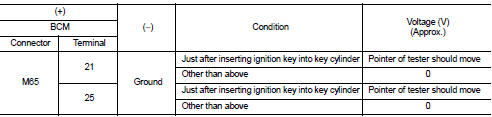
Is the inspection result normal? YES >> GO TO 9.
NO >> GO TO 8.
8.CHECK NATS ANTENNA AMP. SIGNAL CIRCUIT
1. Disconnect NATS antenna amp. connector.
2. Check continuity between BCM harness connector and NATS antenna amp. harness connector.

3. Check continuity between BCM harness connector and ground.

Is the inspection result normal? YES >> Replace NATS antenna amp. Refer to SEC-233, "Removal and Installation".
NO >> Repair or replace harness.
9.CHECK INTERMITTENT INCIDENT
Refer to GI-42, "Intermittent Incident".
>> INSPECTION END
 P1612 chain of ECM-IMMU
DTC Logic
DTC DETECTION LOGIC
NOTE:
• If DTC P1612 is displayed with DTC U1000 (for BCM), first perform the trouble
diagnosis for DTC U1000.
Refer to BCS-153, "DTC Logic".
• If ...
 P1615 diffrence of key
DTC Logic
DTC DETECTION LOGIC
DTC CONFIRMATION PROCEDURE
1.PERFORM DTC CONFIRMATION PROCEDURE
1. Turn ignition switch ON.
2. Check DTC in “Self Diagnostic Result� mode of “ENGINE� using ...
Other materials:
B1082 seat belt Pre-tensioner RH
DTC Logic
DTC DETECTION LOGIC
DTC CONFIRMATION PROCEDURE
1.CHECK SELF-DIAG RESULT
With CONSULT-III
1. Turn ignition switch ON.
2. Perform “Self Diagnostic Result� mode of “AIR BAG� using CONSULT-III.
Without CONSULT-III
1. Turn ignition switch ON.
2. Check the air bag warning la ...
Final drive
Exploded View
1. Shim
2. Differential side bearing outer race
(transaxle case side)
3. Differential side bearing inner race
(transaxle case side)
4. Final gear
5. Differential case
6. Differential side bearing inner race
(clutch housing side)
7. Differential side bearing outer race
( ...
Warning/Indicator light
Warning/Indicator light (red)
12-volt battery charge warning light
or
Brake warning light
Electric shift control system warning light
or
Electronic parking brake in ...
